Template details
Lifetrakr
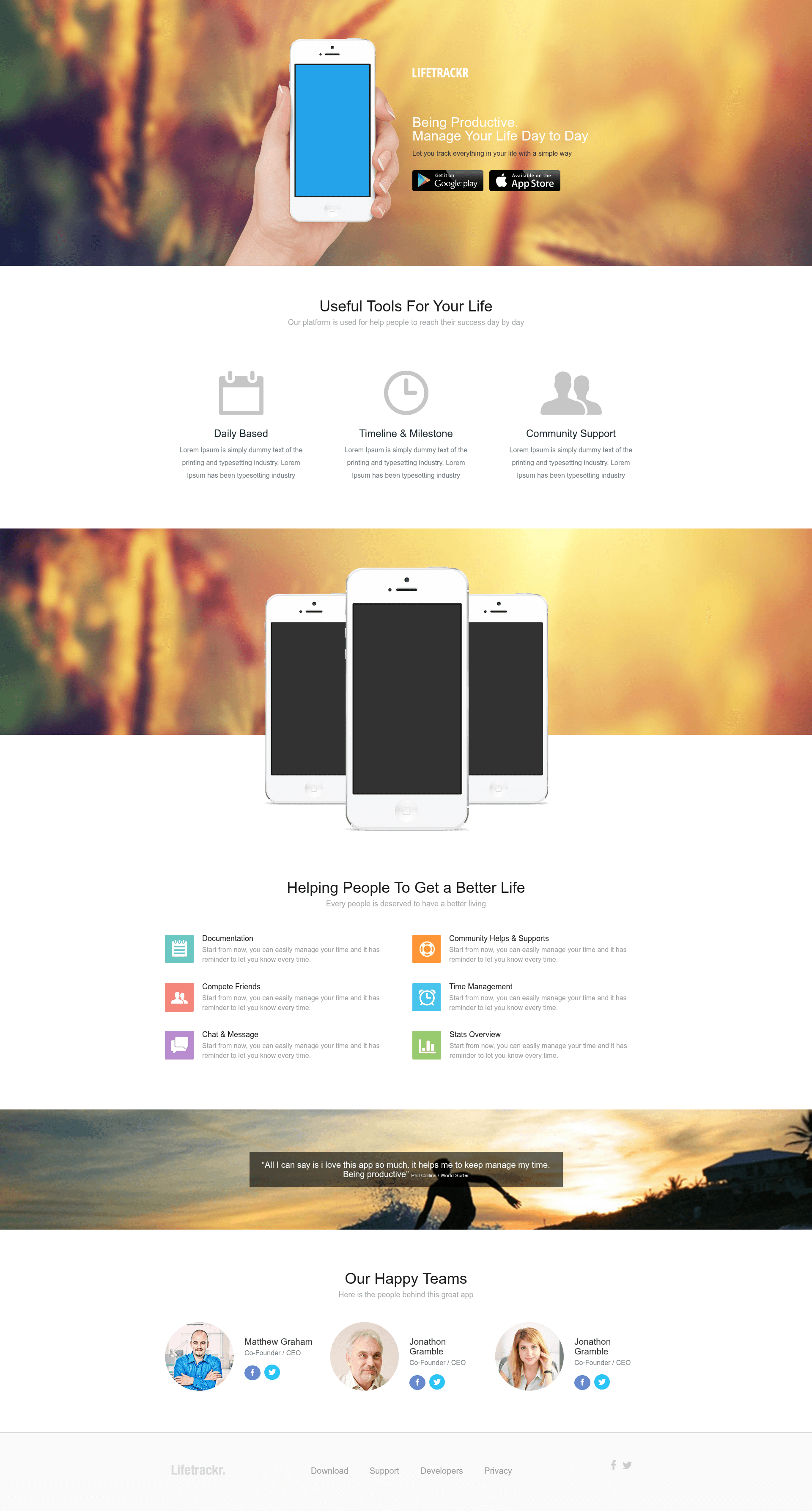
Free Bootstrap-based responsive app landing page template for showcasing Android and iOS apps.
About this template
Lifetrakr is a free, Bootstrap-based responsive HTML/CSS app landing page template from ThemeFisher, built to showcase mobile apps and drive visitors to download them.
What is Lifetrakr?
Lifetrakr is a free HTML/CSS landing page template built on the Bootstrap framework for presenting Android and iOS mobile apps. It takes an app's marketing copy, screenshots, and download links and arranges them in a responsive, single-page design focused on app presentation and conversion. ThemeFisher publishes the template under an MIT open source license, and a fully functional demo is available at demo.themefisher.com.
Key Features
- Free and MIT licensed — The template costs nothing to download and the MIT license allows commercial use, per the ThemeFisher license page linked in the repository.
- Bootstrap-based styling — The layout uses the Bootstrap CSS framework, giving you a responsive grid and standard UI components without extra dependencies.
- Responsive design — The page adapts to phone, tablet, and desktop viewports, which matters for a mobile-app audience.
- Conversion-oriented layout — The README describes the theme as optimized for app presentation and conversion, with a structure aimed at boosting an app's download rate.
- Live demo — A working demo is hosted at demo.themefisher.com so you can preview behavior before downloading.
- Direct download — The template is available from the ThemeFisher product page at themefisher.com/products/lifetrakr-free-app-landing-page-template/.
- Publisher support model — ThemeFisher funds free projects by selling premium templates, and says the effort to maintain free templates depends on that financial support.
Who is Lifetrakr for?
Lifetrakr is for mobile app developers and indie makers who need a quick, no-cost web page for their Android or iOS app. It is also suited to app marketers who want a focused landing page to send traffic to, with the goal of increasing download counts and monetizing through in-app ads.
- Mobile app developers — Set up a presentable landing page for an app without writing layout code from scratch.
- App marketers — Use the conversion-oriented design to direct ad or social traffic toward a download action.
- Startups and small teams — Launch a free marketing page for a new mobile product before or alongside app store listings.
What can you do with Lifetrakr?
- iOS app developers: Create a clean landing page that presents your App Store app and points visitors to the download link.
- Android app developers: Do the same for a Google Play app, relying on Bootstrap's responsive grid to keep the page readable on mobile screens.
- Ad campaign managers: Drive paid or organic traffic to a dedicated page that is built for app presentation and conversion, rather than a general website.
Pricing
Lifetrakr is free to use. It is an MIT licensed open source project and completely free to download; ThemeFisher asks users who want to support development to buy one of their premium templates.
FAQ
Is Lifetrakr free?
Yes, Lifetrakr is completely free to download and use. It is an MIT licensed open source project, so no payment is required, and the license permits modification and commercial use.
What license does Lifetrakr use?
Lifetrakr is released under the MIT license. ThemeFisher links the full license terms from the repository's copyright and license section, and notes the template is completely free to use.
Where can I download Lifetrakr?
You can download Lifetrakr from the ThemeFisher product page at themefisher.com/products/lifetrakr-free-app-landing-page-template/. A live demo is available at demo.themefisher.com/demos/?theme=lifetrakr.
Does Lifetrakr work for Android and iOS apps?
Yes. The README specifically mentions that the template is for people with Android and iOS apps who want to boost their download rate and earn money from ads and advertisements.
Does Lifetrakr require coding knowledge?
Because it is a Bootstrap-based HTML/CSS theme, you can deploy it as a static page. Editing content such as text, screenshots, and download links requires basic HTML knowledge, though you do not need to build the layout yourself.