Template details
Minimaxing
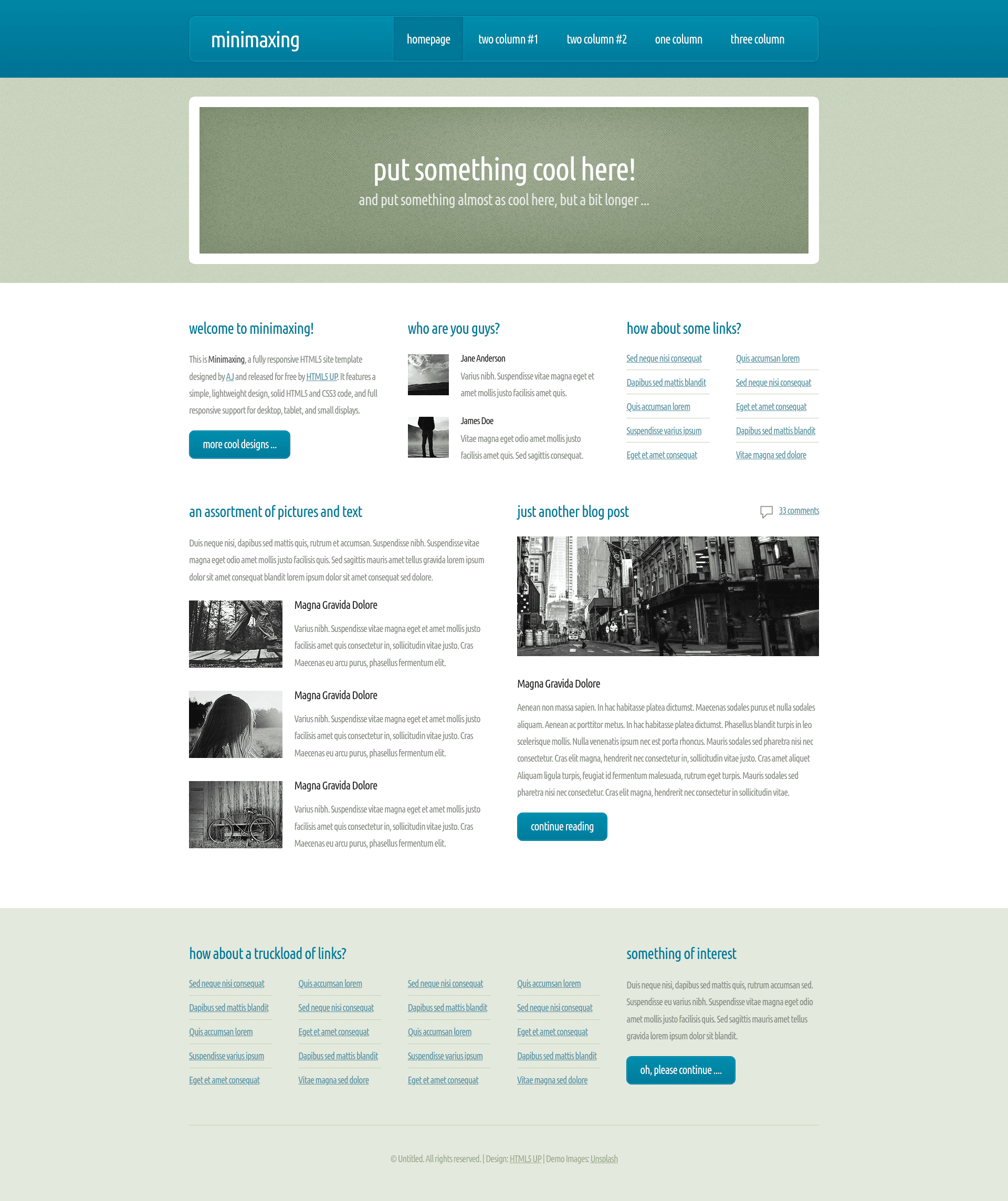
Free, fully responsive HTML5/CSS3 site template by HTML5 UP with multi-section layout for businesses and portfolios.
About this template
Minimaxing is a free, fully responsive HTML5 and CSS3 site template from HTML5 UP that serves as a lightweight multi-section marketing layout for small businesses, portfolios, and personal sites. The template was designed by AJ (twitter.com/ajlkn) and is released for free by HTML5 UP, featuring a simple structure with a banner, feature columns, team member spotlights, a blog post, and link lists.
What is Minimaxing?
Minimaxing is a fully responsive HTML5 site template designed by AJ and released for free by HTML5 UP. It takes solid HTML5 and CSS3 markup as its foundation and outputs a complete, multi-section static web page that supports desktop, tablet, and small displays. The demo page includes a header, a two-part banner area, a welcome section, team profiles, link collections, a sample blog post, and a "something of interest" footer section.
Key Features
- Fully responsive layout — The template adapts to desktop, tablet, and small display sizes without requiring a separate mobile build.
- Simple, lightweight design — The page emphasizes clean typography and minimal styling, keeping the codebase easy to read and modify.
- Solid HTML5 and CSS3 — All markup and styling follow modern standards, making the template a stable starting point for custom edits.
- Multiple content sections — The demo shows a banner, welcome text, two team member cards, three picture-and-text blocks, a blog post with comments, and several link lists.
- Free download from HTML5 UP — The template is offered at no cost under the HTML5 UP release model, with footer credit linking back to the designer.
- Demo images from Unsplash — The sample imagery is sourced from Unsplash, so developers can swap in their own photos without licensing the samples.
Who is it for?
- Freelancers and small business owners — Build a clean landing or company page using the ready-made banner, feature, and team sections.
- Web developers — Use the template as a quick starter for client projects, then replace the demo content and styles.
- Personal site owners — Publish a simple portfolio or personal profile with the included welcome, blog, and link sections.
What can you do with it?
- Launch a small business website — Customize the welcome, "Who are you guys?", and link blocks to present services, team, and contact info.
- Create a portfolio — Replace the team cards and picture blocks with project images and descriptions.
- Start a minimal blog — Use the built-in "Just another blog post" section and comment style to present written content.
Is Minimaxing free?
Yes. The template is released for free by HTML5 UP, and the demo page carries no watermark or usage fee. The footer requires a simple credit link back to HTML5 UP when you use the template.
Who designed Minimaxing?
The template was designed by AJ, whose Twitter handle is linked from the demo page. It is distributed as part of the HTML5 UP collection of free HTML5 templates.