Template details
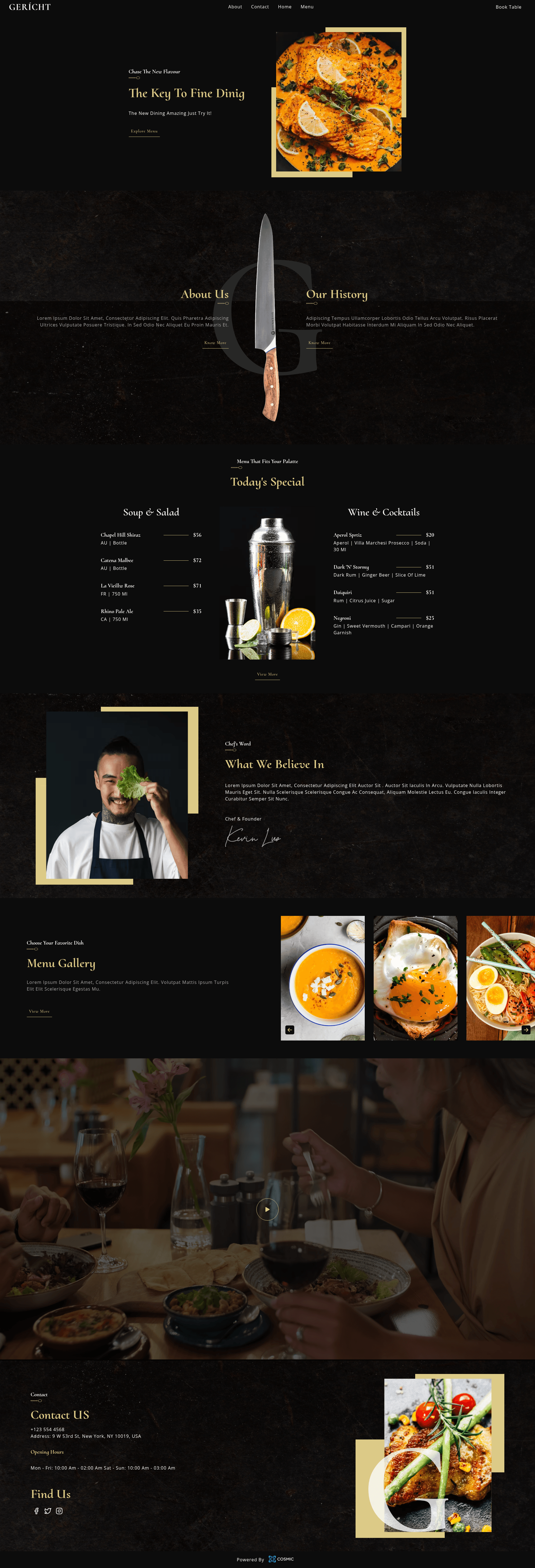
Next.js Restaurant Website
A restaurant website template built with Next.js and Cosmic
About this template
The Next.js Restaurant Website template is a starter project for building a restaurant website on the Next.js React framework, with content managed through the Cosmic headless CMS and styling written in Sass. It is maintained and published by the Cosmic team in the public GitHub repository cosmicjs/nextjs-restaurant-website-cms, and a live demo is hosted at nextjs-restaurant-website-cms.vercel.app.
What is the Next.js Restaurant Website template?
The Next.js Restaurant Website template is a pre-built starter that connects a Next.js front-end to a Cosmic bucket, so that restaurant-specific content such as menus, dishes, and business details lives in the CMS rather than hard-coded in the site. It takes your Cosmic bucket slug and read key via environment variables and renders that content as a working website at localhost:3000 during development. The template is intended to be copied, customized, and deployed, and the project includes a companion article that walks through how the template was built.
Key Features
- Next.js framework — The site is built on Next.js, the React framework for production, which gives you a full-stack React application with file-based routing and server-side rendering out of the box.
- Cosmic headless CMS integration — Content is loaded at runtime from a Cosmic bucket using the
COSMIC_BUCKET_SLUGandCOSMIC_READ_KEYenvironment variables, so editors can update site content without touching code. - Sass styling — Sass is used for the site's styles, providing variables, nesting, and other professional-grade CSS extensions directly in the project.
- Quick local setup — After creating a
.envfile with your Cosmic API values, runningnpm install(oryarn) and thennpm run dev(oryarn dev) starts the development server at http://localhost:3000 with auto-reloading when you editpages/index.js. - One-click Vercel deployment — The repository includes a deploy button that imports the project into Vercel and prompts for the same Cosmic environment variables, so production deployment can be completed without leaving the browser.
- Documentation and live demo — The project links to an article on how it was built and to a live demo, making it easy to see the template working before you install it.
Who is it for?
- Developers who need a headless-CMS-powered restaurant website and want a known-good starting point instead of building the integration from scratch.
- Web agencies that need to deliver restaurant sites quickly and separate content management from code; the client can later update content through the Cosmic dashboard.
- Restaurant owners with a technical partner — while the template requires running code, the content side is CMS-managed, so non-technical staff can edit menus and descriptions after the site is deployed.
- Learners who want to study how Next.js can be wired to a headless CMS like Cosmic, including environment-variable setup and the Vercel deployment flow.
Use cases
- Rapid restaurant site launch: Populate a Cosmic bucket with your restaurant's content, then deploy the Next.js site to Vercel to get a live site in the same session.
- Agency client handoff: Build a customized design using Sass and the
pages/index.jsentry point, then hand the client keys to manage content independently. - Technical reference: Follow the companion article to understand the pattern of connecting Next.js to Cosmic, which can be reused in other headless CMS projects.
How does it work?
To run the template locally, you copy the repository, create a .env file with COSMIC_BUCKET_SLUG and COSMIC_READ_KEY (found in Bucket Settings > API Access in Cosmic), install dependencies with npm install, and start the dev server with npm run dev. The Next.js server then fetches content from Cosmic and renders it in the browser. For production, the Vercel deploy button asks for the same environment variables and builds the project on Vercel's infrastructure.
FAQ
Does the template require a Cosmic account?
Yes, the template requires a Cosmic bucket because it fetches content from Cosmic using a bucket slug and read key. Without these credentials, the site cannot display CMS content.
What environment variables are needed?
The only environment variables required are COSMIC_BUCKET_SLUG and COSMIC_READ_KEY. You can find them in your Cosmic bucket under Bucket Settings > API Access.
Is the template free?
The template is open source and free to use, but you will need your own Cosmic account and a hosting platform such as Vercel for a public site; both services have separate pricing.
What files should I edit to customize the site?
The primary file for page customization is pages/index.js. The page auto-updates as you edit during development, letting you see changes instantly.
Can I deploy without setting the environment variables?
No, the build needs both the bucket slug and read key. The Vercel deployment flow requires you to add them as environment variables before the deployment completes.