Template details
Peak Panda
A modern, responsive landing page theme for business, built in Jekyll
About this template
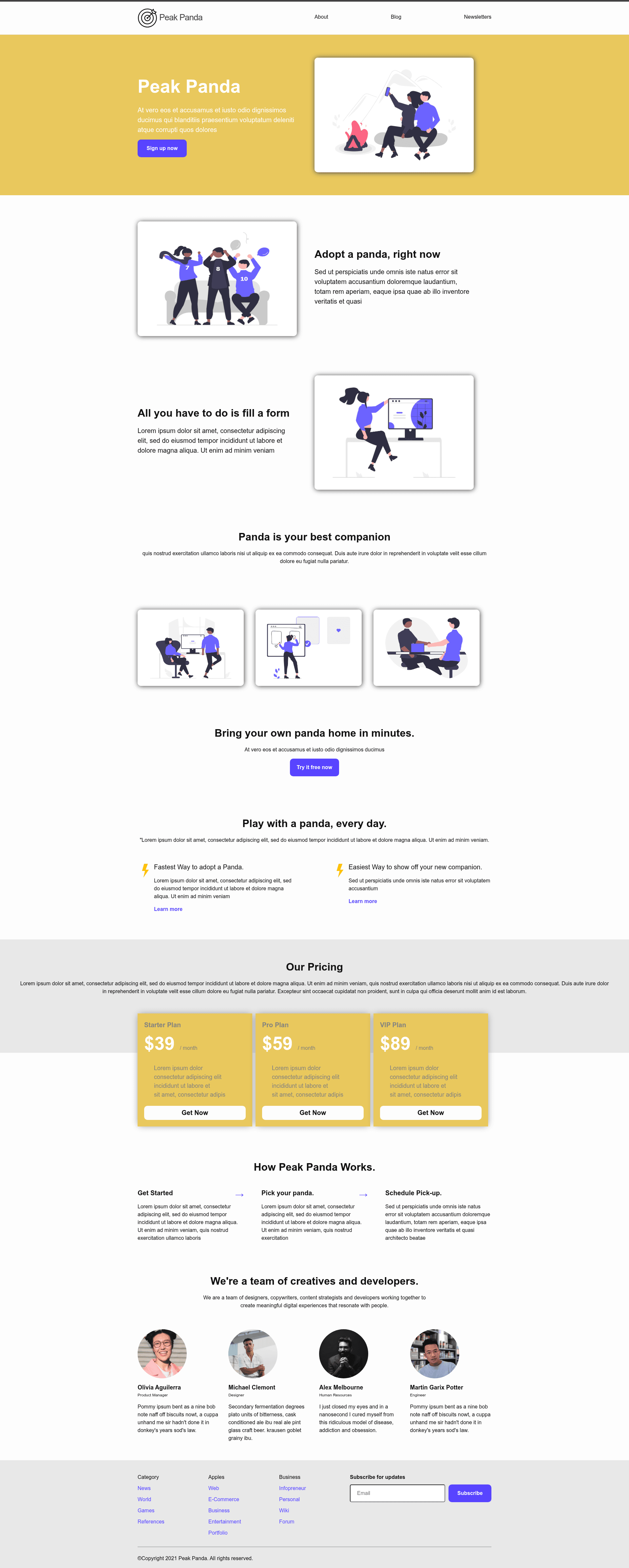
Peak Panda is a modern, responsive Jekyll landing page theme for business sites, designed to let you deploy a complete marketing page with blog support on GitHub Pages or Netlify.
What is Peak Panda?
Peak Panda is a Jekyll theme that generates a complete static landing page from a minimal set of files. You input your site configuration in _config.yml and optional blog posts in _posts/, and it outputs a responsive HTML site with a hero, pricing table, team section, and more. The theme is built for Jekyll 4.2.1, tested with Ruby 3.0.3, and is maintained on GitHub by the junjizhi account, with a live demo available at https://junjizhi.github.io/peak-panda/.
Key Features
- Jekyll-powered — Built on Jekyll 4.2.1, so it works with the standard Jekyll build toolchain and Liquid templating.
- Zero CSS framework dependencies — Uses handwritten Sass in
_sass/peak-panda.scss; no Bootstrap, Tailwind, or other CSS frameworks to override. - GitHub Pages and Netlify ready — The README provides deployment steps for both, and a one-click Netlify deploy button is included in the repo.
- Responsive layout — The theme adapts cleanly across mobile and desktop viewports without extra configuration.
- Pre-built marketing sections — Includes header, hero with call-to-action, side-by-side image and text, multi-column image grid, pricing table, team section with head shots, footer, and an email subscription form.
- Easy content updates — Site copy is edited in
_config.yml, and brand colors/fonts in_sass/peak-panda.scss, so non-developers can update text without touching HTML. - Built-in company blog — Blog support via the
_postsfolder; add Markdown files to publish posts in the same design as the landing page.
Who is it for?
- Small business owners — Launch a professional landing page with pricing and team sections quickly, without hiring a designer or developer.
- Startup founders — Get a clean marketing site online in minutes and iterate on copy and blog posts using Markdown.
- Developers — Fork the repository to customize the Sass theme, extend Jekyll layouts, or use it as a starting point for client projects.
What can you do with Peak Panda?
- Launch a business landing page — Fork the repo, edit
_config.yml, and deploy to GitHub Pages or Netlify to have a complete site with hero, pricing, and team sections. - Publish company blog posts — Drop Markdown files into
_posts/and Jekyll builds a blog section that shares the landing page's styling. - Customize branding — Update colors and fonts in
_sass/peak-panda.scssand change copy in_config.ymlto match your business identity.
How does Peak Panda work?
Fork the repository, update _config.yml with your site details, and optionally adjust the Sass file. Then either run bundle install and bundle exec jekyll serve to preview locally, or deploy via the Netlify one-click button or GitHub Pages guide. Jekyll compiles the config and Markdown content into a static site.
Pricing
Peak Panda is free to use. The source is available on GitHub under the repository's license file, so you can fork, modify, and deploy it without any payment.
FAQ
Is Peak Panda compatible with GitHub Pages?
Yes. The README links to official GitHub Pages documentation for Jekyll, and the demo itself is hosted on GitHub Pages, so the theme works there.
Can I deploy Peak Panda to Netlify?
Yes. The repository includes a "Deploy to Netlify" button that sets up a new site from your GitHub repo with one click.
What Ruby and Jekyll versions are supported?
The theme was tested with Ruby 3.0.3 and Jekyll 4.2.1. The README recommends using rbenv to manage Ruby versions and running bundle install then bundle exec jekyll serve locally.
Does Peak Panda include a blog?
Yes. The theme includes built-in company blog support. You add Markdown files to the _posts folder and they are rendered as blog posts alongside the landing page sections.
How do I change the color theme?
Colors and fonts are defined in the _sass/peak-panda.scss file. Edit the variables there and rebuild the site to see your changes.