Template details
Alstar
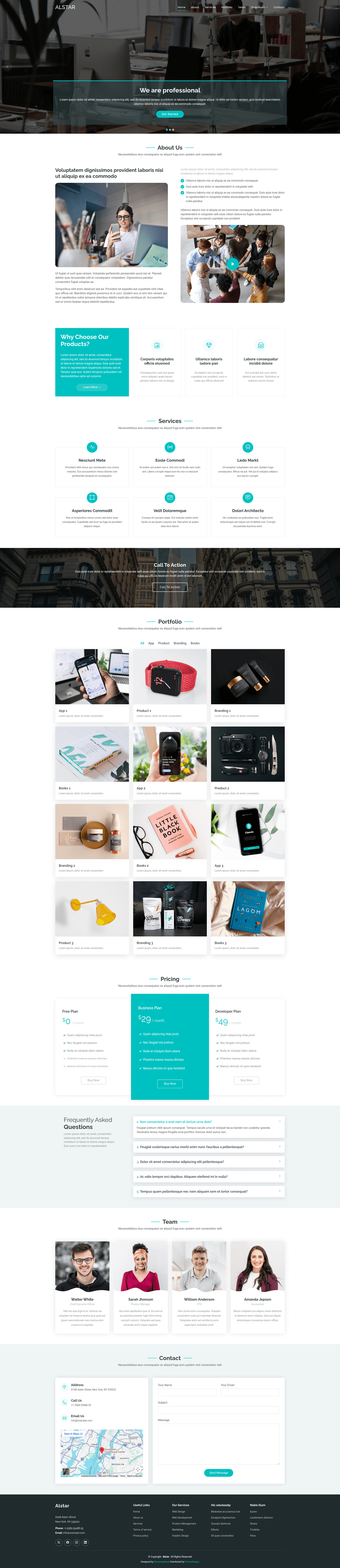
Free Bootstrap 5 one-page business website template with 11 sections, hero header, parallax effects, gallery preview, and on-scroll animations.
About this template
Alstar is a free Bootstrap 5 one-page HTML website template for business, portfolio, and personal sites, distributed by ThemeWagon and created by BootstrapMade. It bundles 11 distinct sections, jQuery-powered animations, and a gallery with thumbnail previews into a single static HTML file.
What is Alstar?
Alstar is a free one-page HTML5 website template built on Bootstrap v5.3.3, designed to let you assemble a complete business or portfolio landing page without writing a page router or navigation structure. You download the package containing one HTML file, seven CSS files, twelve JavaScript files, and demo images, then edit the static markup and CSS to replace the demo content with your own. The template runs on any static web host because it ships as plain HTML, CSS, and JavaScript; no server-side platform or build step is required. It is created by BootstrapMade and listed on ThemeWagon, where it has been downloaded over 2,200 times.
Key Features
- Bootstrap v5.3.3 — The template is built on the current Bootstrap framework, giving you the standard responsive grid, utility classes, and components.
- Hero header — A prominent landing hero section at the top of the page for your headline, call-to-action, and background imagery.
- Sticky top navigation — The menu bar stays fixed at the top while visitors scroll through the one-page layout.
- Parallax effect — Background layers move at different speeds during scrolling, powered by the Stellar.js library.
- Carousel slider — The services section includes an Owl Carousel slider to cycle through offerings, testimonials, or highlights.
- Text rotator — A rotating text effect (via the text rotator plugin) swaps typed or faded phrases in the hero or section headlines.
- 11 unique sections — The layout is split into eleven discrete sections: hero, about, services, portfolio gallery, team, contact, and more, giving enough structure for a startup or personal brand.
- Gallery with preview — The portfolio gallery uses a thumbnail grid; clicking an image opens a preview with detail, and each photo can have its own background.
- On-scroll animation — WOW.js triggers CSS animations as elements enter the viewport.
- FontAwesome icons — Icons are provided by the FontAwesome icon set, included among the assets.
- Mobile-friendly and burger menu — The responsive layout collapses the navigation into a burger menu on small screens.
- Back-to-top button — A button appears to let visitors jump back to the top quickly.
Who is it for?
Alstar fits designers, freelancers, developers, creatives, and small teams who need a one-page website to present work or services. A freelancer can use it to build a portfolio page with a gallery and contact form. A startup can repurpose the 11 sections to introduce the company, list services, and show a team. A designer can customize the single CSS file that controls color settings to match a brand palette.
What can you do with Alstar?
- Designers and creatives: Showcase a portfolio gallery with thumbnail images that open into previews with detail, plus a dedicated background per photo.
- Freelancers: Create a one-page personal brand with hero, about, services carousel, and a contact section with form validation.
- Startups and small businesses: Publish a multipurpose landing page with social media icons, a sticky navigation bar, and a back-to-top button so visitors can navigate the sections easily.
Pros and cons
- Pros: Free to download and use in commercial projects; open source; lifetime free updates; tested on Chrome, Edge, Firefox, Mobile, Opera, and Safari; includes demo images so you can preview the look immediately.
- Cons: The included contact form has validation but is not fully functional, so you must wire it to a backend or third-party form service before going live.
FAQ
Is Alstar free to use in commercial projects?
Yes. The template is marked open source, free to download, and allowed in commercial projects. The ThemeWagon listing also states it receives lifetime free updates.
What is included in the Alstar download?
The download package contains one HTML file, seven CSS files, twelve JavaScript files, and demo images. The JavaScript assets include jQuery v2.2.4, Owl Carousel, WOW, scrollTo, Stellar, and gallery effects.
Does Alstar have a working contact form?
The contact form includes validation, but the page explicitly notes it is not fully functional. You can use it as a preliminary template and connect it to your own backend or form service.
Which browsers are supported?
Alstar is described as tested on Chrome, Edge, Firefox, Mobile, Opera, and Safari, and its layout is device-agnostic.
Can I customize the color scheme?
Yes. There is a single CSS file dedicated to color settings, so you can adjust the theme colors globally by editing that one file.