Template details
ArtisTree
An Astro-based link-in-bio landing page for music artists, centralizing streaming links, shows, releases, and booking contacts.
About this template
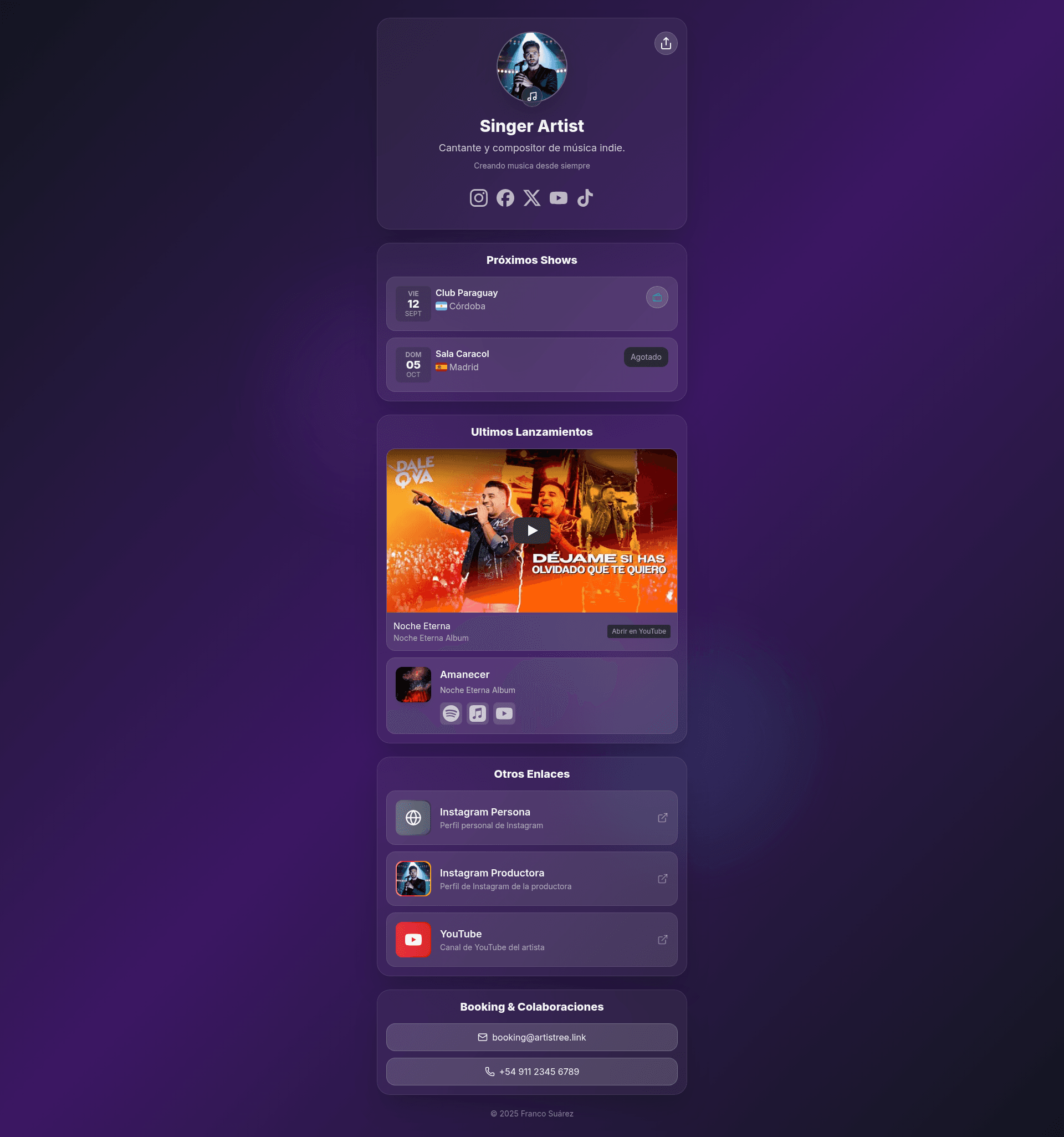
ArtisTree is a free, open-source Astro template that generates a link-in-bio landing page for music artists from a single JSON configuration file. It gathers streaming links, upcoming shows, releases, and booking contacts into one static site that can be deployed to Netlify or any static host.
What is ArtisTree?
ArtisTree is a customizable landing page template built with Astro and TailwindCSS v4. It takes all content from src/data/site.json (or a typed src/data/site.ts variant) and outputs a static HTML site with an artist profile, social icons, a booking section, a tour-date calendar, and a releases grid. The template is developed by francosuarez-dev and available on GitHub under the MIT license.
Key Features
- Single-file configuration — Edit
src/data/site.jsonto control the title, description, theme, artist info, socials, booking, shows, releases, and custom links; no code edits required. - Eight theme presets — Set
config.themetolight,dark,violet,blue,green,red,pink, ororange; Tailwind v4 applies colors and gradients fromglobals.cssvia adata-themeattribute. - Three font presets — Set
config.fonttomodern(Inter),elegant(Inter for text, Playfair Display for headings), orgrotesk(Poppins), loaded automatically from Google Fonts. - Built-in social icon map — Supports
instagram,facebook,x,spotify,applemusic,tidal,youtube,whatsapp,email, andwebsite; only entries with URLs render. - Booking buttons — When
booking.emailorbooking.phoneexist, ArtisTree renders Email (mailto:) and Phone (tel:) buttons in the booking section. - Tour date cards with flags — Each show uses an ISO 3166-1 alpha-2 country code (for example
ARorUS) to display a flag, and anavailableboolean toggles Tickets or Sold Out buttons. - Featured release with YouTube embed — Releases are sorted by
releaseDatedescending; the newest release embeds its YouTube video if ayoutubelink exists, with an Open on YouTube fallback for mobile. - Custom link list — An additional
linksarray supports label, description, URL, icon, and an optionalcoverimage that replaces the icon.
Who should use ArtisTree?
- Independent musicians — Replace a generic Linktree page with a self-hosted, customizable bio page that points followers to Spotify, Apple Music, YouTube, and social profiles.
- Touring artists and their teams — Publish upcoming shows with venue, city, country flag, and a Tickets or Sold Out action, while keeping booking contact details in one place.
- Managers and record labels — Present an artist’s latest release prominently with embedded video, plus links to Deezer, Tidal, Apple Music, and other platforms.
What can you do with ArtisTree?
- Host a personal link-in-bio without third-party branding: Deploy the static site to Netlify or any static host and point your Instagram or TikTok bio link at it.
- Announce new music: The releases grid sorts by
releaseDateand automatically highlights the most recent release; add a YouTube link to embed the video directly on the page. - Promote tour dates: Add shows with ISO country codes and optional ticket URLs; ArtisTree filters to future dates, sorts them ascending, and shows a Sold Out state when
availableis false. - Collect booking inquiries: Configure
booking.emailandbooking.phoneto render direct call-to-action buttons, eliminating the need for a separate contact page.
How does ArtisTree work?
Clone the repository, run pnpm install to install dependencies, then start the development server with pnpm dev at http://localhost:4321. Edit src/data/site.json to change the artist, social links, shows, and releases. For production, run pnpm build and pnpm preview; the generated static files can be deployed to Netlify, Vercel, or any static hosting service.
FAQ
Why doesn’t the country flag appear for a show?
The country field must be a valid ISO 3166-1 alpha-2 code such as AR, ES, or US. Codes like BRA or ARG won’t match the flag-icons classes and the flag will be omitted.
Why is the YouTube embed unavailable on mobile?
Many music videos block embedding on mobile devices. ArtisTree detects when the embed can’t render and shows an “Open on YouTube” button as a fallback, so visitors can still reach the video.
How do I add a new social platform?
Create an .astro icon component in src/icons, register it in the SocialIcons map, and add the corresponding key to the socials object in site.json. Only social keys with a URL value are rendered.
Can I use optimized images with Astro?
Yes. Replace src/data/site.json with src/data/site.ts and import cover and profile images as modules. Astro then generates optimized, hashed URLs instead of relying on absolute paths in the public folder.