Template details
Beam
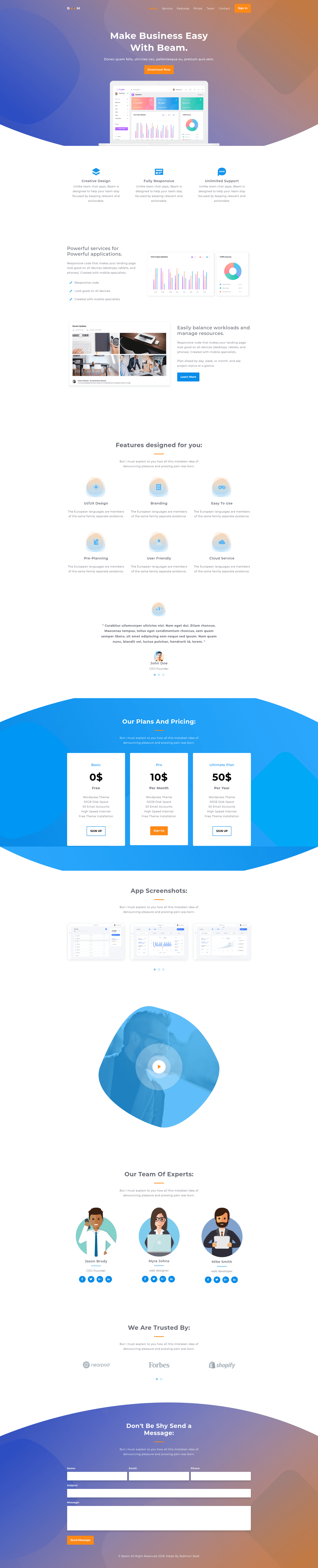
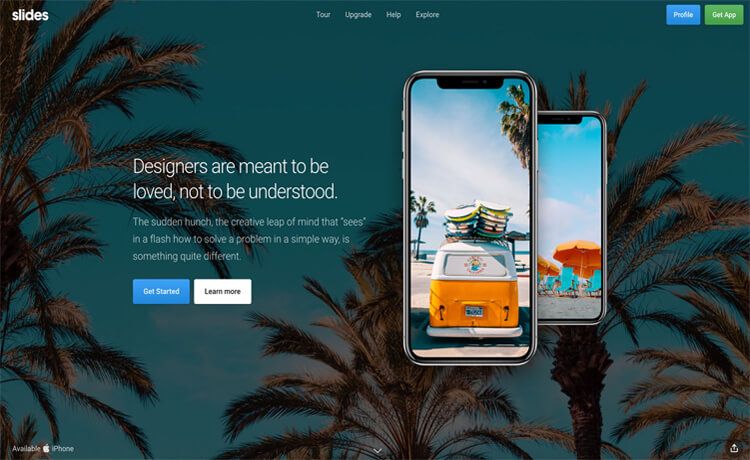
Free Bootstrap 4 HTML5 one-page app landing template with hero header, pricing table, testimonial carousel, and modal YouTube player.
About this template
Beam is a free Bootstrap 4 HTML5 one-page app landing page template by Bootstrap Mess on ThemeWagon, built for showcasing mobile apps and software with a hero header, pricing table, and modal YouTube player.
What is Beam?
Beam is a free Bootstrap 4 HTML5 one-page landing page template created by Bootstrap Mess and distributed through ThemeWagon. It takes a static HTML, CSS, SASS, and JavaScript codebase and produces a complete single-page marketing site for software or mobile apps. The template runs entirely in the browser with no backend, includes a live preview at technext.github.io/beam, and is released under a license that permits open-source and commercial use with lifetime free updates.
Key Features
- Bootstrap v4.1.1 — The layout is built on Bootstrap 4.1.1, giving you the standard grid, utilities, and component classes, with SASS source files included for customization.
- One-page layout — All sections live on a single HTML file, including a hero header, services cards, pricing table, testimonials, and a contact form UI, so you can navigate by scrolling.
- Animated CSS3 preloader — Visitors see a loading animation before the page content appears, which uses CSS3 transitions rather than a JavaScript dependency.
- Animated sticky navigation with scrollspy — The top navigation bar sticks to the viewport while scrolling, and the scrollspy behavior highlights the current section link.
- Testimonial carousel — Customer quotes are displayed in a rotating carousel built with Owl Carousel, one of the included plugins.
- Modal YouTube player — Clicking a video thumbnail opens an embedded YouTube player in a modal dialog, using the YouTubePopUp jQuery plugin.
- On-scroll reveal animation — Page sections fade or slide in as you scroll, powered by the WOW.js library and Animate.css.
- Apps slider and brand slider — Two separate carousel sliders showcase app screenshots and client logos, both also driven by Owl Carousel.
- Pricing table — A multi-column pricing section is included so you can list monthly or yearly plans without building the markup from scratch.
- Contact form UI — A styled contact form section is present, though it is a UI only — no backend submission handler is included.
- Ghost button — The hero header uses a transparent outline button that fills in on hover, a common app-landing aesthetic.
Who is it for?
- App developers — quickly publish a landing page for a new iOS or Android app without writing CSS from scratch, using the included hero header, app slides, and pricing table.
- Software startups — create a one-page marketing site with testimonials and a contact form UI to collect leads while validating a product idea.
- Freelance web designers — use the SASS files and well-organized code structure as a starting point to customize colors, spacing, and content for client projects.
- Bootstrap learners — study how Bootstrap 4 components, Owl Carousel, and WOW.js interact in a complete, responsive one-page template.
What can you do with Beam?
- Launch a mobile app page: replace the sample hero text and app screenshots with your own, then link the ghost button to your App Store or Google Play listing.
- Present a software product: feature the pricing table and testimonial carousel to communicate plan tiers and social proof in one scrollable page.
- Embed a product demo video: drop a YouTube URL into the modal player so visitors can watch a walkthrough without leaving the page.
- Build a promo microsite: use the brand slider to display partner logos and the contact form UI as a call-to-action section.
Alternatives
The ThemeWagon listing recommends three similar free Bootstrap 4 HTML5 app landing templates: Kairos, Nexus, and Standout. Kairos targets mobile app landing pages, Nexus also uses Bootstrap 4 with an app-landing layout, and Standout focuses specifically on email app landing pages. Each is free and available from the same marketplace.
FAQ
Is Beam free?
Yes. The template is offered as a free download on ThemeWagon, and the license permits use in open-source and commercial projects with lifetime free updates.
What does the download include?
The package contains one HTML file, CSS files, SASS files, JavaScript source files, all demo images, plus the library and plugin files for Bootstrap 4.1.1, Animate.css, Owl Carousel, YouTubePopUp, jQuery Easing, and WOW.
Does Beam work on mobile devices?
Yes. The template is described as responsive and the compatibility list includes Chrome, Edge, Firefox, Mobile, Opera, and Safari browsers.
Does the contact form actually send emails?
No. The template includes a contact form UI only, so you would need to connect it to a backend service or form handler to deliver submissions.
Can I use Beam for commercial projects?
Yes. The license says "Use in commercial projects" is allowed, and the template is open source.