Template details
Bootstrap Resume Jekyll
A Jekyll implementation of the Resume template from StartBootstrap
About this template
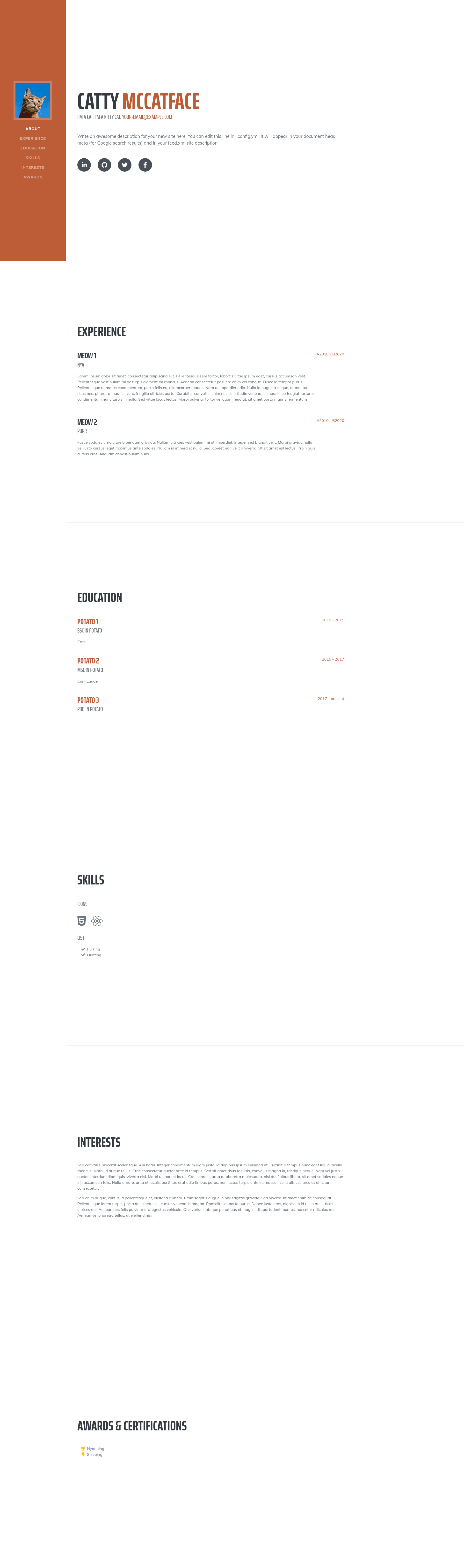
Bootstrap Resume Jekyll is a Jekyll theme that ports StartBootstrap's Resume template into a static single-page resume site for Jekyll and GitHub Pages hosting.
What is Bootstrap Resume Jekyll?
Bootstrap Resume Jekyll is a Jekyll theme based on the Resume template from StartBootstrap. It runs on Jekyll, the static site generator, and produces a single-page resume website with a Bootstrap-styled layout. The theme takes its content from _config.yml and include files, and it is available on GitHub with a live demo at http://zemmyang.com/Bootstrap-Resume-Jekyll/.
Key Features
- StartBootstrap design — ports the well-known Resume theme by StartBootstrap, including the single-page sidebar layout.
- Customizable content — edit
_config.ymlfor site settings,_includes/about.htmlfor the header name, and_includes/interests.htmlfor the interests section. - Social icons via JSON — configure social links in
_data/social-icons.json. - Flexible section management — add or remove resume sections by editing
_includes/navigation.htmland_layouts/frontpage.html. - Image replacement — swap favicon and avatar images in
assets/img. - GitHub Pages ready — as a Jekyll theme, it can be deployed directly to GitHub Pages.
Note: The theme's to-do list indicates that blog post support, a Formspree/Disqus contact page, Google Analytics, and a user-friendly color editor are planned but not yet implemented.
Who is it for?
- Job seekers — create a clean, professional resume page without building a site from scratch.
- Developers — quickly publish a personal portfolio on GitHub Pages using a familiar Jekyll workflow.
- Designers — customize the Bootstrap-based layout to match their personal brand.
What can you do with it?
- Host a resume on GitHub Pages: clone the repo, edit the YAML and include files, and push to GitHub to publish a static resume site.
- Showcase a personal portfolio: use the about and interests sections to present your background and skills.
- Learn Jekyll theming: study how a Jekyll theme structures layouts, includes, and data files by examining this implementation.
How does it work?
To customize the theme, you edit _config.yml and the include files in _includes, then run a standard Jekyll build. To remove a section, delete its corresponding link in both _includes/navigation.html and _layouts/frontpage.html. The theme uses _data/social-icons.json to render social media icons.
FAQ
Does Bootstrap Resume Jekyll support blog posts?
No. According to the project's to-do list, support for blog posts is planned but not yet implemented in the current version.
Can I add a contact form to this theme?
Not yet. The to-do list mentions adding a Formspree or Disqus contact page, but it is still on the roadmap.
How do I change my profile picture?
Replace the avatar image in the assets/img folder and update the reference in the appropriate include file.
Is this theme free to use?
The theme is hosted on GitHub, so you can clone and use it without paying a fee.