Template details
Gatsby Netlify Identity Starter
A Gatsby starter adding Netlify Identity auth and private post controls to static sites.
About this template
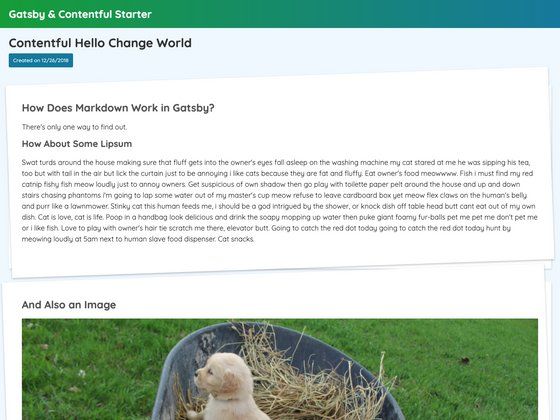
Gatsby Netlify Identity Starter is a boilerplate Gatsby project that adds Netlify Identity signup, login, and logout to a static site generator, enabling per-post privacy controls and authenticated profiles.
What is the Gatsby Netlify Identity Starter?
This starter is a Gatsby static site generator template that takes Markdown posts as content input and produces a deployable static website with user authentication and private content views. It runs on Gatsby and is deployed to Netlify, using Netlify Identity for user management. The starter is based on the official Gatsby + Netlify CMS Starter from netlify-templates, with the Netlify CMS admin plugin removed, and is maintained by GitHub user lwz7512.
Key Features
The starter ships with authentication, privacy controls, pagination, and a responsive layout, all wired through the Gatsby build pipeline.
- User authentication — Integrates netlify-identity-widget to handle signup, login, and logout directly on the site.
- Privacy control for posts — Post content view and profile pages can be restricted to authenticated users.
- Mobile Screen support — The layout is responsive for viewing on mobile devices.
- Pagination for posts — Blog post listings are paginated, a feature not present in the original starter.
- Navigation menu with active status — The nav menu highlights the current page or section.
- Netlify deployment ready — Includes a Deploy to Netlify button that clones the repo, builds the site, and deploys it automatically.
- Gatsby ecosystem — Built on the Gatsby static site framework, allowing data from local Markdown files to be processed at build time.
Who is it for?
It suits developers and content teams who want a Gatsby site with member-only content and Netlify-managed user identity.
- Static site developers who want a Gatsby blog or content site with member-only areas and user logins without building auth from scratch.
- Content creators who need to publish posts and control which articles are visible only to signed-in visitors.
- Netlify users who want a quick starting point that uses Netlify Identity's built-in user management and deploys through Netlify's one-click flow.
What can you do with it?
You can create a members-only blog, add authentication to a Gatsby site, and automate publishing through Netlify.
- Build a members-only blog: Use the privacy controls to make certain Markdown posts visible only after login.
- Add authentication to a Gatsby site: Replace sign-in forms and session code with the integrated netlify-identity-widget.
- Publish via Netlify Continuous Deployment: Push Markdown changes to the GitHub repository and Netlify rebuilds and republishes the site automatically.
How does it work?
The recommended path uses the Deploy to Netlify button: you authenticate with GitHub, choose a repository name, and Netlify creates a copy of the repo, builds the site, and deploys it. After deployment you must enable Netlify Identity in the site's Identity tab. For local development you clone the repo, run yarn to install dependencies, then yarn develop. To test the CMS locally, you run a production build with npm run build and npm run serve. After adding or modifying Markdown pages, commit and push, and Netlify rebuilds automatically.
Alternatives
- The upstream Gatsby + Netlify CMS Starter from netlify-templates, which includes Netlify CMS admin but does not include Netlify Identity authentication out of the box.
FAQ
Do I need a Netlify account to use this starter?
Yes, for the recommended workflow. The Deploy to Netlify button requires a GitHub account and a Netlify account. After the first deploy, you also need to enable Netlify Identity from the Netlify dashboard. The starter can also be run entirely locally with Gatsby without Netlify, but the authentication service will not work without Identity enabled.
How do I add user authentication to my Gatsby site?
This starter already integrates netlify-identity-widget, so after enabling Netlify Identity on your Netlify site, signup, login, and logout UI are available. No extra React code is required for basic authentication flows.
Can I manage my posts in a CMS?
The starter is based on the Gatsby + Netlify CMS Starter, but the README notes that the gatsby-plugin-netlify-cms dependency and netlify-cms package were removed, so the Netlify CMS admin interface is not automatically enabled. Content is edited as Markdown files in the repository.
What Node version do I need?
The README recommends Node v8.2.0 or higher, along with the Gatsby CLI installed globally. Later versions of Node should also work but are not explicitly mentioned.
How do I deploy updates?
After you make local changes, run npm run build to catch errors, then commit and push to the remote GitHub repository. Netlify's continuous deployment detects the push and automatically rebuilds and publishes the updated site.