Template details
Global Template
Free HTML/CSS business website template with orange curved menu and dark gradient background, from TemplateMo.
About this template
Global Template (208 Global) is a free HTML/CSS website template from TemplateMo, built specifically for business and company websites, with a distinctive orange curved menu and dark gradient background.
What is Global Template?
Global Template, also listed as 208 Global on TemplateMo, is a free HTML and CSS website layout designed for business and company websites. It was added to TemplateMo's catalog on 06 April 2010 and has been downloaded 34,497 times. The template produces a complete static website using standard HTML and CSS, with no backend or build process required. It is published by TemplateMo, a provider of free CSS templates, and is available for anyone to download, edit, and use.
Key Features
- Free license — The template is 100% free to download, edit, and use for both commercial and non-commercial websites.
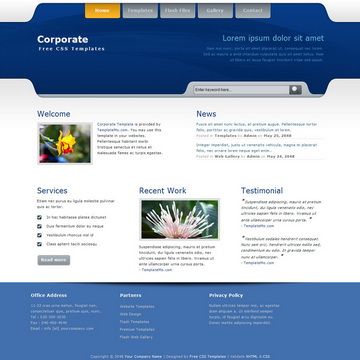
- Business-oriented design — Uses an orange curved menu, a light blue texture, and a dark background gradient to create a distinct corporate look.
- HTML and CSS only — Built with plain HTML and CSS, so it runs on any static web host and requires no server-side processing or JavaScript frameworks.
- Long-standing track record — Added in April 2010, it has accumulated 115,231 views and 34,497 downloads on TemplateMo.
- One-click download — The template is delivered as a ZIP file via the TemplateMo download button, and the page includes a live preview and full-size screenshot.
- Editable source — Users can modify the HTML and CSS to change colors, text, and layout structure for their own branding.
- Related template family — It is part of TemplateMo's series of free layouts, including Grid System, Simple Blue, Work, Light Gray, and Fruit Site, each as a separate download.
Who should use Global Template?
- Small business owners — Launch a simple company website by downloading the ZIP, editing the text and images, and uploading the HTML files to any web host.
- Freelance web designers — Use it as a starting point for client projects, customizing the orange menu and gradient background to match a client's brand.
- Students learning HTML/CSS — Study a complete layout to see how a multi-section business page is structured with pure HTML and CSS.
What can you do with Global Template?
- Company websites: Publish a professional-looking site with a dark gradient background and orange navigation, ready for company info and services.
- Portfolio or landing pages: Replace the default content with your own text and links to create a simple online presence.
- Template customization practice: Edit the CSS and HTML to learn how a static layout is built and styled.
Pricing
Global Template is free. TemplateMo offers the entire template as a no-cost download, and the license allows commercial and non-commercial use.
FAQ
Is Global Template free to use?
Yes, Global Template is 100% free to download. The TemplateMo page states that anyone can download, edit, and use this HTML CSS layout for commercial or non-commercial sites, with no fee mentioned.
Can I use Global Template for a commercial project?
Yes. The template's license explicitly permits commercial use. You can modify the design and deploy it on a business website without paying for a license.
What does Global Template look like?
It uses an orange curved menu at the top, a light blue texture, and a dark background gradient. The layout is described as an attractive business design, and a full-size screenshot is available on the TemplateMo page.
When was Global Template published?
It was added on 06 April 2010. Since then it has received over 115,000 views and about 34,500 downloads, indicating it's been a popular free template for over a decade.
What files are included in the download?
The template is provided as a ZIP file that contains the HTML and CSS files. The exact file list isn't detailed, but it's a static layout that can be opened directly in a browser and edited with any text editor.