Template details
HTML-Only Share Buttons
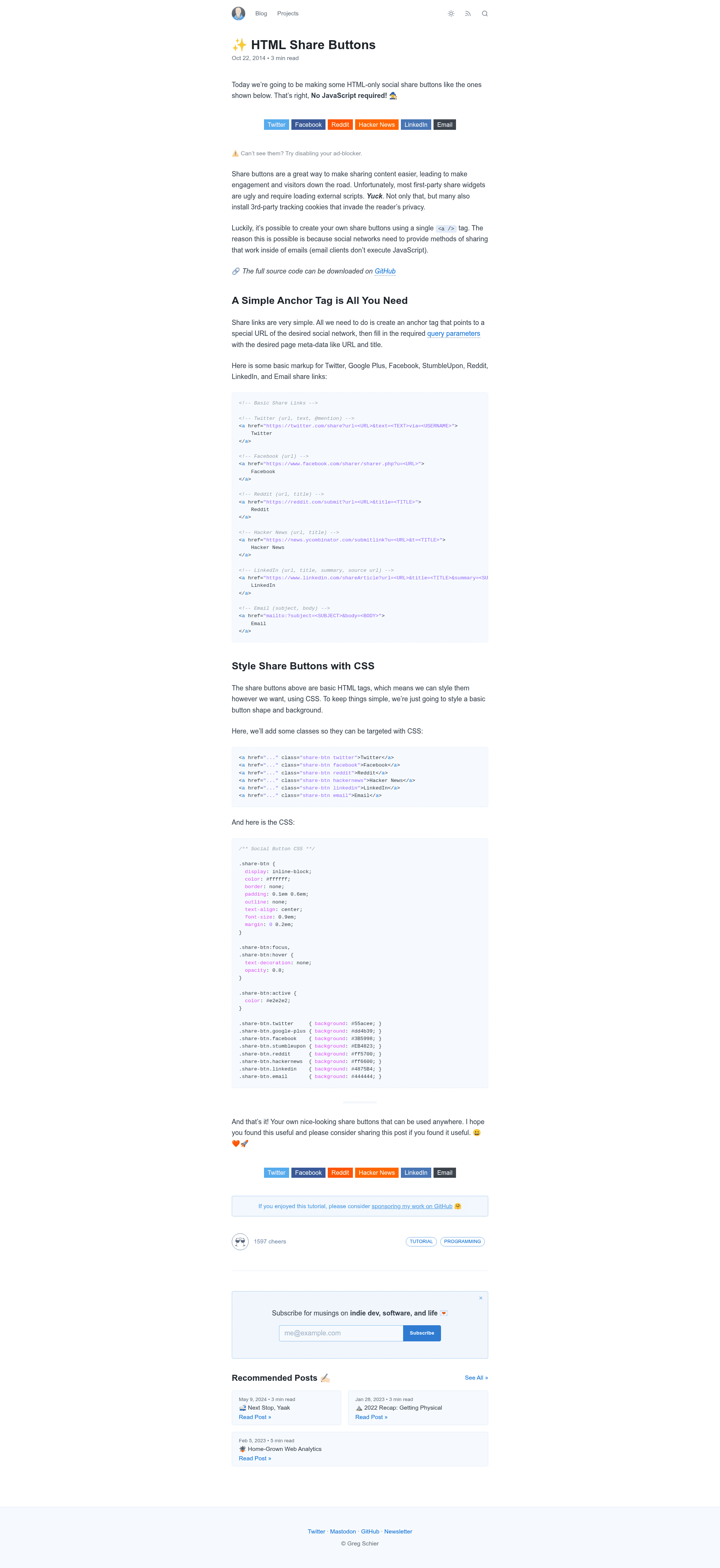
JavaScript-free social sharing buttons built from HTML, CSS, and Font Awesome icons that respect visitor privacy.
About this template
HTML-Only Share Buttons is a JavaScript-free social sharing component, built with plain HTML, CSS, and Font Awesome icons by developer Gregory Schier, that adds share links to any web page without loading third-party tracking scripts.
What is HTML-Only Share Buttons?
HTML-Only Share Buttons is a code snippet set rather than a full website template: it supplies the markup and styles for social sharing buttons that operate with zero JavaScript. The input is any static web page or site template; the output is a row of share links that open the relevant social network's share page directly in the browser. It is distributed as a public GitHub repository with 123 stars, and the accompanying blog post and tutorial at schier.co walks through how the buttons are put together.
Key Features
- Zero JavaScript — The buttons are plain HTML anchor elements styled with CSS, so no script files are loaded and nothing executes on the client.
- Privacy-first design — With no widget scripts embedded, the page sends no visitor data to social networks until someone actively clicks a share link.
- Font Awesome icons — The button graphics come from Font Awesome icon fonts rather than image files, keeping the icons scalable and recolorable through CSS.
- Static-site friendly — The plain HTML/CSS approach requires no framework, build step, or server runtime; the markup drops into static pages and generated sites alike.
- Lightweight footprint — Apart from the Font Awesome stylesheet, integration adds no extra HTTP requests or meaningful page-weight overhead.
- Extensible pattern — Any platform that accepts a URL-based share or intent endpoint can be added by copying the same anchor structure with a new href.
Who is it for?
- Static site developers working with tools like Jekyll, Hugo, or Astro who want share buttons in their post templates without committing to a JavaScript widget.
- Privacy-conscious site owners who avoid third-party scripts and want to limit tracking to the moment a visitor actually shares a page.
- Performance-focused bloggers who keep request counts and page weight low and prefer simple share links over feature-heavy share widgets.
What can you do with HTML-Only Share Buttons?
- Bloggers: add a row of share links to each post so readers can push the article URL to their social networks from a styled anchor.
- Documentation and landing pages: include compact share buttons in headers or footers without bloating the page with additional scripts.
- Plain HTML and email contexts: reuse the same share markup wherever JavaScript is disabled or blocked and text links are the only option.
How does it work?
Each button is an HTML anchor whose href points to a social platform's own web share URL — such as a share or intent endpoint — with a Font Awesome icon and label inside. The included CSS arranges the anchors into a button row and adds hover states. When a visitor clicks, the browser opens that network's share page in a new tab where the visitor confirms the post; no data is transmitted to the network before that click.
Pros and cons
- Pros: no JavaScript to load or maintain, no visitor tracking before a click, no build step, and a small footprint beyond the Font Awesome stylesheet.
- Cons: share counts are not available because fetching them would require script, and sharing happens on the network's own page in a new tab rather than in a scripted popup — one extra step for the visitor.
Pricing
Free — the repository is publicly hosted on GitHub, and the accompanying tutorial is published for free on the author's blog at schier.co.
FAQ
Does HTML-Only Share Buttons require JavaScript?
No. The repository description explicitly states the buttons are JavaScript-free: each button is a plain HTML anchor styled with CSS. If scripts are disabled, the buttons still render and click through to the platform's share page, because no client-side code is involved.
Is HTML-Only Share Buttons free?
Yes. The source code is available as a public GitHub repository, and the tutorial that explains how it works is published publicly at schier.co. No paid tiers or license fees are mentioned anywhere in the repository.
What do I need to add these buttons to my site?
Only the HTML snippets for the platforms you want, the accompanying CSS for button styling, and Font Awesome for the icons. No package manager, bundler, or build tool is needed.
Do the buttons show share counts?
No. Since there is no JavaScript, the buttons cannot query social APIs to fetch or render share counts; their only function is to link out to each platform's share page.