Template details
Hugo Freelancer
A one-page freelance portfolio theme for Hugo with a responsive portfolio grid, project modals, and a Formspree contact form.
About this template
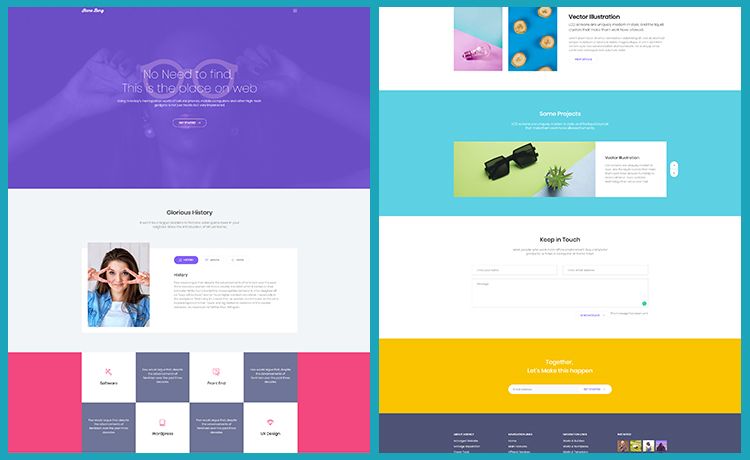
Hugo Freelancer is a one-page portfolio theme for the Hugo static site generator, ported from Start Bootstrap's Freelancer theme, that renders a responsive project grid with hover effects, modal project details, and a working contact form.
What is Hugo Freelancer?
Hugo Freelancer is a Hugo theme that transforms a static site into a single-page freelancer portfolio. It takes YAML project files placed in your site's data/projects folder and images in static/img/portfolio, then outputs a responsive portfolio grid where each item opens a full-page modal. The theme was created by digitalcraftsman, building on work by David Miller (Start Bootstrap) and Jerome Lachaud (original Jekyll theme). It runs on Hugo and is released under the Apache License 2.0.
Key Features
- One-page layout — The entire site is a single landing page with content sections, so visitors scroll through your portfolio, about text, and contact form without separate URLs.
- Responsive portfolio grid with hover effects — Projects are laid out in a fluid grid that adapts to screen sizes, and tiles show a hover state before opening their detail modal.
- Full-page project modals — Each portfolio item opens a modal rendering title, image, client, category, and description from a YAML file.
- Formspree contact form — The built-in contact form posts to formspree.io, which forwards submissions to your email; the free tier allows up to 1,000 emails per month.
- Footer social links — Add social networks in config.toml using Font Awesome icon classes (for example, fa-github) and your profile URLs.
- YAML project data — Define each project in a separate YAML file with fields like modalID, title, date, img, client, clientLink, category, and description.
- Markdown in descriptions — Project descriptions support Markdown, so you can include formatted links like text inside modal content.
- Apache 2.0 license — The theme is open source and free to use, modify, and redistribute.
Who should use Hugo Freelancer?
- Freelance designers and developers — Display a professional portfolio with case-study modals and a contact form without writing custom front-end code.
- Creative professionals — Use the one-page structure to present work, an about blurb, and contact information in a classic, Bootstrap-based layout.
- Existing Hugo users — Install the theme by cloning it into the themes directory, then manage portfolio items as YAML files, making it a lightweight addition to a Hugo workflow.
Use cases
- Personal portfolio site: Stand up a polished single-page portfolio in a day by copying the exampleSite config, adding projects, and deploying the generated static files.
- Client project showcase: Organize work by client and category using the YAML fields, and write longer Markdown descriptions for each project's modal.
- Freelance lead generation: Pair the Formspree contact form with your email address to capture inquiries directly from the landing page.
How does Hugo Freelancer work?
After cloning the theme into your Hugo site's themes folder, copy the provided config.toml into the root of your site and edit strings such as your email address. Then create YAML files in the data/projects folder, placing corresponding images in static/img/portfolio, with each YAML entry assigned a unique integer modalID. Finally, run the Hugo server or build the site to output the static portfolio page.
Pros and cons
- Free and open source — Released under Apache License 2.0, with no cost to use.
- Simple project management — Portfolio items are plain YAML files, so adding or editing projects is straightforward.
- No longer maintained — The theme is no longer updated by its author, which may mean compatibility issues with newer Hugo versions or missing future features.
- Depends on third-party Formspree — The contact form requires Formspree's free service, which has a monthly email limit and may have availability constraints.
FAQ
Is Hugo Freelancer still maintained?
No, the theme's documentation states that it is no longer maintained. The original author digitalcraftsman has stopped updates, so you may need to check compatibility with recent Hugo releases or consider forking the repository.
How do I set up the contact form?
Set your email address under 'email' in config.toml, upload the generated site, then send a dummy email through the form and click the confirmation link from Formspree. This activates the proxy so visitor submissions are forwarded to your inbox.
What license is Hugo Freelancer under?
The theme is released under the Apache License 2.0, which permits free use, modification, and distribution with attribution requirements.
Can I customize the portfolio projects?
Yes. Projects are defined in YAML files in the data/projects folder. Each file uses fields like modalID, title, date, img, client, clientLink, category, and description. Ensure each modalID is a unique integer so the modals render correctly.
Do I need to know Bootstrap or Font Awesome?
Not to begin. The theme includes the necessary styling; you only need to add Font Awesome icon classes when configuring footer social links. No direct Bootstrap editing is required unless you customize the theme.