Template details
Hugo NexT
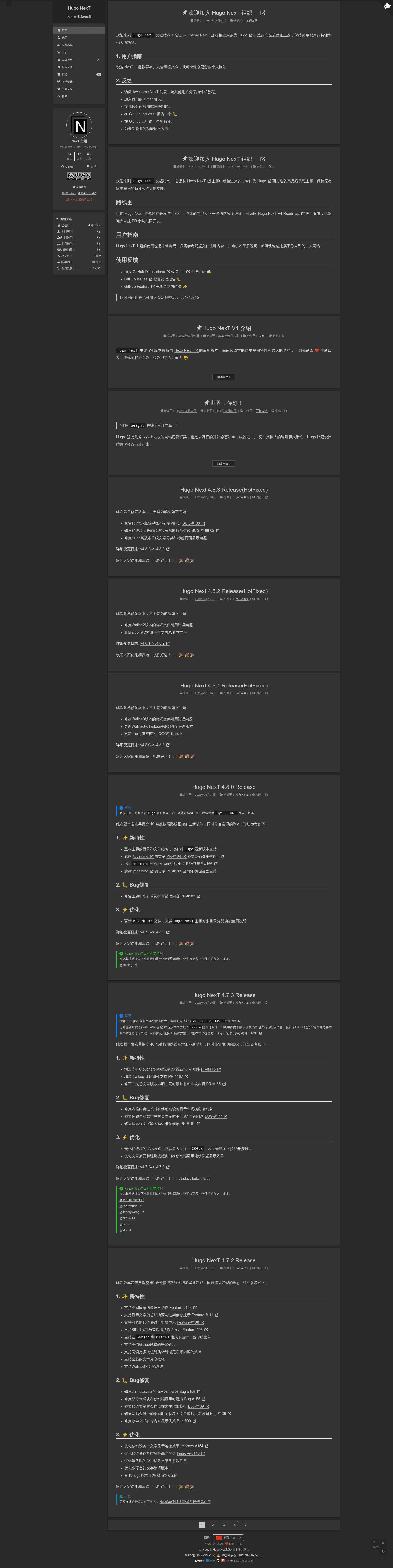
Elegant Hugo theme ported from Hexo NexT, offering 4 schemes and full layout compatibility for blogs.
About this template
Hugo NexT is a high-quality, MIT-licensed Hugo theme that ports the classic Hexo NexT design to the Hugo static site generator, giving you four switchable color schemes and full layout compatibility with its Hexo ancestor.
What is Hugo NexT?
Hugo NexT is a Hugo theme created by the hugo-next team as a port of the popular Hexo NexT theme. It takes Hugo content written in Markdown and produces static websites styled with one of four schemes: Muse, Mist, Pisces, and Gemini (the default). The theme requires Hugo Extended version 0.146.0 or newer, and its page designs and configuration options are kept compatible with Hexo NexT, so a site can be migrated from Hexo to Hugo with minimal restructuring.
Key Features
- Four schemes — Muse, Mist, Pisces, and Gemini are all built in, with separate live previews on the project documentation site.
- Hexo NexT compatibility — Page layouts and configuration keys match the Hexo theme, easing migration from Hexo to Hugo.
- Multiple installation paths — Install via git submodule, Hugo module, or use the GitHub template repository hugo-theme-next-starter to scaffold a site.
- Math rendering — A per-post front matter option enables either MathJax or KaTeX for displaying math formulas.
- Flexible front matter — Posts support categories, tags, sticky weights, TOC toggling, external link redirects, and custom Open Graph image URLs.
- Post archetype included — The theme ships a post template so
hugo new posts/hello-world.mdgenerates a ready-to-fill front matter block. - Active community — Development is tracked in a public roadmap issue, with GitHub Discussions and Gitter chat for users.
Who is it for?
Hugo NexT is for bloggers and site owners who want the clean, readable layout of the classic NexT theme in a Hugo environment. Hexo users moving to Hugo can reuse most of their configuration. Personal blog authors can pick a scheme and start publishing with static site speed. Hugo developers can also use it as a reference for building their own themes with scheme switching.
What can you do with Hugo NexT?
- Hexo migrants: Rebuild an existing Hexo NexT blog as a Hugo site while keeping familiar page layouts and configuration.
- New Hugo bloggers: Start a blog from the Hugo NexT starter template and publish with
hugo newandhugo server. - Math-heavy writers: Enable KaTeX or MathJax per post for scientific or technical articles.
How does Hugo NexT work?
First install Git and Hugo Extended 0.146.0+. Then either clone the theme repository and run the exampleSite with the startup script, create a repository from the hugo-theme-next-starter template, or add the theme as a git submodule or Hugo module. Run hugo server to preview locally at http://127.0.0.1:1313/; for production, build with hugo and deploy the output to your web server.
Pros and cons
- Pro: MIT licensed, so it is free for personal and commercial use.
- Pro: The default Gemini scheme is set out of the box.
- Con: It requires Hugo Extended, not the standard Hugo binary, and version 0.146.0 or higher.
Alternatives
- Hexo NexT — The original theme for Hexo that Hugo NexT ports; it is the choice if you prefer staying on the Hexo engine.
- Other Hugo themes — Many independent Hugo themes exist, though Hugo NexT is one of the few that mirrors NexT's exact scheme system.
FAQ
Is Hugo NexT free?
Yes, Hugo NexT is released under the MIT License, and the theme repository is public. It is free for personal or commercial use, and there are no paid tiers mentioned in the project documentation.
What is the default scheme?
Gemini is the default scheme. The other options — Muse, Mist, and Pisces — can be selected through the theme configuration, and each has its own public preview on the Hugo NexT documentation site.
How do I install Hugo NexT?
You can clone the repository and copy the exampleSite, use the hugo-theme-next-starter GitHub template to create a new site, add the theme as a git submodule with git submodule add, or use a Hugo module with hugo mod init. All methods are documented in the README.
Does Hugo NexT support math formulas?
Yes, each post's front matter can set math to either mathjax or katex to enable formula rendering. The theme does not load a math engine site-wide unless a specific post requests it, keeping pages lightweight.
Can I use Hugo NexT with an older Hugo version?
No, the theme requires Hugo Extended version 0.146.0 or newer. If you are using the standard Hugo binary, you will need to switch to the Extended edition to get full compatibility.