Template details
Hugo Serif
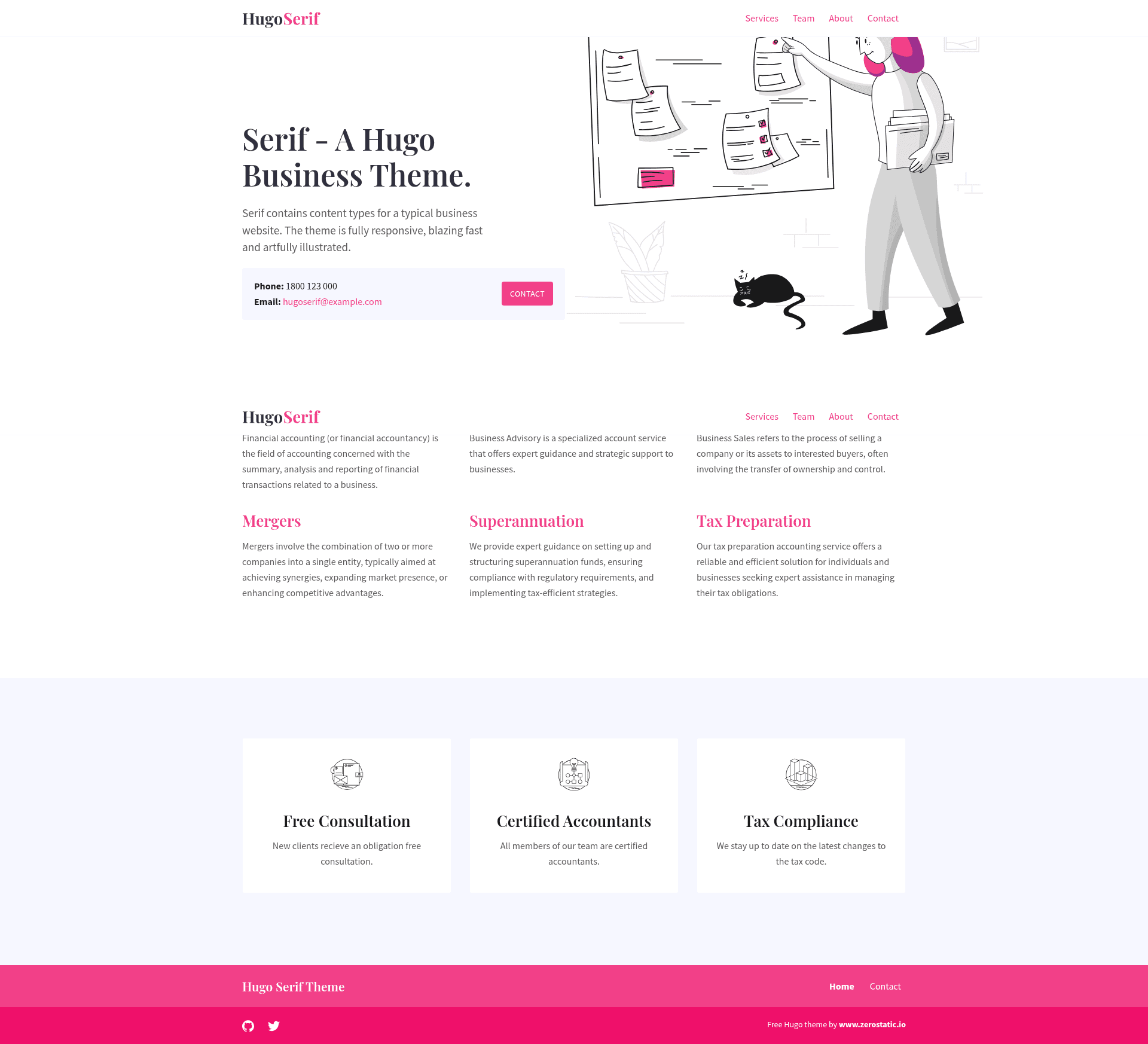
Serif is a modern business theme for Hugo with services, team, and features content types, configurable SCSS, and 100/100 Lighthouse scores.
About this template
Hugo Serif is a modern business theme for the Hugo static site generator, built by Zerostatic Themes to deliver corporate and service-oriented websites from Markdown content and data files with a perfect 100/100 Google Lighthouse performance score.
What is Hugo Serif?
Hugo Serif is a business theme that takes Markdown content for Services and Team, plus JSON/YAML data for Features, and renders a responsive static website with homepage, services, team, and contact pages. It runs on Hugo and requires Hugo Extended because it uses Hugo Pipes to compile SCSS into minified CSS. The theme is maintained by Zerostatic Themes and includes example content plus royalty-free illustrations by Icons8 in the Pixeltrue style. The available content types are Services (Markdown), Team (Markdown), and Features (data), along with a custom contact page layout.
Key Features
- Performance — 100/100 Google Lighthouse speed score; the generated site is under 50KB without images and under 80KB with images and illustrations, with no jQuery and only a small vanilla JavaScript snippet for the mobile menu.
- SCSS theming — Styling is written in SCSS and compiled via Hugo Pipes; it uses Bootstrap 4's grid and media queries only, with an option to import the entire Bootstrap framework by uncommenting one line in style.scss.
- Config-driven customization — Google Fonts (default Playfair Display headings and Source Sans Pro body), primary color palette, logo, favicon, and Google Analytics ID are all set in config.toml and injected into SCSS as variables.
- SEO and accessibility — 100/100 Lighthouse scores for SEO and accessibility; supports per-page meta titles, descriptions, Open Graph and Twitter Card tags, and semantic HTML structure.
- Menu — The responsive navigation is managed in config.toml, with an animated hamburger menu on mobile.
- Example code patterns — Layouts contain no hardcoded content; they demonstrate Hugo loop functions (range and where), using data files like contact.yaml and features.json, passing site context and custom variables to partials, injecting per-page JavaScript, and setting body classes per layout.
- Netlify deployment — A netlify.toml is included to deploy directly from the exampleSite folder, and the Google Analytics ID can be set via the HUGO_GOOGLE_ANALYTICS_ID environment variable.
Who is it for?
- Small businesses and startups — launch a corporate site quickly by copying the example content and replacing Markdown and data files; the theme provides services, team, features, and contact pages out of the box.
- Hugo developers — use the template as a learning reference for SCSS with Hugo Pipes, data-driven content, partials with dict context, and per-page layout overrides.
- Agencies and freelancers — customize colors, fonts, and analytics from config.toml and deliver a static site that scores 100/100 on Lighthouse without touching layout HTML.
What can you do with Hugo Serif?
- Company websites: Build a homepage with intro image, featured services, team bios, and a contact page from Markdown and YAML/JSON content, all rendered responsively.
- Service catalogs: Add each service as its own Markdown file with front matter for titles, images, and SEO meta tags; the Services section lists them automatically.
- Theme prototyping: Run the bundled exampleSite in isolation with the command
hugo server --source=exampleSite --theme=../..to develop or preview theme changes at localhost:1313.
How does Hugo Serif work?
Installation follows five steps: install Hugo Extended, create a new Hugo site with hugo new site mynewsite, clone this theme into themes/hugo-serif-theme, copy the contents of the exampleSite folder to the site root, then run hugo for production or hugo server for local development. The theme then compiles the SCSS and Markdown into a static site accessible at localhost:1313.
Pros and cons
- Pro: Extremely fast — 100/100 Lighthouse speed score and under 80KB total weight with images.
- Pro: Highly configurable without editing layouts — colors, fonts, logo, analytics, and menu all live in config.toml.
- Pro: Includes substantial example content and illustrations, so a full demo site runs immediately after copying exampleSite.
- Con: Requires Hugo Extended; the standard Hugo binary will not compile the theme's SCSS.
- Con: The license prohibits creating ports, redistributing, or reselling the theme as your own template.
Pricing
The theme is free to download and use. The license section states that you cannot re-distribute or re-sell it as your own template. No paid tier or pricing is listed on the page.
Alternatives
- Hugo Hero — an open-source business theme from the same maker.
- Hugo Advance — a premium advanced multi-page business and marketing theme from Zerostatic, which is paid.
FAQ
Does Hugo Serif require Hugo Extended?
Yes. The theme uses Hugo Pipes to compile SCSS and minify assets, so it only works with the Hugo Extended version. Run hugo version and check for /extended in the output, for example Hugo Static Site Generator v0.51/extended darwin/amd64.
Is Hugo Serif free to use?
Yes, the theme is free to download. Its license restricts you from redistributing or reselling it as your own template, and you should not create ports without the author's permission.
How do I change the theme colors and fonts?
Edit the params.colors and params.fonts sections in config.toml. The values are passed into style.scss as SCSS variables, and the Google Fonts link is updated from the google_fonts URL in the fonts setting.
Can I deploy Hugo Serif to Netlify?
Yes, the repository includes a netlify.toml configured to build from the exampleSite folder. You can also set your Google Analytics ID through the HUGO_GOOGLE_ANALYTICS_ID environment variable, which Netlify supports.
How do I run the site locally?
After installing the theme and copying the exampleSite contents to your site root, run hugo server from that root folder and open localhost:1313 in your browser. For theme development, you can run hugo server --source=exampleSite --theme=../.. from the theme directory.