Template details
Jekyll Photo Grid Gallery
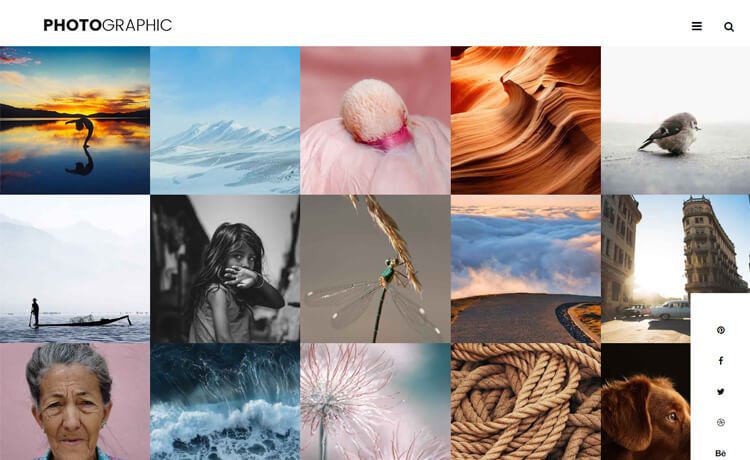
A responsive Jekyll theme for creating photo grid galleries, based on the Google Grid Gallery blueprint.
About this template
Jekyll Photo Grid Gallery is a free, responsive Jekyll theme that turns a folder of images into a grid-based photo gallery, based on the Blueprint: Google Grid Gallery design by Codrops. Developed by GitHub user iamnii, it is designed for static sites hosted on Jekyll or GitHub Pages.
What is Jekyll Photo Grid Gallery?
Jekyll Photo Grid Gallery is a Jekyll theme that creates a photo grid gallery from images stored in specific folders. It accepts a large image in img/large/ and a matching thumbnail in img/thumb/, along with a Jekyll post containing front matter for the photo filename and captions. The theme outputs a static grid page that works on any Jekyll installation. A live demo is available at https://iamnii.github.io/GridGallery, and the repository has 57 stars on GitHub.
Key Features
- Responsive grid design — Uses the responsive Google Grid Gallery blueprint from Codrops to adapt to different screen sizes.
- Simple image workflow — Place a large image and a thumbnail with the same filename in the designated folders, no configuration files needed.
- Jekyll post integration — Each gallery item is defined as a post with front matter fields for
photo,caption_header, andcaption. - Custom captions — Add a caption header and a caption to each photo, which appear when the photo is viewed.
- Static output — The theme generates plain HTML/CSS/JS, deployable on any web server without a database.
- GitHub Pages ready — The theme can be used directly with GitHub Pages, which supports Jekyll.
- Open source — The source code is available on GitHub, so users can customize and share their own versions.
Who is it for?
- Photographers — Showcase a portfolio of work in a clean, responsive grid with click-through to larger images.
- Designers — Present project visuals or case study images with customizable captions.
- Jekyll users — Add a gallery section to an existing Jekyll blog without learning a separate JavaScript framework.
- Students and hobbyists — Build a personal photo archive on GitHub Pages for free.
What can you do with it?
- Photographers: Publish a photo collection by uploading large images and matching thumbnails, then writing one post per photo to control placement and captions.
- Designers: Use the grid to display UI mockups or artwork, with
caption_headeras the project title andcaptionas the description. - Bloggers: Insert a visual gallery page into a Jekyll site, reusing the existing post structure and layout for consistent navigation.
How does it work?
The workflow is: first, create a thumbnail version of each image and place it in img/thumb/, and the full-size version in img/large/, using identical filenames. Then, create a new post under _posts with front matter that specifies the photo filename and any caption text. Finally, build the site with jekyll build and serve it with jekyll serve to preview locally, or push to GitHub Pages for a public deployment.
Pros and cons
- Pros: Free to use; responsive grid layout; easy to set up with basic Jekyll knowledge; no database or backend required.
- Cons: Thumbnails must be created manually for each image; the theme only supports images, not video or other media; no image optimisation or lazy loading is included.
FAQ
Do I need to know Jekyll to use this theme?
Yes, the theme is built for Jekyll. Basic familiarity with Jekyll and command-line usage is required to build and serve the site locally.
How do I add a new photo to the gallery?
Place a thumbnail in img/thumb/ and the full-size image in img/large/ with the same filename, then create a Jekyll post with front matter including photo, caption_header, and caption fields.
Can I use this theme with just large images and no thumbnails?
No, the theme expects both a large image and a thumbnail; without a thumbnail the grid layout will not render correctly.
Is this theme free?
Yes, the theme is open source and hosted in the iamnii/GridGallery repository on GitHub, with 57 stars.
Does this theme support video?
The documentation only describes image handling, so the gallery is intended for static image collections only.