Template details
Lifetrackr
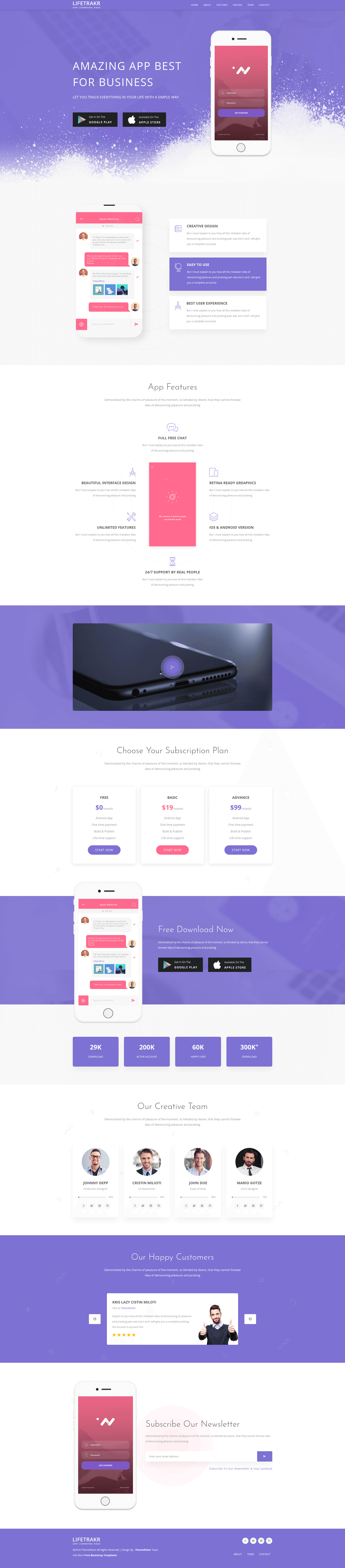
Free responsive Bootstrap app landing page template for showcasing software, apps, and games.
About this template
Lifetrackr is a free, responsive Bootstrap 3 app landing page template by Themefisher, built to showcase software, mobile apps, and games through a single-page marketing site with a full-page hero image and call-to-action buttons.
What is Lifetrackr?
Lifetrackr is a free HTML5 and CSS3 landing page template created by the design agency Themefisher and distributed on ThemeWagon. It takes a product name, tagline, feature list, and screenshots as input and outputs a one-page website with a hero header, feature blocks, and a prominent call-to-action. The template runs in all modern browsers, includes FontAwesome icons and Google Fonts, and is built on the Bootstrap 3 grid system for responsive layout.
What makes Lifetrackr stand out?
- Mobile-first responsive layout — Built on Bootstrap 3, the template adapts to phones, tablets, and desktops, and the page explicitly states a mobile-first design approach.
- Smooth CSS3 animations — The template includes CSS3 animations that give the page a polished feel without requiring JavaScript coding.
- FontAwesome icon integration — A full set of FontAwesome icons is bundled, letting you add icons to feature blocks and buttons.
- Cross-browser compatibility — The page is verified to work on Chrome, Edge, Firefox, Opera, Safari, and mobile devices.
- Stylish navigation — A clean, fixed navigation bar helps visitors jump to different sections of the single-page layout.
- 100% customizable code — The HTML and CSS files are well-commented, making it straightforward to change colors, text, images, and layout.
- SEO-friendly structure — The template is described as 100% SEO friendly, with semantic HTML5 markup.
- Free lifetime updates — The template is open source, free for commercial use, and receives lifetime updates from the developer.
Who should use Lifetrackr?
- App entrepreneurs — Use the template to build a marketing page that highlights your mobile app's features and drives downloads through app-store buttons.
- Game developers — Showcase your game with a hero image, trailer embed, and a call-to-action that sends visitors to stores.
- Software vendors — Create a professional landing page for desktop or web software, including sections for screenshots, features, and contact.
- Non-technical founders — Launch a respectable product site in hours by replacing placeholder content without touching code, as one customer review said they launched in six hours.
What can you do with Lifetrackr?
- App developers: Present your iOS or Android app with a full-page hero image, feature highlights, and a download button.
- Game studios: Promote a new game with animated sections and a call-to-action link to store pages.
- SaaS and tool makers: Advertise a web-based tool or online service using feature blocks and a sign-up button.
- Freelancers and agencies: Offer a polished single-page template to clients who need a quick product launch page.
How does Lifetrackr work?
Download the template from ThemeWagon, unzip the files, and open the HTML files in a code editor. Replace placeholder text, images, and links with your own product details, then upload the folder to any static web host. Because the code is well-commented and uses standard HTML5 and CSS3, even beginners can make simple changes.
Pros and cons
- Pros: Free to download and use commercially; open source with lifetime updates; responsive and cross-browser; well-documented code; includes FontAwesome and Google Fonts.
- Cons: Built on Bootstrap 3, which is an older version of Bootstrap than the current Bootstrap 5, so it may not include the latest components and utilities.
Pricing
Lifetrackr is free. The download page lists "Open source," "Use in commercial projects," and "Life time free updates" as the license terms, with no paid tier mentioned.
Alternatives
Similar free Bootstrap landing page templates on ThemeWagon include Spify, SEO Dream, and Watch. Each offers the same single-page marketing structure but with different visual styles and feature sets.
FAQ
Is Lifetrackr free?
Yes. Lifetrackr is free to download from ThemeWagon, open source, and permitted for commercial projects. The developer also provides lifetime free updates.
What framework does Lifetrackr use?
Lifetrackr is built with HTML5, CSS3, and Bootstrap 3. It also integrates FontAwesome icons and Google Fonts.
Is Lifetrackr responsive?
Yes. The template uses a mobile-first design and the Bootstrap 3 grid system, so it adapts to smartphones, tablets, and desktop screens. It is tested on Chrome, Edge, Firefox, Opera, Safari, and mobile browsers.
Do I need coding experience to use Lifetrackr?
No. You can replace text and images in the HTML files without writing code, and the template is described as easy to use. For deeper customisation, knowledge of HTML and CSS helps.