Template details
Linkify
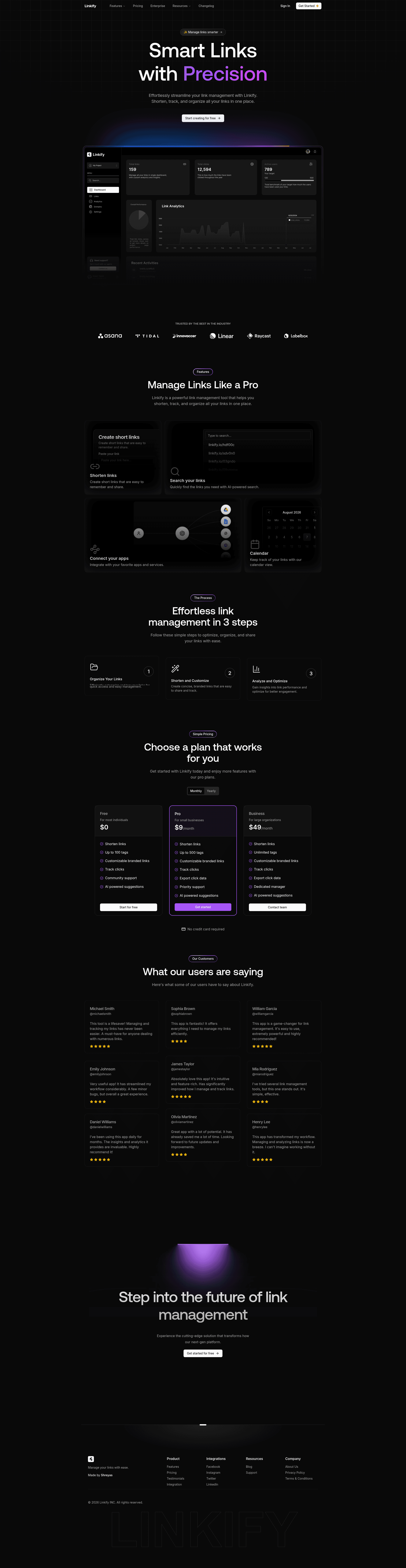
Next.js landing page template for a link management SaaS, featuring analytics, branding, and AI suggestions.
About this template
Linkify is an open-source Next.js landing page template for a link management SaaS, presenting short-link creation, analytics, and AI-powered optimization features.
What is Linkify?
Linkify is a front-end landing page template built with Next.js, Tailwind CSS, Shadcn UI, Magic UI, and Aceternity UI, designed for a link management platform. It uses Prisma as the ORM and MongoDB for storage, with Clerk for authentication and React Hook Form for forms. The template is authored by Shreyas and released under the MIT License. A live demo is hosted at Linkify-demo.vercel.app, and a YouTube tutorial demonstrates how the system was built.
Key Features
- Next.js Framework — The project is built on Next.js, providing a React-based foundation.
- Tailwind CSS Styling — Utility-first CSS classes are used for responsive design.
- Shadcn UI Components — Pre-built components are integrated into the UI.
- Magic UI — Offers animation and visual effects.
- Aceternity UI — Contributes additional UI elements and styling.
- Prisma ORM — Handles database queries with MongoDB.
- MongoDB Database — Used as the data store, configured via a DATABASE_URL environment variable.
- Clerk Authentication — Provides user sign-in; requires NEXT_PUBLIC_CLERK_PUBLISHABLE_KEY and CLERK_SECRET_KEY.
- React Hook Form — Manages form state and validation.
- Link Shortening UI — The landing page highlights URL shortening functionality.
- Analytics Dashboard — Showcases click tracking and engagement metrics.
- Customizable Links — Displays branded link options.
- AI-Powered Suggestions — Presents smart link optimization recommendations.
- Live Demo — Hosted at Linkify-demo.vercel.app for immediate preview.
- Build Tutorial — Available on YouTube at youtu.be/3_sZPAfVR_U.
- MIT License — Permits free use, modification, and distribution.
Who is Linkify for?
- SaaS founders launching a link management product need a landing page to display their features.
- Next.js developers seeking a starter template with Tailwind CSS, Shadcn UI, and Clerk can adapt this codebase.
- UI/UX designers wanting to see integrations of Magic UI and Aceternity UI in a real project can study this template.
- Indie hackers looking to quickly deploy a front-end for a URL shortener can use Linkify.
What can you do with Linkify?
- Product presentation: Communicate the core features of a link management service—shortening, analytics, branding, and AI—to visitors.
- Learning resource: Examine how Next.js combines with Prisma and MongoDB in a practical setup.
- Customizable starter: Tailor the landing page copy, colors, and sections to your own brand using Tailwind and component libraries.
- Rapid prototyping: Set up a local development environment with npm install and npm run dev, after configuring environment variables.
How does Linkify work?
Clone the repository, run npm install, and set up a .env file with NEXT_PUBLIC_APP_DOMAIN, NEXT_PUBLIC_APP_NAME, Clerk keys, and DATABASE_URL. Then start the development server with npm run dev. The template uses these variables to connect Clerk for authentication and MongoDB for database storage.
FAQ
Is Linkify free to use?
Yes, the project is open source under the MIT License, so you can use, modify, and distribute it without cost.
What tech stack does Linkify use?
Linkify uses Next.js, Tailwind CSS, Shadcn UI, Magic UI, Aceternity UI, Prisma, MongoDB, Clerk, and React Hook Form, as listed in the README.
Does Linkify include authentication?
Yes, Clerk authentication is integrated. You must provide your own Clerk publishable and secret keys for it to work.
Where can I see a live demo?
The live preview is at Linkify-demo.vercel.app. A YouTube tutorial at youtu.be/3_sZPAfVR_U also shows the build process.
Can I customize the template?
Since it is a Next.js project, you can modify components, styles, and content. The use of Tailwind CSS and component libraries makes customization straightforward.