Template details
Lumio Lite
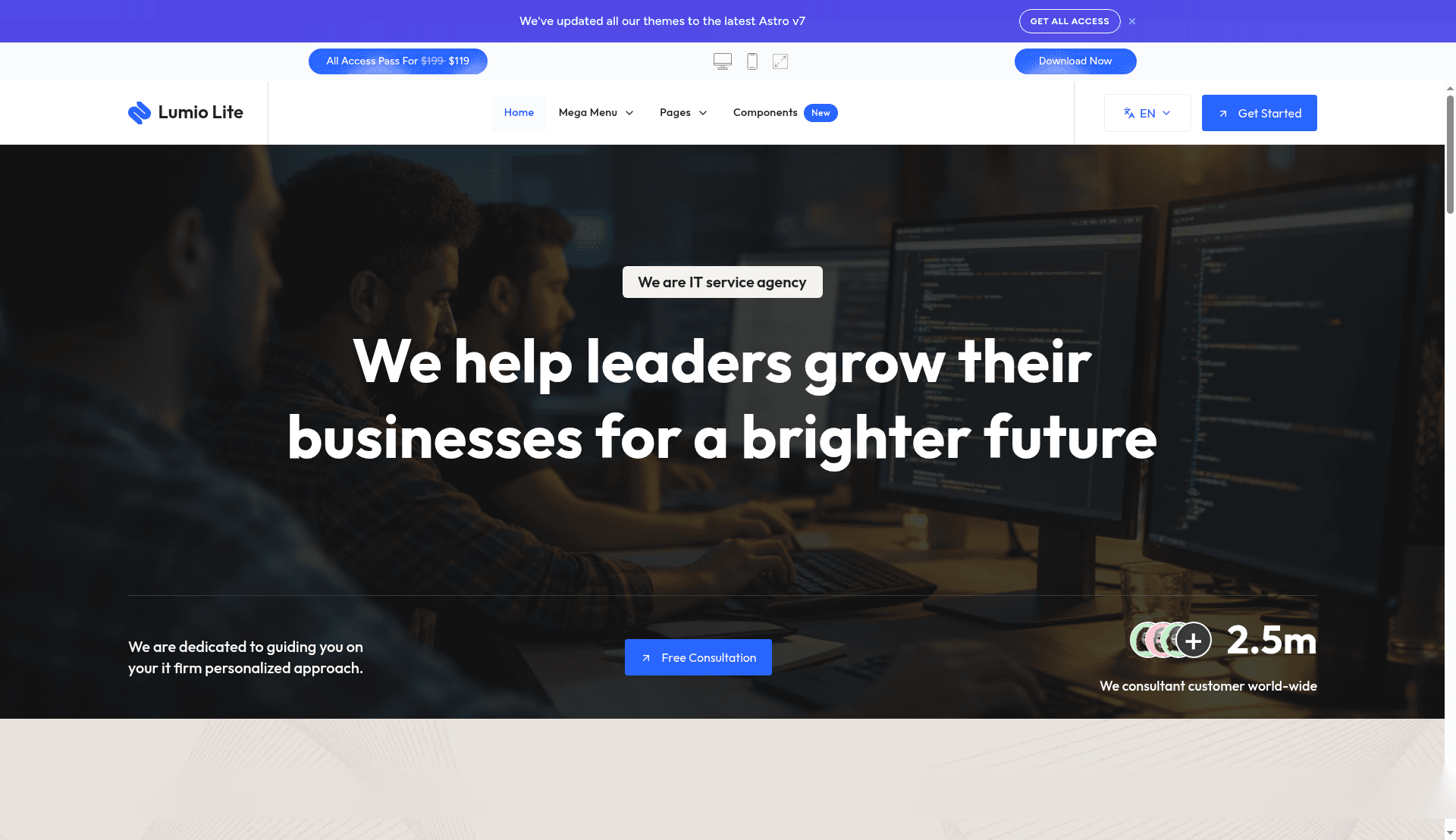
A free multilingual Astro theme for agency, startup, and IT service websites with service pages, config-first editing, and AI-assisted coding support.
About this template
Lumio Lite is a free, multilingual-ready Astro v7 starter theme from Get Astro Themes for agency, startup, and IT service websites that need clean structure and service pages without premium extras.
What is Lumio Lite?
Lumio Lite is a lightweight Astro theme that outputs a localized homepage, a services index, a service single page, and a 404 page. All content lives in editable config files, and the theme includes MDX, Shiki, and table of contents settings. Get Astro Themes maintains it as the free companion to the paid Lumio theme.
Key Features
- Config-first editing — Site settings live in
src/config/config.toml, menu files inmenu.en.jsonandmenu.fr.json, plussocial.jsonandfonts.json, so edits don't require hunting through component code. - Nested dropdown menus — The menu system supports multi-level dropdowns, nested child items, badge and dot markers, and is localized per language.
- Sticky header from config — A
stickyHeadersetting inconfig.tomlcontrols the header behavior without touching components. - Three form providers — Contact forms support
formsubmit.co,formspree, andnetlify, letting you switch providers later. - Multilingual structure included — Localized menu files and a multilingual-ready project structure ship from the start; run
npm run remove-multilingualto go single-language ornpm run generate-multilingual-contentto restore it. - AI-assisted coding ready — The theme includes
AGENTS.md,CLAUDE.md,GEMINI.md,SKILLS.md, and rules for Cursor, GitHub Copilot, and Windsurf so AI tools follow the project's structure and conventions. - MDX and Shiki support — Long service pages can include technical explanations, process details, and code examples with syntax highlighting.
- Four core pages — Home, Services, Service Single, and 404 give small teams a sharp company story plus clear service pages.
Who is it for?
Lumio Lite suits small teams and freelancers launching a service-led business site who want a free starter that doesn't feel basic. Agencies can use it as an MVP company site; startups can deploy a multilingual service landing page in minutes; IT service providers can publish structured service pages with code examples; and developers can hand it to clients because navigation, forms, and multilingual content are configurably managed.
What can you do with Lumio Lite?
- Agencies launching an MVP: Publish a company story, services index, and a single service page quickly, then upgrade to Lumio Pro when case studies and pricing pages are needed.
- Startups needing multilingual pages: Use the built-in fr/en menu files to ship a localized service landing page without adding a translation plugin.
- IT service providers: Write long service pages with MDX and Shiki code highlighting to explain technical processes.
- Developers working with AI tools: Let Claude, Codex, Cursor, Copilot, Gemini, or Windsurf read the bundled instruction files so generated code matches the theme's conventions.
How does Lumio Lite work?
Configuration is file-based: edit src/config/config.toml for site settings, menu.en.json and menu.fr.json for navigation, social.json for links, and fonts.json for typography. To remove multilingual content, run npm run remove-multilingual; to regenerate it later, run npm run generate-multilingual-content. The theme ships with an AGENTS.md file and per-assistant rules so AI coding tools can follow the same structure and content model.
Pros and cons
- Pros: Free download; clean structure; multilingual-ready; config-first editing; supports three form providers; AI-assisted coding instructions included; runs on Astro v7; MDX and Shiki support for technical content.
- Cons: Only four core pages; no case studies, pricing, FAQ, or team pages — those require the paid Lumio theme; not ideal for content-heavy websites or teams needing multiple home demos.
Pricing
Lumio Lite is free to download. The full Lumio theme is $99 or included with the All Access Pass, which is sold in Essential ($119), Pro ($197), and Studio ($349) tiers.
Alternatives
- Lumio — The paid counterpart by the same maker, with more demos, case studies, pricing pages, and a broader section library.
- Folex Lite — A free Astro theme better suited to creative-agency or portfolio-led brands.
- Looka — A paid Astro theme for more premium consulting or corporate-business presentations.
FAQ
Is Lumio Lite free?
Yes, Lumio Lite is currently available as a free Astro theme. The full Lumio theme is paid.
Does Lumio Lite support multilingual websites?
Yes. Lumio Lite includes a multilingual-ready project structure with localized menu files (menu.en.json and menu.fr.json), which helps when the site needs localized routes or content. You can remove multilingual support with a command.
What built-in pages or features does Lumio Lite include?
Lumio Lite includes four core pages: Home, Services, Service Single, and 404. It also offers config-first editing, nested dropdown menus, sticky header, three form providers, MDX support, and AI-assisted coding instructions.
When should I choose Lumio Lite over similar Astro themes?
Choose Lumio Lite when you need a free multilingual starter for a service-led business site and want a cleaner structure than most basic free themes provide. If you need more demos, case studies, pricing pages, and a larger section library, consider the paid Lumio theme.
What changed in version 1.1.0?
Version 1.1.0 upgraded the theme to Astro v7, replaced astro-auto-import with Astro's native MDX components, updated dependencies, and added AI-assisted coding support with AGENTS.md, CLAUDE.md, GEMINI.md, SKILLS.md, plus Cursor, GitHub Copilot, and Windsurf rules.