Template details
Nike Landing Page
Landing Page of a World Famous Shoe Brand - Nike
About this template
Nike Landing Page is an open-source, single-page marketing template for a Nike shoe brand, built with the Next.js App Router, TypeScript, and Tailwind CSS v4. It is authored by Om Patel and distributed under the MIT License, with a live demo hosted on Netlify.
What is the Nike Landing Page?
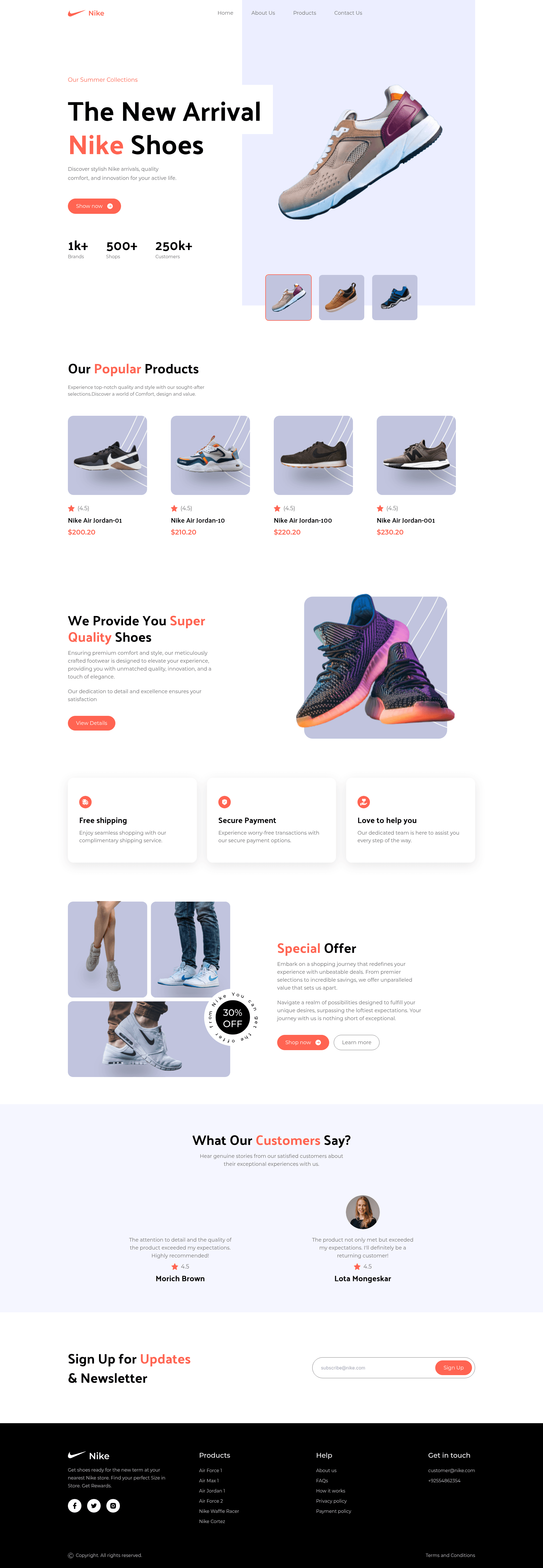
The Nike Landing Page is a fully responsive, componentized Next.js starter that renders a complete brand marketing site from a single composed home route. As input it takes product content centralized in a constants/ directory and typed models from types/; as output it produces a static-style landing page with hero collection, popular products, quality highlights, services, special offers, customer reviews, and a newsletter sign-up section. It uses the Next.js App Router and runs on Bun 1.3+ for package management and scripts. The project is maintained by Om Patel and was inspired by a JavaScript Mastery tutorial.
What makes Nike Landing Page stand out?
- Next.js App Router — Uses the modern App Router layout system with a single composed home route for the entire landing page.
- Tailwind CSS v4 styling — Adopts the CSS-first
@themeconfiguration with a custom set of design tokens, replacing the older Tailwind config file approach. - Interactive hero section — Users can click a thumbnail to swap the featured shoe image, demonstrating stateful component behavior.
- Typed, reusable components — Presentational components such as Button and cards are fully typed in TypeScript and shared across sections.
- Centralized, type-safe content — All copy and product data live in
constants/with shared TypeScript models intypes/, making content edits predictable. - Responsive breakpoints — Layout adapts across mobile, tablet, and desktop viewports.
- Bun tooling — Scripts for dev, build, start, and lint are run through Bun; linting uses oxlint.
- MIT licensed — Free to use, modify, and distribute with attribution.
Who should use the Nike Landing Page?
The template suits developers and learners who want a typed, production-structured Next.js landing page as a starting point.
- Frontend developers learning Next.js — Can study a production-structured App Router project with typed components and centralized content.
- Developers needing a brand landing page starter — Can clone the repo and replace the Nike content with their own product data.
- Students following JavaScript Mastery tutorials — Can compare this implementation to the original video build to see refactoring and typing improvements.
What can you do with the Nike Landing Page?
With the centralized content model and typed components, you can repurpose the landing page for other brands or extend its sections.
- Showcase a product line: Replace the constants and types to feature your own shoe or consumer product catalog in the hero, popular products, and special offers sections.
- Practice Tailwind v4 theming: Experiment with the
@themedesign tokens to rebrand the entire palette without editing component classes. - Learn App Router structure: Use the single-route composition as a starting point for adding additional routes like a product detail page or blog.
- Deploy as a static marketing site: Run a production build and host it on services like Netlify, as the included demo does.
How does the Nike Landing Page work?
The template follows a standard Next.js workflow: clone the repository, run bun install to fetch dependencies, then bun dev starts the development server at http://localhost:3000. A production build is created with bun run build and served with bun start. Content lives in constants/ and flows into typed components that render the sections.
Pricing
The Nike Landing Page is free and open source under the MIT License, so there are no licensing fees or paid tiers.
FAQ
Is the Nike Landing Page free?
Yes, the project is released under the MIT License, which permits free use, modification, and distribution, including in commercial projects, provided the license notice is retained.
What tech stack does the Nike Landing Page use?
It is built with Next.js (App Router), React, TypeScript, Tailwind CSS v4, and Bun. The linting script uses oxlint rather than ESLint.
How do I run the Nike Landing Page locally?
Clone the repository, install dependencies with bun install, and start the dev server with bun dev. You need Bun 1.3 or newer installed.
What scripts are available?
bun dev starts the development server, bun run build creates a production build, bun start serves that build, and bun run lint runs oxlint.
Can I replace the Nike content with my own?
Yes, all product and copy content is centralized in the constants/ directory with shared TypeScript models in types/, so updating the text and images for another brand is a matter of editing those files.