Template details
Notary
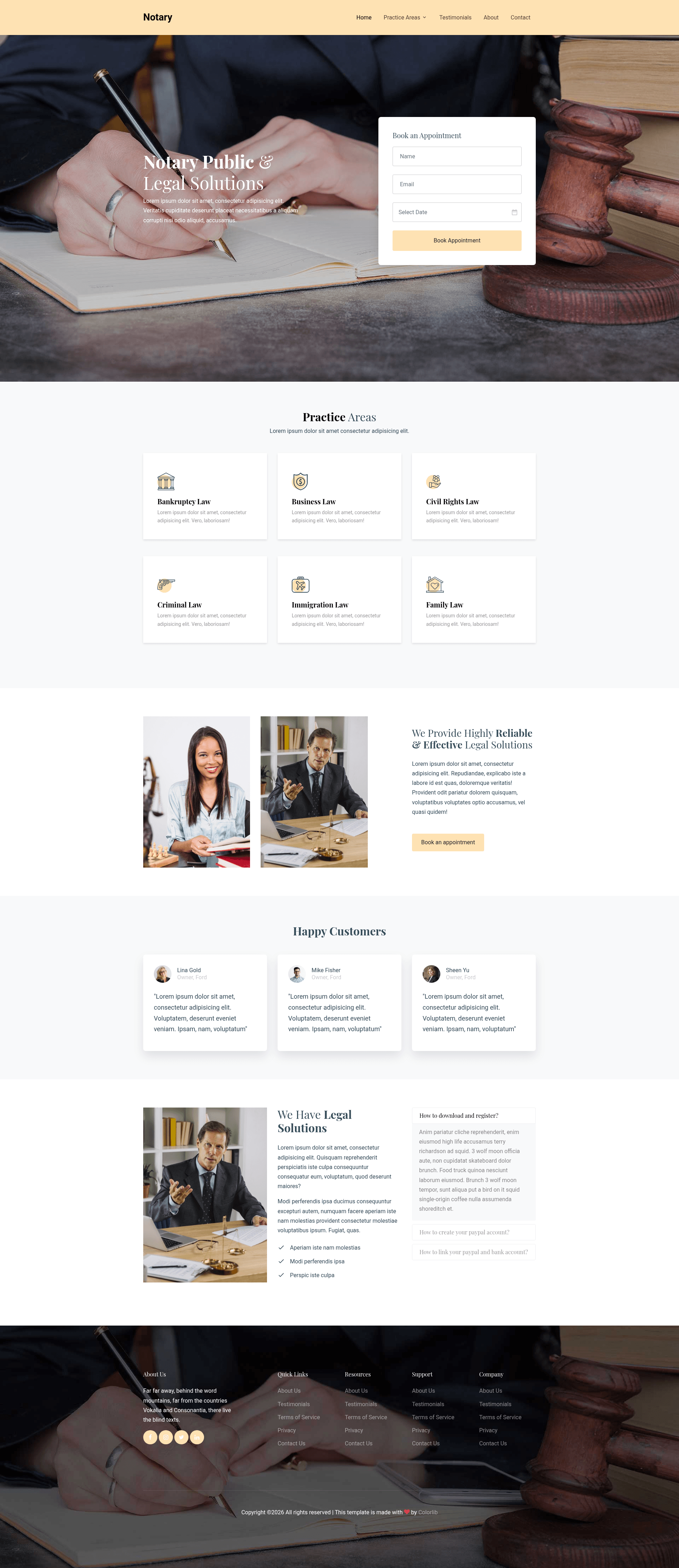
Free Bootstrap 4 HTML5 multi-page template for law firm websites with hero header, testimonials, accordions, and appointment form.
About this template
Notary is a free, open-source Bootstrap 4 HTML5 multi-page website template from ThemeWagon and Colorlib built specifically for law firm and legal agency websites.
What is Notary?
Notary is a multi-page, static HTML5 template that gives you a complete law firm website package: it takes the included HTML, CSS, SCSS, and JavaScript files, which you edit and deploy to any static web host. The template is built on the Bootstrap 4 framework, uses FontAwesome for icons, and is created by Colorlib, distributed through ThemeWagon with a license that permits commercial use and provides lifetime free updates.
Key Features
- Bootstrap 4 framework — Built on Bootstrap 4 with HTML5 and CSS3, giving you a responsive grid, components, and utilities; SCSS source files are included for deeper customization.
- Six HTML files — A multi-page template structure with ready-to-edit pages for law firm content like services, blog, and contact.
- Hero header and call-to-action button — The homepage includes a prominent hero section with a CTA button to encourage visitor engagement.
- Testimonial carousel — Uses Owl Carousel to display client testimonials in a rotating slider.
- Accordions and FAQ section — Accordion components are included, well-suited for an FAQ or practice-area details page.
- Appointment booking form UI and contact form — Pre-built form sections let visitors request appointments or send messages without you building forms from scratch.
- Drop-down menu and hover effects — Multi-level navigation with drop-downs and CSS hover animations are part of the default design.
- FontAwesome font icons — The icon set is included, so you can add icons to buttons, feature lists, and contact details.
- Responsive and cross-browser compatible — Layout is 100% responsive and tested for Chrome, Edge, Firefox, Mobile, Opera, and Safari.
Who is it for?
- Independent attorneys and solo practitioners — Launch a professional firm site quickly by editing the included HTML files; no backend or build tooling is required.
- Small and mid-size law firms — Present practice areas, testimonials, and an appointment booking form to convert visitors into client consultations.
- Web designers and freelancers — Use the template as a clean starting point for client projects, customizing the SCSS to match a firm's branding.
- Legal agencies and consultancies — Deploy a multi-page brochure site with blog and FAQ sections to build authority and answer common client questions.
What can you do with Notary?
- Solo practitioners: Stand up a multi-page law firm website with a hero header, blog, appointment booking form, and contact form by editing the six HTML files.
- Law firm marketers: Add client testimonials via the Owl Carousel slider and publish FAQ content using the accordion component to address common legal questions on-page.
- Designers prototyping for legal clients: Use the SCSS source files to quickly restyle colors, fonts, and spacing, and deliver a responsive, cross-browser site based on the included components.
Pricing
Notary is free to download and open source. The license allows commercial use, and the template receives lifetime free updates from ThemeWagon.
Alternatives
- Law Firm – Free Bootstrap 4 HTML5 Agency Website Template from ThemeWagon
- Judicial – Free Bootstrap 4 HTML5 Law Firm Website Template from ThemeWagon
- Adalot – Free Bootstrap 4 HTML5 Law Firm Website Template from ThemeWagon
FAQ
Is Notary free?
Yes, Notary is a free download from ThemeWagon. It is open source, can be used in commercial projects, and comes with lifetime free updates.
Does Notary work on mobile?
Yes, the template is 100% responsive and tested on mobile browsers. It is also compatible with Chrome, Edge, Firefox, Opera, and Safari.
What files are included in the download?
The package includes 6 HTML files, CSS and SCSS files, FontAwesome icons, JavaScript source files, all demo images, and library/plugin files such as Bootstrap 4, Owl Carousel, Magnific Pop-Up, Fancybox, and Slick.
Can I customize Notary's design?
Yes, you can edit the HTML directly and use the included SCSS files to change colors, fonts, and layout. The template also includes hover effects and supports drop-down menus.
Is there a setup or installation required?
No installation is needed. After downloading, unzip the folder and open an HTML file to preview; deploy the files to any static web server for a live site.