Template details
Small Business Starter
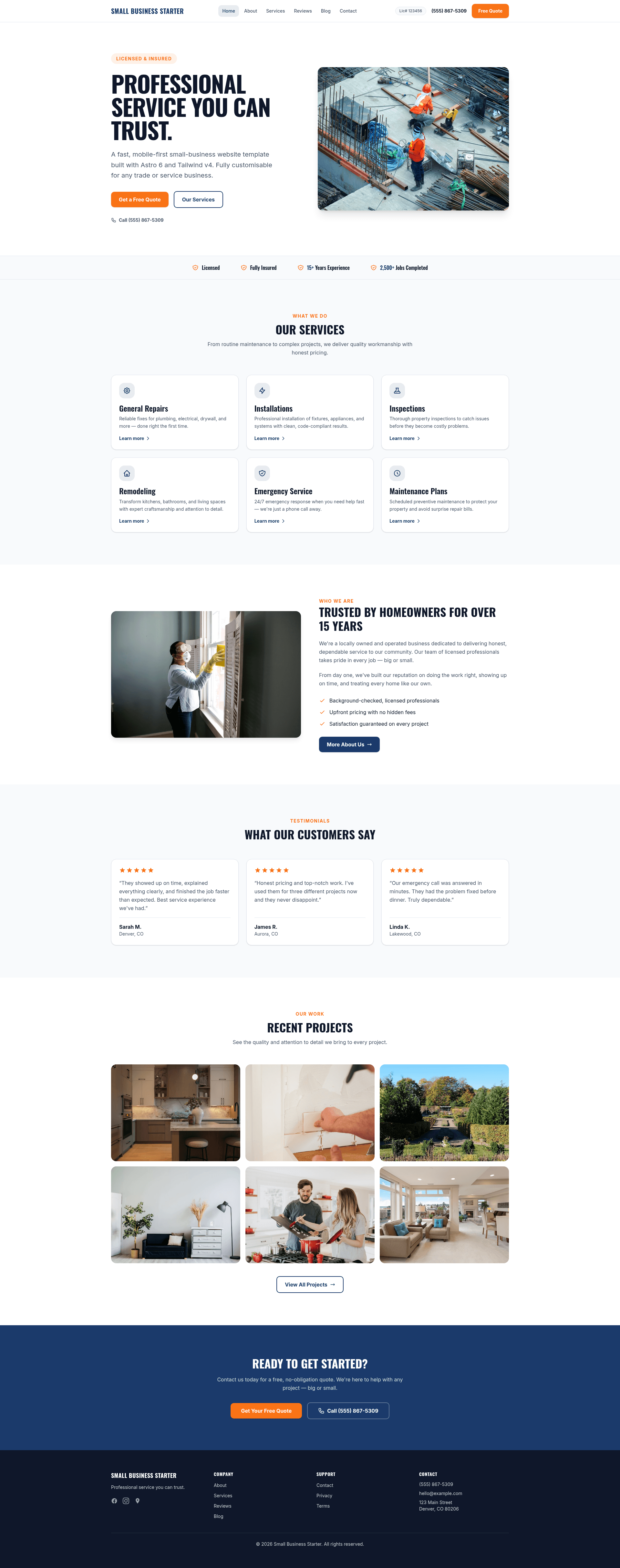
A mobile-first Astro 6 and Tailwind CSS v4 template for trade and service businesses, ready to deploy on Netlify.
About this template
Small Business Starter is a free, mobile-first website template for trade and service businesses such as handymen, electricians, plumbers, and landscapers, built on Astro 6 and Tailwind CSS v4 and ready to deploy on Netlify in minutes.
What is the Small Business Starter template?
Small Business Starter is a static site template for local service businesses. It takes placeholder business information and photos and produces a complete marketing website with a homepage, about, services, reviews, contact, and blog pages. The template runs on the Astro static site generator, uses Tailwind CSS v4 for styling, and lists Netlify as the recommended hosting and form-handling platform. It uses a pnpm-based workflow, with pnpm 9 or newer required.
Key features
- Two-file customisation — All placeholder content lives in src/data/client.ts and src/config/brand.ts; edit these two TypeScript files to replace the business name, phone, address, social links, colors, fonts, and tagline.
- Built-in SEO — Pages include title tags, meta descriptions, canonical URLs, Open Graph metadata, JSON-LD structured data, a sitemap, and robots.txt.
- Netlify Forms integration — The contact page includes a form ready for Netlify Forms, plus a dedicated success page after submission.
- Astro View Transitions — Page navigation uses Astro's built-in View Transitions for smooth transitions between pages.
- Automatic image processing — Images placed in src/assets/ are processed at build time, converted to WebP or AVIF, resized, and assigned srcset attributes. Gallery images are auto-discovered from the gallery folder, and the filename becomes the caption.
- Markdown blog — Blog posts are Markdown files with frontmatter fields for title, description, author, date, tags, and draft status; the filename becomes the URL slug.
- Mobile-first layout — The template includes a hamburger drawer nav on mobile, a sticky header on desktop, and a dark footer with social links.
- Netlify configuration included — The netlify.toml file supplies build settings, security headers such as X-Frame-Options, and immutable caching for hashed assets.
Who is it for?
Small Business Starter is aimed at independent trade and service businesses that need a fast online presence, and at web developers who build sites for local clients. A plumber can replace the placeholder contact details and photos to launch a standalone site in an afternoon. An agency or freelance designer can use the two-file content structure to hand off a maintainable site to a non-technical client. A landscaping company can use the included blog and gallery to publish project photos and maintenance tips.
What can you do with it?
- Handymen: replace the two content files with your services, phone number, and photos, then deploy to Netlify to get a live site with a contact form.
- Electricians: use the services page and reviews grid to list specialties and customer testimonials.
- Contractors: add project photos to the gallery folder and run a build; the filenames become captions automatically.
- Web designers: create a branded site by editing the brand.ts color and font tokens, then update the matching hex values in theme.css and font names in astro.config.mjs.
How does the template work?
The template is a standard Astro project. After installing dependencies with pnpm, you run pnpm run dev to start a local server at localhost:4321, edit the client and brand data files, and run pnpm run build to output a static site to the dist folder. Deployment to Netlify starts by pushing the repository to GitHub and importing it in Netlify, which reads the netlify.toml file for build settings.
FAQ
Do I need to use pnpm?
Yes. The project uses pnpm, and the instructions warn not to use npm install or yarn because they create conflicting lockfiles.
How do I change the business phone number?
Edit src/data/client.ts. The phoneForTel field should contain digits and hyphens only for tel: links, and the phoneFormatted field controls how the number appears on the page.
How do I replace the placeholder photos?
Drop images into src/assets/images/hero, about, or gallery. For hero and about images, update src/config/images.ts to import the new file. Gallery images are picked up automatically when you run the build.
How do I deploy to Netlify?
Push the project to GitHub, then in Netlify choose Add new site and Import an existing project. Netlify detects the build settings from netlify.toml. After deploying, set the live domain in three places: the domain field in client.ts, the url field in brand.ts, and the site field in astro.config.mjs.
Can I hide the contractor license number?
Yes. Leave the license value empty in src/data/client.ts, and the number will not appear on the site.