Template details
Astro EmDash Starter
Self-hostable Astro marketing + blog + docs starter using EmDash CMS, SQLite, and Cloudflare R2. Typed pages, full-text search, SEO.
About this template
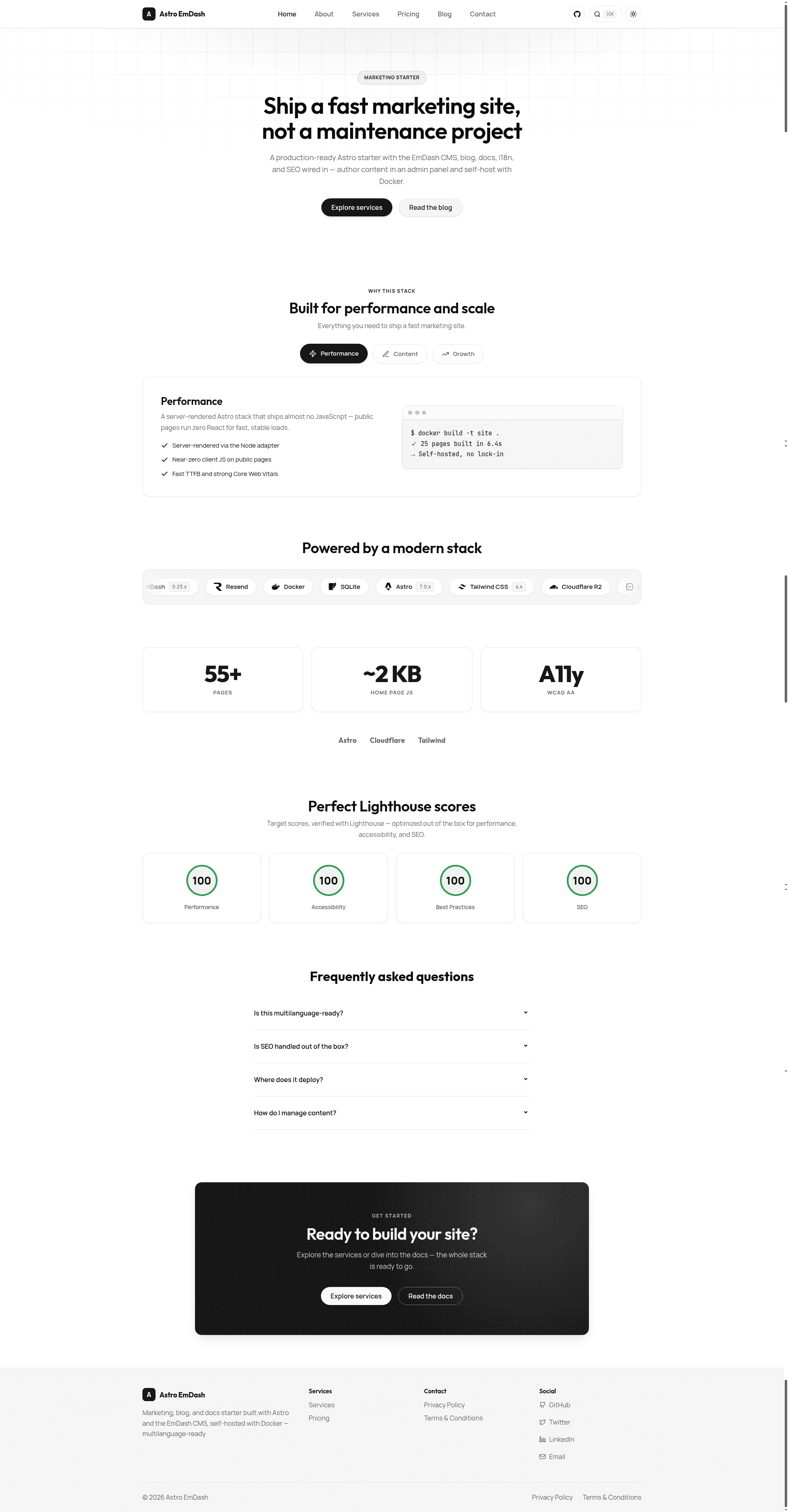
Astro EmDash Starter is a self-hostable Astro 7 boilerplate that bundles a marketing site, a blog, and a Starlight-powered documentation section into a single project, with the EmDash CMS managing content as the single source of truth.
What is the Astro EmDash Starter?
The starter is a production-ready template for server-rendered Astro sites that need a CMS-backed blog and pages plus static documentation. It takes content authored in the EmDash admin panel and renders it through the Astro Node adapter, serving everything from a Docker container on any Node host. The project is built by milzamsz and released under the MIT license, with the repository description claiming 100/100 Lighthouse scores.
Key Features
- EmDash CMS as the content source — Content for the blog and pages lives in SQLite and is managed through the EmDash admin panel at
/_emdash/admin; portable text rich content is rendered with a PortableText component. - Typed page fields — Pages are built from typed fields (hero, a features repeater with title/description/icon, and CTA fields) so editors get real inputs instead of raw JSON.
- Multilanguage-ready i18n — English-first with a prefix-based routing engine that is ready for additional languages.
- Starlight documentation with full-text search — The docs section uses Starlight and includes full-text search, with guides for content management, i18n, and deployment.
- Minimal client JavaScript — Interactive parts are plain Astro components with small inline scripts; no React is used on public pages.
- SEO defaults — Canonical URLs, hreflang, JSON-LD, Open Graph tags, sitemap, RSS, and a dynamic
llms.txtare generated from a single site config. - Cloudflare R2 for media — Uploaded media goes to an R2 bucket via the S3 API and is served through EmDash's same-origin proxy, so the bucket can stay private.
- Optional magic-link auth — Sign-in to the admin panel can be enabled by setting a
RESEND_API_KEY, which lets Resend deliver magic links.
Who is the starter for?
- Self-hosters who want a CMS-driven site without paying for a hosted CMS or lock-in: everything runs on their own Docker host with a persistent volume.
- Open-source project maintainers looking for a documentation-plus-marketing site skeleton that includes changelog, contributing, and security docs in Starlight.
- Astro developers who need a headless CMS experience inside the Astro ecosystem and want typed content schemas, seeding, and export scripts rather than a hand-rolled admin.
- Marketers and content editors who get a familiar admin panel to write blog posts and edit landing-page sections without touching code.
What can you do with the starter?
- Publish a company blog: write posts in the EmDash admin, store them in SQLite, and have them served with SEO meta and RSS without rebuilding.
- Build landing pages with structured sections: use the typed hero, features, and CTA fields to assemble marketing pages in the admin.
- Ship a documentation site: keep docs in
src/contentas Markdown or JSON, with full-text search from Starlight, then host everything from the same deployable container. - Internationalize your site: with the prefix-based i18n engine, you can add language versions that route by URL prefix.
How does the starter work?
Running pnpm dev starts EmDash's dev server, which boots Astro, runs database migrations, and seeds seed/seed.json on the first run. You then open the site at localhost port 4321 and the admin at /_emdash/admin, where the first visit walks you through creating an owner account. Content is stored locally in ./data/emdash.db and uploads in ./data/uploads, with no database configuration required.
Pros and cons
- Pros: MIT-licensed and free to self-host; no React dependency on public pages; SEO and sitemap generated automatically; works with any Docker host and a persistent volume.
- Cons: the Astro Node adapter serves assets uncompressed, so you need to enable gzip or Brotli compression at a reverse proxy like Traefik to get the best Lighthouse scores.
Pricing
The template is free and open source under the MIT license. Infrastructure costs are your own: a Docker host or Dokploy deployment, Cloudflare R2 for media storage, and an optional Resend account for magic-link email.
FAQ
How do I install the Astro EmDash Starter?
Clone the repository, run pnpm install, then pnpm dev. The dev server starts EmDash, runs migrations, and seeds the database with starter content automatically. After that, open http://localhost:4321 for the site and /_emdash/admin for the admin panel.
Where does the content go?
Blog posts and pages are stored in a SQLite database file (./data/emdash.db) on first run, with media uploads in ./data/uploads locally. In production, you mount a persistent volume at /app/data and set Cloudflare R2 credentials so uploads go to a private bucket.
How do I deploy it?
Build with pnpm build to produce a Node server output, then run the included Dockerfile on a Node host such as Dokploy. Mount a persistent volume at /app/data and provide R2 credentials as environment variables. For the best Lighthouse scores, compress responses at your reverse proxy.
Is React used on the site?
Public pages are built with plain Astro components and small inline scripts rather than React. The optional magic-link sign-in through Resend is the only external dynamic service tied to the admin, not the rendered site.
Can I export my changes to a seed file?
Yes, the project includes a pnpm export-seed script that exports the current CMS content back to a seed file, which is useful for versioning content or resetting an environment.