Template details
Astro Neumorphism
A simple and responsive template focused on neumorphism UI design, built with AstroJS, TypeScript, Preact, and Tailwind CSS.
About this template
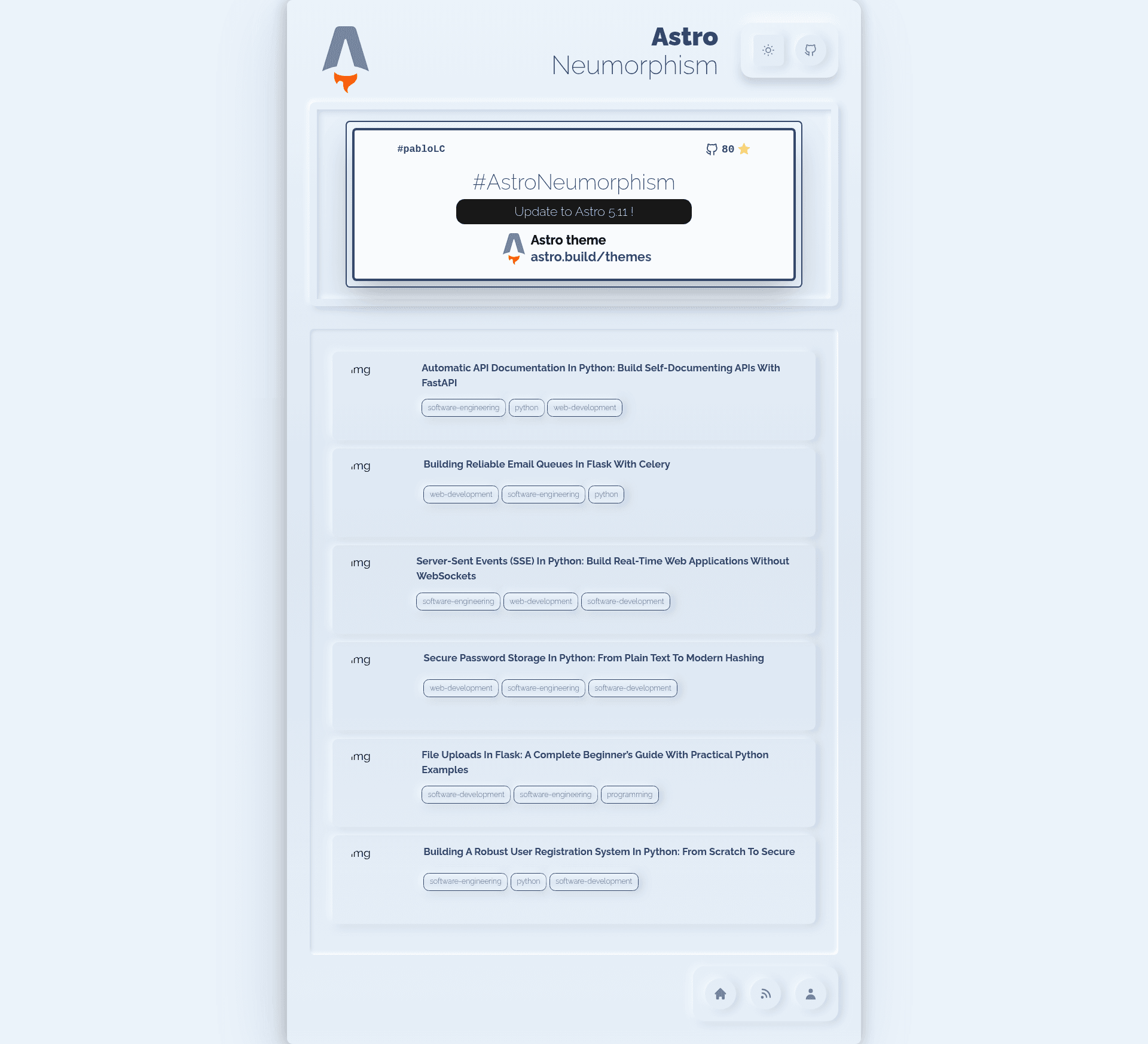
Astro Neumorphism is a GitHub-hosted personal website template built on Astro 5.11 that wraps the entire UI in the soft, extruded neumorphic design style. It includes an interactive homepage card, an about-me page, and a Medium-post list, all styled with Tailwind CSS.
What is Astro Neumorphism?
Astro Neumorphism is a simple and responsive template focused entirely on neumorphism UI design, created by GitHub user pabloLC. It takes your content — an avatar image, an about-me description, and a Medium username — and produces a static personal website with three pages: index, aboutme, and postlist. The project runs on the Astro framework (version 5.11), is written with TypeScript and Preact components, and is styled entirely with Tailwind CSS. A live demo is available at https://astro-neumorphism-roan.vercel.app/.
Key features
- Interactive home card — The homepage card is customizable and reacts on hover with a transition, making it the visual centerpiece of the site.
- Medium post integration — Set your Medium username in the MediumPost component and the template displays a list of your latest posts automatically.
- Fully responsive design — Different components appear depending on the viewport size, so the site adapts to mobile and desktop screens.
- Dark mode support — Dark mode is configured through the tailwind.config.js file.
- Modern tech stack — Built with Astro 5.11, TypeScript, Preact, and Tailwind CSS.
- Modular architecture — Components live in src/components and pages in src/pages, so adding or customizing pieces is straightforward.
- Local Raleway font — The Google font Raleway is included locally rather than loaded from a CDN, avoiding an external dependency.
- Credited background animation — The animated background was sourced from midudev's miduconf-website, with credit given to the original author.
Who is it for?
Astro Neumorphism suits frontend developers who want a ready-made neumorphic personal site built on a modern static-site generator. Bloggers and content creators who publish on Medium can use the built-in post list to surface their latest articles without manual updates. Designers looking for an unusual visual style can quickly customize the color palette, dark mode, and interactive card to fit their own brand.
What can you do with it?
- Developers: Use it as a starting boilerplate for a neumorphic portfolio, then customize the interactive card and color scheme.
- Writers: Replace the Medium username to display your latest posts on the postlist page automatically.
- Designers: Toggle dark mode and edit tailwind.config.js to explore light and dark neumorphic color palettes.
How does the template work?
The project follows a standard Astro structure: src/pages contains index.astro, aboutme.astro, and postlist.astro, while src/components holds reusable components like MainCard, MediumPost, and StarCount. To get started, run npm install to install dependencies, npm run dev to serve locally at localhost:3000, and npm run build to generate a production site into ./dist/. The author also published a Medium article explaining why the theme was built for the AstroJS community: https://medium.com/@pablolc/why-i-built-a-theme-for-the-astrojs-community-c96da1c692b3.
FAQ
Does it support dark mode?
Yes. Dark mode is handled through the darkMode setting inside tailwind.config.js, so you can enable or adjust it from that single file.
How do I show my Medium posts?
Edit the MediumPost component and replace the placeholder username with your Medium username. The template then fetches and displays your latest posts automatically.
What Astro version does it use?
The template specifies astro@5.11, so it is built on Astro 5.x with that exact minor version.
Is the font served from a CDN?
No. The Raleway font is bundled locally in the project, so there is no external font CDN dependency. This helps with privacy and offline development.
Can I customize the layout?
Yes. The architecture is explicitly modular — you can add or remove components in src/components and pages in src/pages, and all styling is centralized in base.css and the Tailwind configuration.