Template details
Block 3d
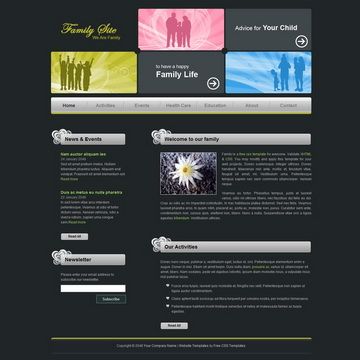
Block 3D Template, colorful header in 3D perspective design, 3-column layout
About this template
Block 3d is a free HTML CSS website template from TemplateMo featuring a colorful header rendered in 3D perspective and a 3-column content layout.
What is Block 3d Template?
Block 3d Template is a free website layout built with plain HTML and CSS, distributed as a ZIP file through TemplateMo's library. It takes a static content structure with a 3D-styled header and three vertical content columns, and renders it as a complete multi-section brochure-style web page. The template was added on 15 July 2009 and has since been viewed 81,757 times and downloaded 16,714 times, making it one of TemplateMo's older but still accessible designs.
Key Features
- Colorful 3D perspective header — The page opens with a bold, multi-colored header that uses a 3D perspective effect to draw attention, visible in the full-size screenshot.
- 3-column layout — Content is organized into three vertical columns, suitable for presenting side-by-side sections such as services, news, and contact information.
- Plain HTML and CSS — No JavaScript frameworks or build tools are required; the template consists of static files that can be edited with any text editor.
- 100% free license — TemplateMo allows anyone to download, edit, and use this template for both commercial and non-commercial websites without payment.
- Live preview and full-size screenshot — The template page includes a live-view link to see the rendered result and a full-size screenshot for closer inspection before downloading.
- ZIP download — The entire template is packaged as a single ZIP file accessible from the download button on the page.
Who is it for?
- Small business owners — Set up a simple online presence with a service-and-about layout using the three columns without needing a web developer.
- Web designers and developers — Use the template as a starting skeleton for custom projects, editing the HTML and CSS to match a client's branding.
- Students and hobbyists — Learn how a basic multi-column page is structured, with clear separation between header, content columns, and footer.
What can you do with Block 3d Template?
- Company brochure site: Arrange services, testimonials, and contact details across the three columns to create an informative corporate page.
- Personal landing page: Adapt the 3D header as a striking introduction for a personal profile or portfolio, then use the columns for bio, skills, and links.
- Practice project: Rebuild or restyle the layout to experiment with CSS color schemes and column widths.
How do I get Block 3d Template?
Download the ZIP file from its TemplateMo page using the download button, extract the files, and edit the HTML and CSS to your needs. After editing, upload the folder to any web host and the site goes live immediately, since no server-side processing or database is required.
Pricing
Block 3d Template is completely free. There are no paid tiers or hidden fees; the download page states it is 100% free to use for anyone.
Alternatives
- 121 Simple Blue — Another free TemplateMo design with a professional XHTML/CSS layout and a 2-column content area plus a 5-column section area.
- 120 Dark Brown — A free template from TemplateMo with a top menu, 2-column content area, and 3-column footer.
- 119 Fruit — A free web template with a fruit and juice theme, 2-column layout, and an integrated JavaScript photo gallery.
FAQ
Is Block 3d Template free?
Yes. TemplateMo states on the template page that Block 3d Template is 100% free to download for anyone. You may download, edit, and use it on commercial or non-commercial sites without paying any fees.
Can I use Block 3d Template for commercial projects?
Yes. The template page explicitly grants permission to download, edit, and use the layout for commercial or non-commercial websites. No attribution is required, though TemplateMo asks that you share the template with friends.
How many columns does Block 3d Template have?
The layout uses a 3-column content structure. Combined with the colorful 3D perspective header, the columns allow side-by-side presentation of different types of content, such as text, images, and links.
What technologies does Block 3d Template use?
It is built with plain HTML and CSS. There is no mention of JavaScript frameworks or preprocessors on the template page, so it can be opened directly in a browser and edited with a basic text editor.