Template details
Venue
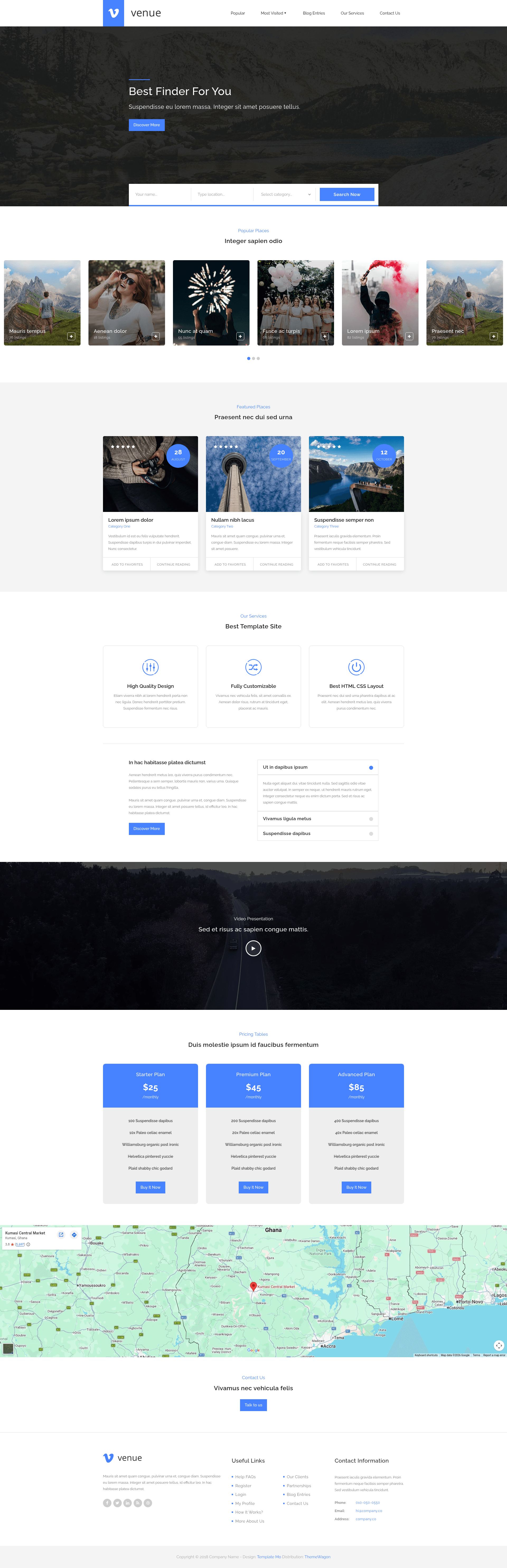
Free HTML5 multipurpose one-page website template with advanced search, video background, Google Maps, and accordions for businesses and agencies.
About this template
Venue is a free, open-source HTML5 multipurpose website template built on Bootstrap 3, distributed by ThemeWagon and created by TemplateMO, that delivers a one-page site with an advanced search bar, video background, and Google Maps.
What is Venue?
Venue is a one-page multipurpose template for building landing, business, agency, and directory-style websites. The download contains one HTML file, 11 CSS files, 8 JavaScript files, a video file, and demo images, which together produce a responsive single-page site with sections for search, video background, Google Maps, pricing, accordions, and a detailed footer. It is offered for free on ThemeWagon and is also open source with commercial use permitted.
Key Features
- One Page Layout — The entire site lives on a single scrolling page with multi-level dropdown navigation and smooth scroll behavior.
- Advanced Search Bar — A built-in search option suited for listing and directory content, paired with sliding listing cards.
- Background Video — A video file ships in the download and plays behind a page section to create a motion backdrop.
- Google Maps Included — A map section is already integrated into the layout, so you just supply your location details.
- Accordions — Collapsible text blocks are available for FAQs, service details, or schedule information.
- On-hover Effects — Interactive hover styling is applied to buttons, cards, and navigation elements.
- Custom Icons via Font Awesome — The template uses Font Awesome 4.7.0 for icons throughout the page.
- Detail Footer and Social Icons — The footer includes multiple link columns and social media icon links.
- Pricing Plan Table — A pricing section allows you to present two or more service tiers in a grid.
Who is it for?
- Small businesses that need a quick, professional one-page presence with a map and contact details.
- Creative agencies that want a landing page with a video hero and a pricing table for their packages.
- Directory or listing site operators who can leverage the advanced search bar and sliding listings to display entries.
- Freelancers and developers looking for a free, editable HTML/CSS/JS starting point without a build system.
What can you do with Venue?
- Local businesses: Build a location page that shows opening hours in accordions, embeds a Google Map, and lists services in the footer.
- Agencies: Showcase a portfolio in the sliding listings and add a pricing plan table for different service levels.
- Event promoters: Use the background video to highlight a venue or event, with a search bar to filter offerings.
- Startups: Launch a one-page marketing site with a video intro and a call-to-action section.
How does Venue work?
Venue works as a static HTML site: download the package, open the main HTML file, and replace the demo text and images with your content. All styling comes from CSS files and Bootstrap 3.3.1, while interactivity (smooth scroll, dropdowns, carousel) is handled by jQuery 1.11.2, Owl Carousel, and Bootstrap Datepicker.
Pros and cons
Pros:
- Free to download, open source, and explicitly licensed for use in commercial projects.
- No build step or package manager needed; just edit the HTML and CSS files.
- Cross-browser compatible with Chrome, Edge, Firefox, Mobile, Opera, and Safari according to the listing.
Cons:
- Built on Bootstrap 3.3.1, which is an older version compared to the current Bootstrap 5.
- One-page structure only; if you need a multi-page site, you must restructure the layout.
- The template is dated (released 8 years ago) and the current version is 1.
Pricing
Venue is free. ThemeWagon's product page includes "Free download," "Open source," "Use in commercial projects," and "Life time free updates," and no paid tier or premium upgrade is mentioned.
FAQ
Is Venue free?
Yes. ThemeWagon lists Venue as a free download, and the license notes it is open source, allows commercial use, and includes lifetime free updates.
What frameworks does Venue use?
Venue is built on Bootstrap 3.3.1 with jQuery 1.11.2, Font Awesome 4.7.0, Owl Carousel, and Bootstrap Datepicker. It uses static HTML5, so no server-side language or build tool is required.
What files are included in the Venue download?
The "In the box" section lists 1 HTML file, 11 CSS files, 8 JavaScript files, 1 video file, and demo images.
Does Venue include Google Maps?
Yes. "Google Maps Included" is one of the listed features, so you get a map section you can customize with your own location data.
Can I use Venue commercially?
Yes. The product page explicitly states that the template is open source and can be used in commercial projects.