Template details
Block – Free Tailwind CSS & Vite Landing Page Template
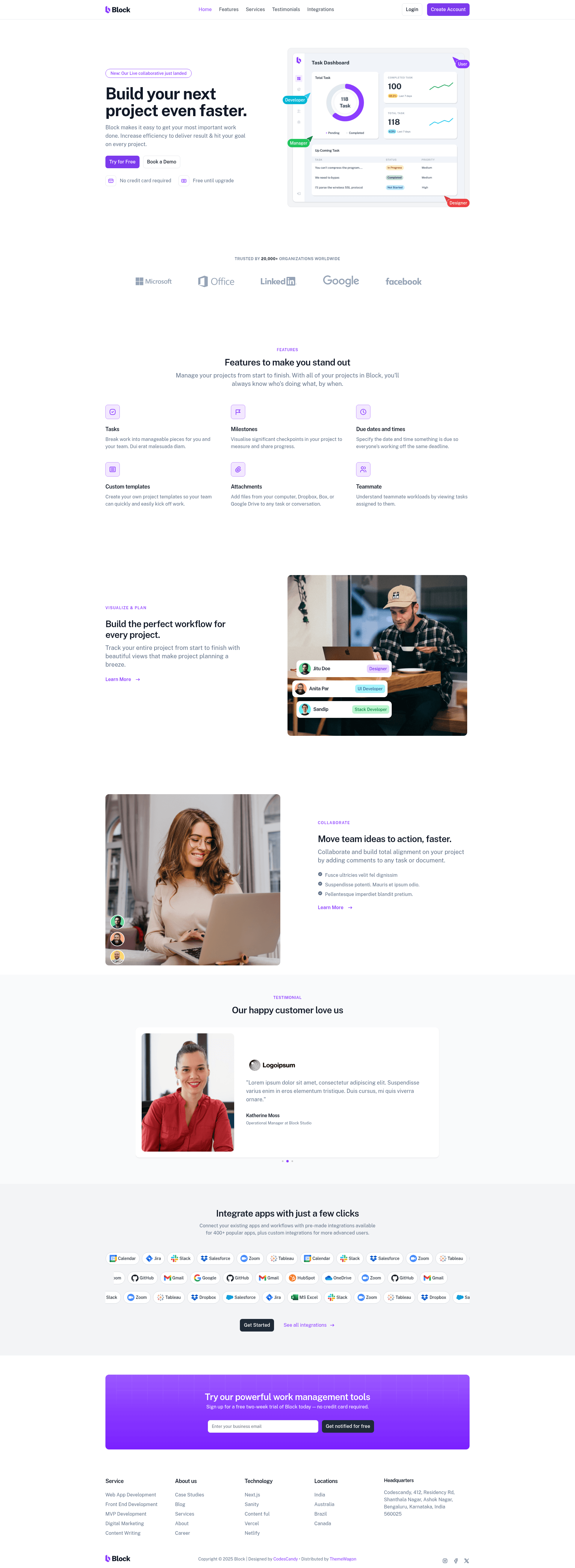
Free one-page SaaS landing template built with Tailwind CSS v4.1.13 and Vite, featuring hero header, testimonial carousel, newsletter form, and sticky nav.
About this template
Block is a free one-page landing website template built on Tailwind CSS v4.1.13 and the Vite build tool, designed for SaaS startups and digital agencies to publish a polished marketing page quickly. Created by CodesCandy and distributed through ThemeWagon, it bundles a hero header, sticky navigation, a testimonial carousel, a newsletter subscription form, and a detailed footer into a single responsive page.
What is Block?
Block is a free, open-source landing page template from CodesCandy, listed on ThemeWagon. It runs as static HTML/CSS/JS generated from a Tailwind CSS v4.1.13 and Vite project, with the Swiper library powering its testimonial carousel. As input, you get the full source code with demo images and libraries; as output, you get a deployable one-page site suitable for any static hosting service. The template is mobile-first and works across browsers including Chrome, Edge, Firefox, Safari, and Opera.
Key Features
- Tailwind CSS v4.1.13 — utility-first styling system used for every component, eliminating custom CSS files.
- Vite build tool — provides a fast dev server and produces optimized production bundles.
- Swiper carousel — enables the testimonial slider with swipe and touch support.
- Sticky top navigation bar — stays fixed at the top when scrolling and collapses into a burger menu on mobile.
- Hero header — the first section with a headline, supporting text, and call-to-action buttons.
- Newsletter subscription form — embedded form for collecting visitor email addresses.
- Social media icons and detailed footer — persistent link area with platform icons and navigation content.
- On-hover effects — interactive states on buttons and elements improve the browsing experience.
- SEO-friendly and page-speed-optimized — clean markup and efficient assets aim for higher search rankings and faster loads.
- One-page layout — includes a single pre-built page, all demo images, and required libraries.
Who is it for?
- SaaS startups — stand up a product landing page with hero, testimonials, and newsletter capture without writing custom design code.
- Digital agencies — show off client work and quotes using the Swiper testimonial carousel and prominent call-to-action sections.
- Front-end developers — use the clean, open-source codebase as a starting point for custom Tailwind and Vite projects.
What can you do with Block?
- SaaS founders: replace placeholder content with product details and go live on Netlify, Vercel, or GitHub Pages in an afternoon.
- Agency marketers: reorganize the sections to highlight services, team, and client logos, then point the sticky nav to anchors on the page.
- Prototype builders: fork the template and experiment with Tailwind utility classes to test landing page variations quickly.
Pros and cons
- Free and open source — no cost, lifetime free updates, and commercial use permitted.
- Clean codebase — a developer-friendly one-page structure with few cross-browser concerns.
- Responsive by design — mobile-first styling covers Android, iPhone, and iPad.
- Only one pre-built page — you must add any additional pages (pricing, blog, etc.) yourself.
Pricing
Block is a free template on ThemeWagon. It is open source, allows commercial use in projects, and comes with lifetime free updates.
FAQ
Is Block free to use?
Yes, Block is a free download from ThemeWagon. The license allows both personal and commercial use, and updates are provided for free for life.
What tech stack does Block use?
Block uses Tailwind CSS v4.1.13 for styling, Vite for building, and Swiper for the testimonial carousel. The output is plain HTML, CSS, and JavaScript.
How many pages are included?
The template includes exactly one pre-built landing page. Demo images and the required libraries (Tailwind, Swiper, Vite) are bundled in the download.
Can I customize Block?
Yes. The codebase is open source and developer-friendly, so you can edit any component or style using Tailwind classes and modify the project structure with Vite.
Does Block work on mobile?
Yes, it uses a mobile-first design and is compatible with Android, iPhone, and iPad. It supports a collapsible burger menu for small screens.