Template details
BlogRa
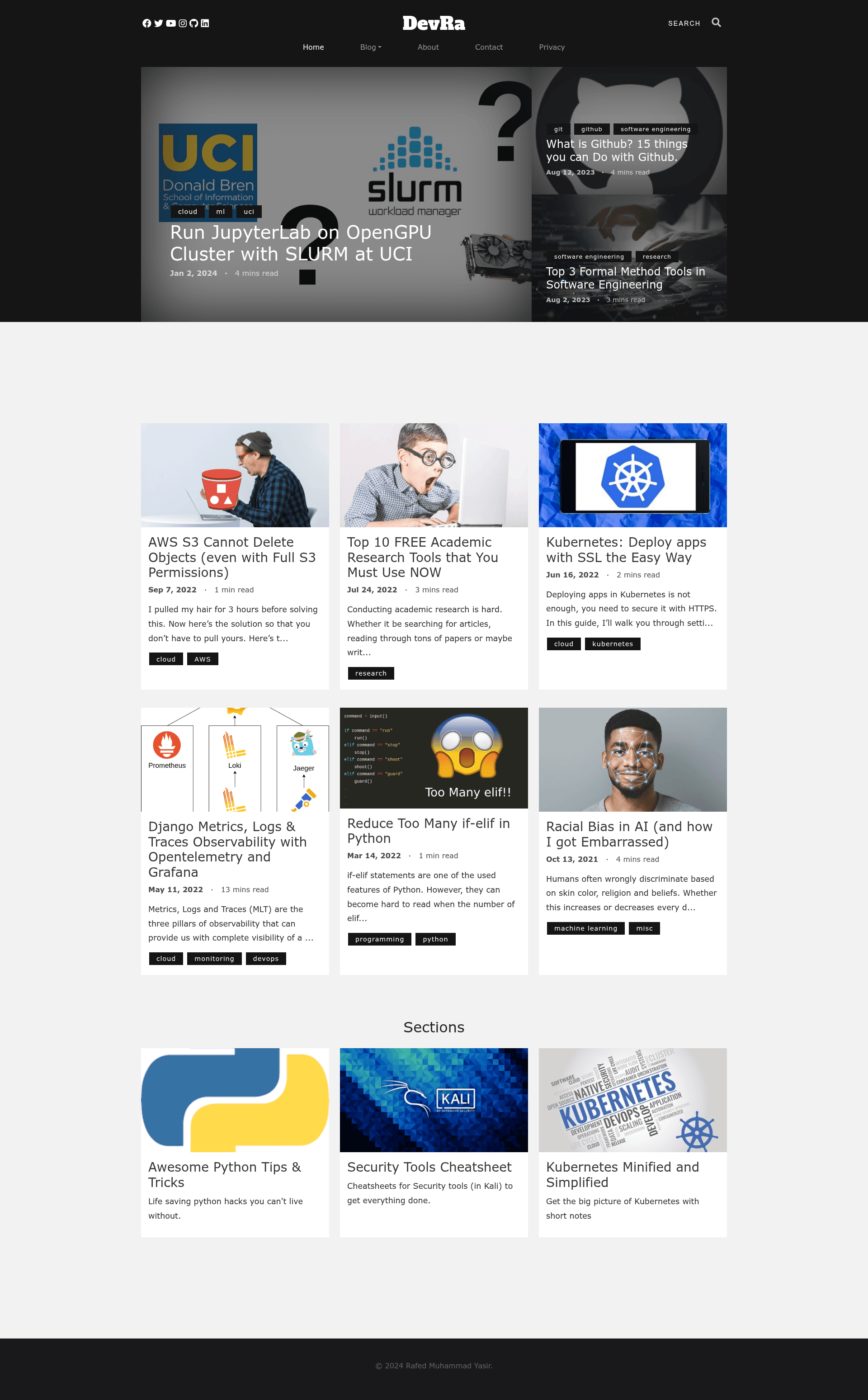
A Hugo theme for tech blogs with code snippets, math equations, mermaid diagrams, Google Analytics, and Disqus comments.
About this template
BlogRa is a Hugo theme for building technology-focused blogs, with built-in support for code, math, diagrams, analytics, and comments.
What is BlogRa?
BlogRa is an open-source Hugo theme created by Rafed Yasir for technology-centric personal and project blogs. It takes Markdown content with frontmatter settings as input and renders a static, mobile-responsive website as output, running on the Hugo static site generator. The theme includes a live demo at rafed.github.io/devra and is hosted on GitHub under the GPL license.
Key Features
These capabilities are built into the theme and controlled from config.toml or each page's frontmatter.
- Google search bar — embeds a Google Programmable Search Engine using the googleSearch parameter in config.toml.
- Google Analytics v4 — tracks site traffic with a GA4 measurement ID (for example, G-A1B2C3D4E5) set via googleAnalytics.
- Social share bar — places share buttons below each article, enabling readers to share posts across social networks.
- Disqus comments — enables hosted, threaded comments by setting disqusShortname in config.toml.
- Mermaid diagrams — render flowcharts, sequence diagrams, and other Mermaid graphs when mermaid: true is set in a page's frontmatter.
- Math equations — render mathematical formulas with KaTeX when math: true is enabled in frontmatter.
- SEO and social metadata — includes Open Graph and Twitter Card tags so shared links display rich previews.
- Admin dashboard summary — provides an admin panel showing the numbers of posts, tags, and sections for an overview of the site's content.
Who is it for?
BlogRa suits three types of users who want a fast, static tech blog.
- Tech bloggers — publish articles with code snippets, math, and diagrams using a ready-made Hugo theme instead of building a site from scratch.
- Hugo users — set up a new blog quickly by adding BlogRa as a git submodule and customizing config.toml for navigation, social links, and analytics.
- Developers deploying to static hosts — generate a static site that can be published on GitHub Pages or similar services, as demonstrated by the demo blog.
What can you do with BlogRa?
BlogRa supports the core tasks of a technical blog day-to-day.
- Write technical tutorials — include syntax-highlighted code, KaTeX math, and Mermaid diagrams to explain complex topics clearly.
- Organize content by sections and tags — create sections for related articles and let visitors list posts by specific tags.
- Share articles with rich previews — rely on the built-in share bar and Open Graph/Twitter Card metadata to improve click-through when posts are shared.
- Run a personal blog with minimal setup — configure baseURL, title, Disqus, and social URLs in one config.toml, then write Markdown posts with featured images.
How does BlogRa work?
To use BlogRa, install Hugo's extended version, create a new site, and add the theme as a git submodule. Set theme = 'BlogRa' in config.toml, then fill in parameters such as disqusShortname, googleAnalytics, and social media links. Write posts in Markdown with frontmatter that can enable math (math: true) or Mermaid (mermaid: true) for individual pages. Updates are applied by running git submodule update --remote --merge.
Pricing
BlogRa is free and open source, released under the GPL license. You can use it, modify it, and distribute it under the terms of that license.
FAQ
Is BlogRa free?
Yes, BlogRa is free and open source under the GPL license. There are no subscription fees, and you can use the theme for personal or commercial blogs.
What Hugo version do I need?
You must download Hugo's extended version from the official Hugo GitHub releases page. The standard version may lack the extended features BlogRa relies on.
How do I enable math equations and Mermaid diagrams?
Per-page, set math: true or mermaid: true in the frontmatter of a post. The theme also notes that it is best to enable these per page rather than globally, though they can be set in config.toml params.
How do I add Disqus comments?
Set your Disqus shortname in the disqusShortname field in config.toml. The theme will then load Disqus on your posts.