Template details
Carrent
Free Bootstrap 4 HTML5 car rental website template with booking form, hero header, timeline, and blog.
About this template
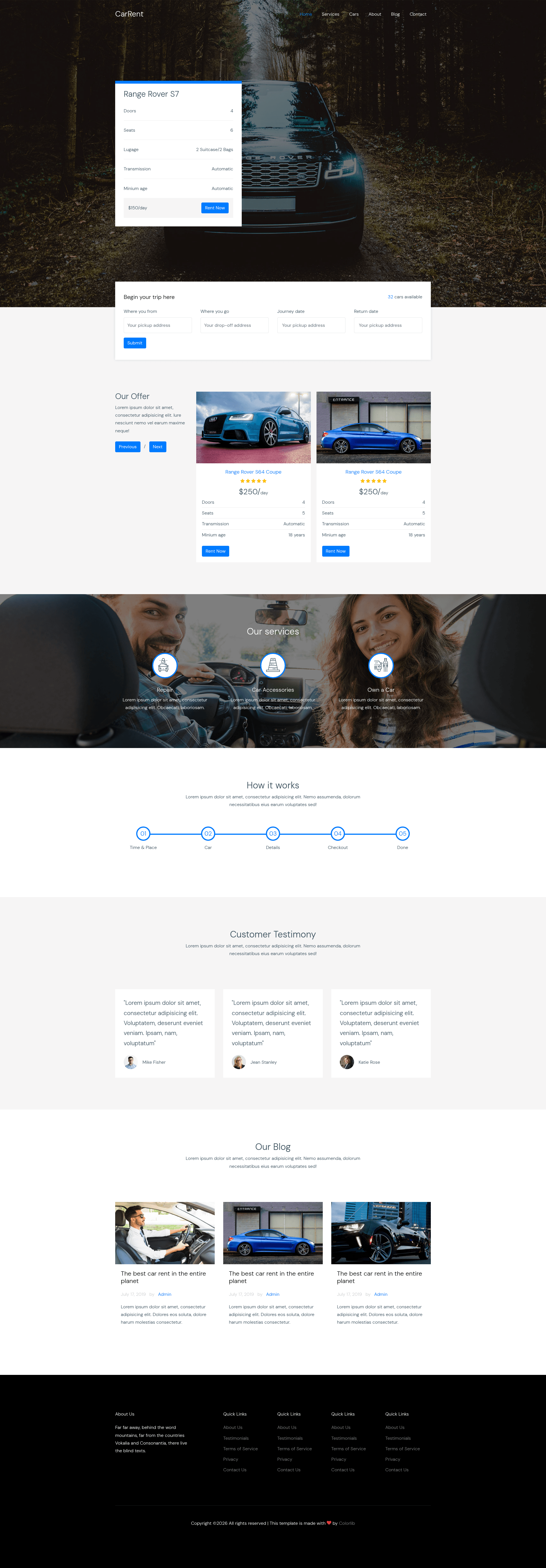
Carrent is a free multi-page Bootstrap 4 HTML5 website template built for car rental businesses, with a booking form, hero header, timeline, testimonials, and a blog section ready to use. Created by Colorlib and distributed through ThemeWagon, this template provides a clean, minimal, and fully responsive layout that works across major browsers including Chrome, Firefox, Safari, Edge, and Opera.
What is Carrent?
Carrent is a static HTML5 template built on Bootstrap 4, meaning you get hand-coded HTML, CSS/SCSS, and JavaScript files rather than a CMS-based theme. It includes 7 HTML files covering a multi-page site structure, all demo images, font icons via Icomoon, and plugin files for Owl Carousel, Magnific Pop-Up, and Slick. The template is open source and free to use in commercial projects, with lifetime updates.
The template's core function is to give a car rental company a ready-made marketing website where customers can see available vehicles, make bookings through the built-in booking form, read company news via the blog section, and contact the business through the contact form. Since it's a static template, you customize the HTML and CSS directly, then host it on any web server or static hosting service.
Key Features
- Bootstrap 4 framework — Built on Bootstrap 4 grid and components, giving you a solid responsive foundation with cross-browser compatibility.
- Booking form — A prominent reservation form lets visitors select pickup date, drop-off date, and car type without leaving the page.
- Hero header — A large attention-grabbing header area with a call-to-action button, suitable for showcasing your fleet or special offers.
- Offer slider — An Owl Carousel-powered slideshow to highlight promotions, featured vehicles, or seasonal discounts.
- Timeline section — A visual timeline for presenting company history, fleet milestones, or step-by-step rental process.
- Testimonials — A customer review area to display social proof and build trust with potential renters.
- Blog section — Includes a blog listing page with pagination, plus a comment form for reader engagement.
- Contact form — A ready-to-use contact form for inquiries, along with footer navigation and Icomoon font icons.
Who is it for?
- Car rental agencies — Launch a professional company website with booking capabilities, fleet showcases, and contact options for customers.
- Small transportation businesses — Use the timeline and testimonial sections to explain history and build credibility for shuttle, limo, or van services.
- Web developers — Quickly kick off a client project by customizing the SCSS source files, swapping content, and reusing the pre-built components like the offer slider and booking form.
- Startups in travel tech — Use Carrent as a landing page for a vehicle-sharing or rental platform, adapting the booking form and hero header to your own service.
What can you do with Carrent?
- Launch a rental website quickly — Deploy the 7 HTML files to any static host and replace placeholder images and text with your fleet details and contact info.
- Showcase special offers — Use the offer slider to cycle through discounts and promotions, updating the slides in the HTML without touching the plugin code.
- Collect booking inquiries — Customers fill out the booking form, and you connect it to your preferred form handler or email service, then manage reservations manually or via a backend.
- Publish company news — The blog section with pagination lets you share updates, driving tips, or local travel guides, while the comment form invites reader interaction.
FAQ
Is Carrent really free?
Yes. Carrent is distributed as a free download on ThemeWagon and covered by an open-source license that allows commercial use. The page also states lifetime free updates.
What files are included in the download?
The package includes 7 HTML files, all demo images, CSS and SCSS source files, JavaScript source files, Icomoon font icons, and library/plugin files. This includes Bootstrap 4, Owl Carousel, Icomoon, Magnific Pop-Up, and Slick.
Which browsers are supported?
The template is compatible with Chrome, Edge, Firefox, Mobile browsers, Opera, and Safari. Because it uses Bootstrap 4's responsive grid, the same HTML adapts to smartphone, tablet, and desktop viewport sizes.
Do I need to know how to code?
Basic HTML and CSS knowledge is enough to edit text, images, and links. To change the SCSS variables or customize the JavaScript behavior, you'll need some developer skills, but the files are organized so you can find and edit content quickly.