Template details
Caviar – Free HTML5 Bootstrap 4 Restaurant Website Template
Free multipage Bootstrap 4 restaurant template with reservation form, filterable menu gallery, and full-screen slideshow.
About this template
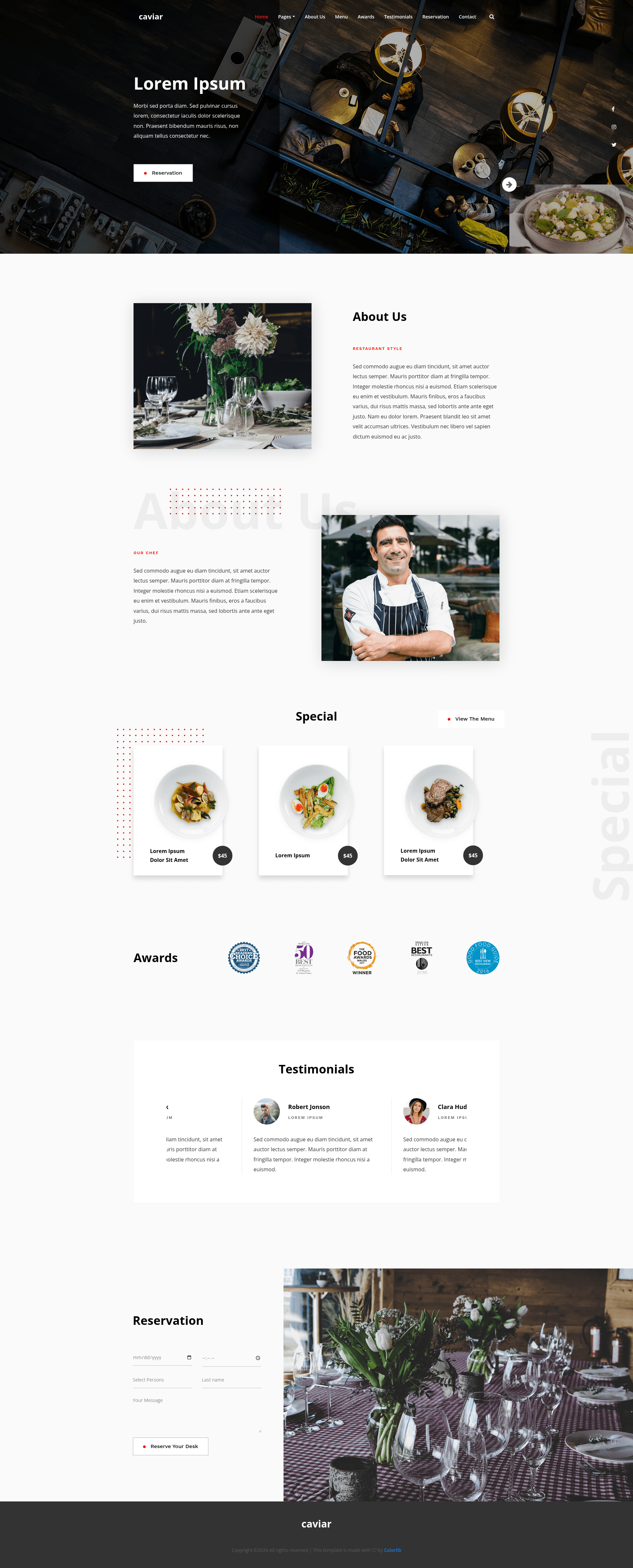
Caviar is a free, multipage HTML5 restaurant website template built with Bootstrap 4 (beta) that provides a complete front-end for food-related businesses, including a custom reservation form with date and time picker, a filterable food menu page, and a full-screen image slideshow banner. The template is distributed by ThemeWagon and created by Colorlib, and it is open source with lifetime free updates.
What is Caviar?
Caviar is a static HTML template package containing 4 HTML files plus demo images, CSS, uncompressed JavaScript, and FontAwesome/PE-icon icon packs. It runs entirely in the browser with no server-side build step, so you edit the HTML and CSS files directly and upload them to any web host. It is built on Bootstrap 4 beta, uses Isotope for the filterable gallery, Owl Carousel for sliders, and includes a contact form UI (front-end only) plus an integrated Google Maps scheme.
Key Features
- Full-screen slideshow banner — A custom-made hero section with welcome text, social media icons, and a bold call-to-action button, distinct from typical sliding banners.
- Sticky navigation with search box — The menu bar remains fixed at the top while scrolling and includes a site search input.
- Filterable food menu page — A dedicated menu page with animation and an Isotope-powered gallery that lets visitors filter dishes by category.
- Custom reservation form — A genuine reservation widget with an integrated date and time picker, ready for binding to a backend.
- Testimonial carousel — A sliding testimonial section with a unique transition style powered by Owl Carousel.
- Contact form UI — A built-in contact form interface included in the package (front-end design only).
- Extra UI touches — A custom preloader and a back-to-top button (scrollup v2.4.1) are included; navigation supports smooth scroll and on-hover effects.
- Technology stack — Bootstrap 4 beta, CSS3, jQuery easing, imagesLoaded, Isotope, jQuery One Page Nav, FontAwesome icons, and a Google Maps scheme; compatible with Chrome, Edge, Firefox, Opera, Safari, and mobile devices.
Who is it for?
- Independent restaurant owners — Get a professional-looking website quickly by editing the provided HTML files and replacing the demo images with their own dishes and venue photos.
- Café and bar managers — Use the custom reservation form with date/time picker to collect table bookings and the Google Maps section to help guests find the location.
- Freelance web developers — Use Caviar as a starting point for client projects because it is open source, easy to customize, and comes with uncompressed JavaScript files for debugging.
- Food bloggers and small hospitality brands — Publish a multipage site with a distinct menu page, about section, testimonials, and contact section without paying for a premium theme.
What can you do with Caviar?
- Set up a reservation workflow: Visitors pick a date and time through the built-in picker and submit the custom reservation form, which you can connect to a backend or email service.
- Showcase a filterable menu: The food menu page uses Isotope so guests can filter dishes by category, with animations on hover.
- Build a location page: The integrated Google Maps scheme helps customers find the restaurant, paired with the contact form UI and social media icons.
- Launch a brand site fast: Download the package, edit the text and images in the four HTML files, and host it anywhere — no build tools required.
FAQ
Is Caviar free to use?
Yes, Caviar is a free template. The download requires an email address on ThemeWagon, and the license allows use in commercial projects with lifetime free updates.
Is Caviar built with Bootstrap 4?
Yes, it is built on Bootstrap 4 beta, along with CSS3, jQuery plugins such as Isotope, Owl Carousel, and One Page Nav. It is fully responsive and cross-browser compatible.
Does the reservation form work without a backend?
The package ships a front-end reservation form with date and time picker UI. There is no server-side handler included, so you need to connect the form to your own backend or third-party service to store submissions.
What files are included in the package?
The download includes 4 HTML files, demo images, necessary CSS files, uncompressed JavaScript files, and FontAwesome plus PE-icons icon packs.
Which browsers are supported?
Caviar is compatible with Chrome, Edge, Firefox, Opera, Safari, and mobile devices, per the ThemeWagon listing.