Template details
CuratedStack Nocode Template
Free & open-source Nuxt.js template to create a curated directory of websites with Netlify CMS, search, and PWA support.
About this template
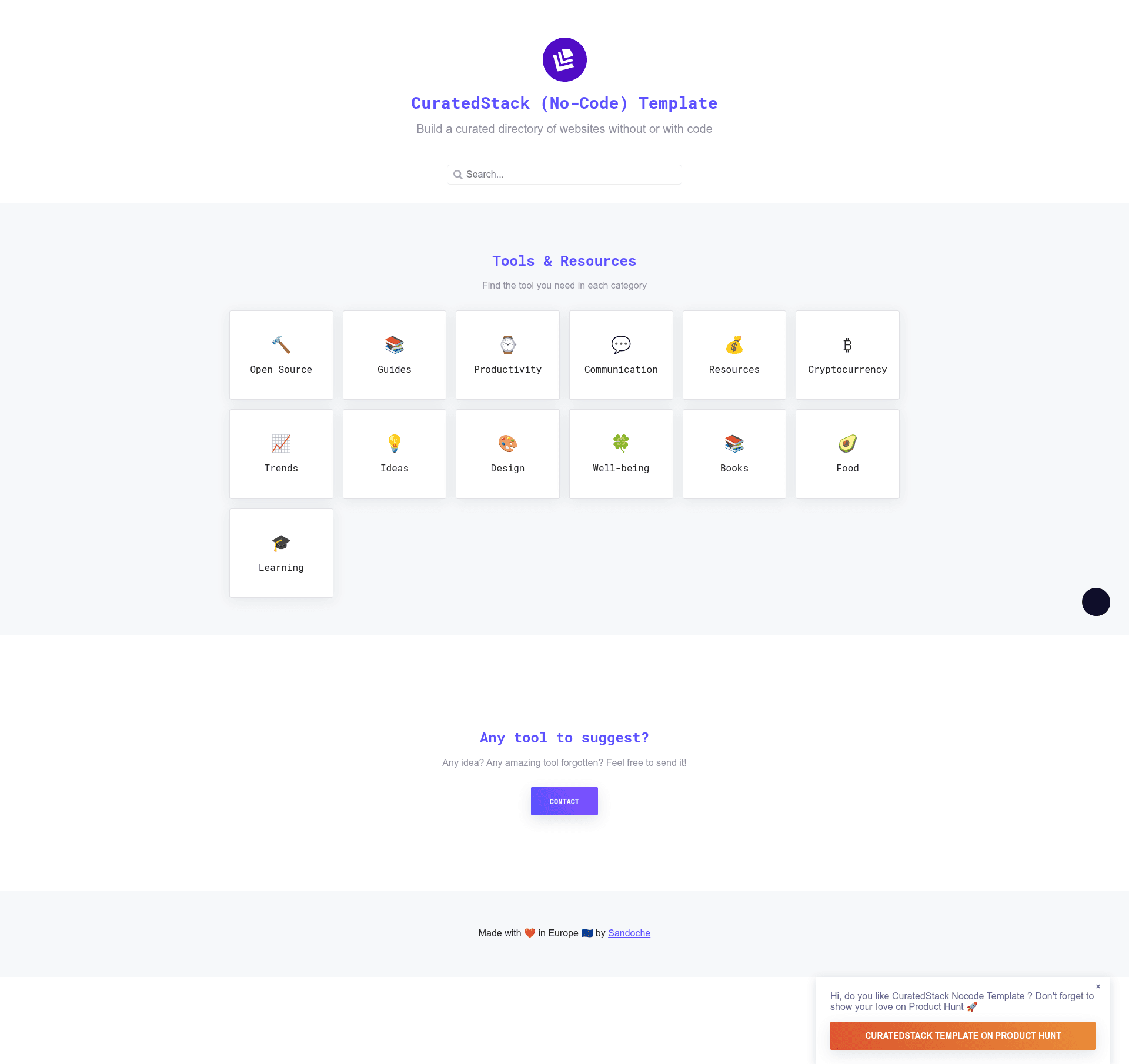
CuratedStack Nocode Template is a free, open-source Nuxt.js starter for creating a curated directory of websites, with a Netlify CMS admin panel so non-developers can manage entries without writing code.
What is CuratedStack Nocode Template?
CuratedStack Nocode Template is a static-site template that turns a set of JSON files — content/links.json and content/categories.json — into a categorized listing of websites. It outputs a deployable dist folder via the npm run generate command, and it can be edited either by hand or through a built-in Netlify CMS interface. The template is built on Nuxt.js, as stated in the repository metadata, and is maintained by Sandoche (linked from the README's Medium and Twitter profiles).
Key Features
- Category listing — Organize websites by category; the homepage renders sections for each category defined in
content/categories.json. - Netlify CMS integration — After enabling Identity and Git Gateway, editors can log in at
/adminand add or edit entries without touching code. - Automatic search — A search bar with a generated index runs on Lunr.js, scanning all listed websites client-side.
- Automatic dark theme — The site adapts to the user's system color scheme with no manual toggle.
- Floating prompt — A dismissible call-to-action banner, intended for announcements such as a Product Hunt launch.
- Google Analytics — Includes
gtagsupport so you can track traffic by pasting your tracking ID. - Progressive Web App — Installable on mobile devices; works as an offline-capable app.
- Automation scripts —
npm run analyzechecks for duplicate links and per-category counts;npm run get-logosattempts to download website logos intostatic/images/logos.
Who should use CuratedStack Nocode Template?
- Curators and content editors — People who maintain hand-picked lists of tools, resources, or websites and want a no-code way to publish updates via Netlify CMS.
- Indie hackers and founders — Those building a directory as a side project or launch page, using the floating prompt to promote a Product Hunt campaign.
- Developers — Those who want a Nuxt.js starter and prefer editing JSON directly, running
npm run analyzeandnpm run get-logosto automate maintenance.
What can you do with CuratedStack Nocode Template?
- Launch a curated directory: Publish a collection of websites in your niche, as seen in the demo at curatedstacktemplate.learn.uno.
- Create a resource hub: Build a link list like undesign.learn.uno, which uses this template to showcase design assets.
- Run a product announcement page: Use the floating prompt to highlight a Product Hunt or other launch inside an existing directory.
How does CuratedStack Nocode Template work?
The README documents three workflows: the simplest no-code path uses the t3mpl.n4no.com online editor to modify content and export a zip; the Netlify CMS path involves deploying to Netlify, enabling Identity and Git Gateway, then editing at /admin; the coders path requires forking the repo, editing the JSON content files and locale strings, running the generate command, and deploying the dist folder to Netlify, GitHub Pages, or Surge.
Pricing
CuratedStack Nocode Template is free and open source under the MIT license, as shown by the license badge and the LICENSE file in the repository.
FAQ
Is CuratedStack Nocode Template free to use?
Yes. The repository is MIT-licensed, so you can use it for personal or commercial projects without payment.
Do I need to know how to code to use this template?
No. The t3mpl.n4no.com editor lets you change content visually and export a zip. You can also use the Netlify CMS admin panel after setting up Identity and Git Gateway.
How do I add my own websites?
Edit content/links.json (and content/categories.json) for categories, or log into the CMS and use the form-based editor to publish new entries.
Can I deploy the generated site for free?
Yes. The README explicitly lists Netlify, GitHub Pages, and Surge as free deployment options for the static output in dist.