Template details
Nginxy
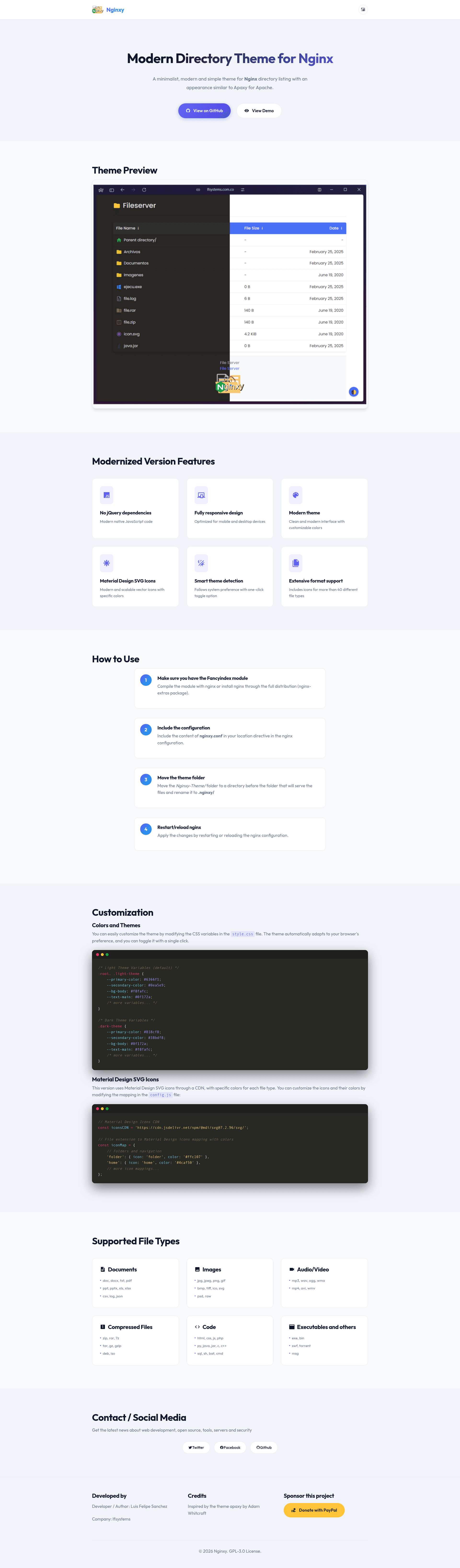
Modern responsive directory listing theme for the Nginx Fancyindex module, inspired by Apaxy, with Material Design icons.
About this template
Nginxy is an open-source directory listing theme for the Nginx Fancyindex module that replaces the default file index with a modern, responsive interface featuring colored Material Design SVG icons, light and dark themes, and no jQuery dependencies.
What is Nginxy?
Nginxy is a modernized responsive theme for the Nginx Fancyindex module, inspired by Apaxy for Apache. It transforms a plain nginx directory listing into a clean, file-browser-like page with colored icons per file type. The theme takes a directory served by nginx as input and outputs a styled HTML index page with icons, file names, sizes, and modification dates. It runs on any nginx server compiled with the ngx-fancyindex module and was developed by Luis Felipe Sanchez of lfsystems.
Key Features
- No jQuery dependencies — Uses modern, native JavaScript code, so the theme loads faster and relies on fewer external libraries.
- Fully responsive design — Optimized for mobile and desktop devices, so the directory listing adapts to any screen width.
- Light and dark theme support — Automatically adapts to the browser's color scheme preference through CSS variables.
- Colored Material Design SVG icons — Icons load from the jsDelivr CDN (Material Design Icons version 7.2.96) and each file extension maps to a specific icon and color.
- Wide format support — Includes icons for more than 40 different file types across documents, images, audio/video, archives, code, and executables.
- Customizable colors and icons — Modify CSS variables in
style.cssto change the color palette, or edit the icon map inconfig.jsto change which icon and color each file type uses.
Who is it for?
- Nginx administrators who want a more polished and usable file browser for shared directories, public download folders, or mirrors.
- Self-hosting enthusiasts running nginx-based file servers who want automatic light/dark theme support without manual configuration.
- Developers who need a clean, customizable starting point for an nginx file index and are comfortable editing CSS variables and JavaScript icon mappings.
What can you do with Nginxy?
- Public download mirrors: Serve software packages, ISOs, or large collections of files with clear icons for archives (zip, rar, 7z, tar, gz) and executables, helping visitors identify what to download at a glance.
- Document sharing: Provide a browsable index of PDFs, Word documents, and spreadsheets with distinct colors for each format, so office documents are easy to spot.
- Media libraries: Display folders containing images, audio, and video files with visual icons for mp3, mp4, jpg, png, and other formats, letting users scan the listing quickly.
How does Nginxy work?
Nginxy works by integrating with the ngx-fancyindex module. First, ensure nginx is compiled with the Fancyindex module or install the nginx-extras package. Then include the contents of nginxy.conf in your location directive, and move the Nginxy-Theme/ folder to a directory before the served folder, renaming it to .nginxy/. After reloading nginx, the theme rewrites the directory listing using its HTML template, CSS, and JavaScript icon mapping.
FAQ
Do I need jQuery to use Nginxy?
No. Nginxy is built with modern, native JavaScript and has no jQuery dependency, which reduces page weight and load time.
How do I install Nginxy on my nginx server?
Compile nginx with the ngx-fancyindex module or install the nginx-extras package, include nginxy.conf in your location directive, and place the theme folder as .nginxy/ in the parent directory of the files you want to serve. Then reload nginx.
Can I customize the colors and icons?
Yes. Colors are controlled by CSS variables defined in style.css, with both light and dark theme palettes provided. Icons and their colors are mapped in config.js, which references Material Design Icons from the jsDelivr CDN.
What file types get icons?
Nginxy includes icons for more than 40 formats, including documents (pdf, docx, xlsx), images (jpg, png, gif, svg), audio/video (mp3, mp4), archives (zip, tar, gz), code (html, js, py, sql), and executables (exe, bin).
Is Nginxy free?
Yes, Nginxy is open source. The project carries an Open Source Love badge and welcomes contributions via its GitHub issues page.