Template details
Dark Portfolio Template for 11ty
Eleventy starter blog using the W3CSS Dark Portfolio Template with photo gallery and feed.
About this template
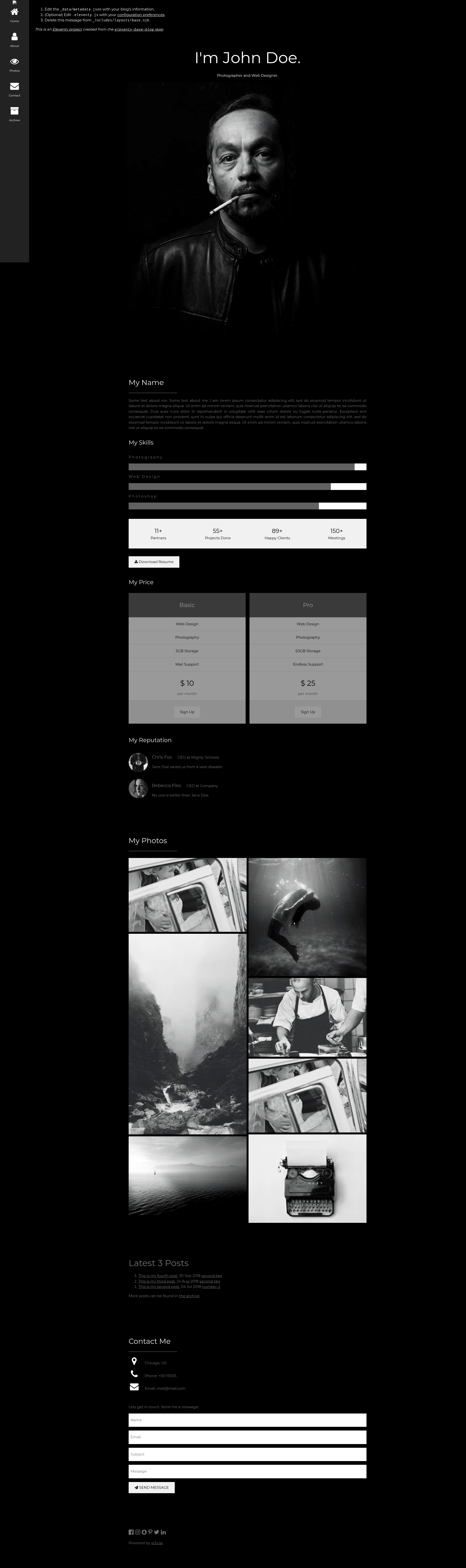
Dark-Portfolio-Template-11ty is a starter repository that converts the W3C 'Dark Portfolio Template' into a blog built with the Eleventy static site generator.
What is Dark-Portfolio-Template-11ty?
Dark-Portfolio-Template-11ty is a starter repository that shows how to build a blog with the Eleventy static site generator, using the W3CSS template 'Dark Portfolio Template'. It takes content written in Markdown, Nunjucks, or other template formats and outputs a static blog site with a dark-themed portfolio design. The project runs on Node.js via Eleventy, and requires only npm to install dependencies. The repository is maintained by jmschrack and hosts a live demo on GitHub Pages.
Key Features
- Eleventy static site generator — The entire site is built by Eleventy, producing plain HTML/CSS/JS with no runtime dependencies.
- W3.CSS dark styling — The design is based on the W3.CSS 'Dark Portfolio Template', which uses the W3.CSS framework instead of Tailwind or similar.
- Photo gallery — The latest 6 blog posts tagged 'photo' are automatically collected and displayed as a gallery.
- RSS feed — A feed template at feed/feed.njk generates a feed using site metadata from _data/metadata.json.
- Reusable post list component — The Nunjucks include _includes/postlist.njk lets you render a list of posts on any page.
- Three layout files — base.njk (HTML structure), home.njk (home page), and post.njk (blog post layout) are included.
- Simple navigation — Pages with the 'nav' tag appear in the top navigation menu.
- Pass-through file copying — Files with .css and .png extensions are copied to the output directory unchanged, while other template types can be configured via .eleventy.js.
Who is it for?
Developers new to Eleventy who want a working blog starter with a visual portfolio design can use this repository as a basis for learning and customization. Bloggers who need a dark-themed, content-focused site with a photo gallery will find the included templates and post collection ready to use. Designers who have used the original W3.CSS Dark Portfolio Template can see a concrete example of porting a W3.CSS theme into an Eleventy project.
What can you do with Dark-Portfolio-Template-11ty?
- Build a portfolio blog — Add Markdown posts in the posts directory, tag them as desired, and they appear in the post list and photo gallery if tagged 'photo'.
- Create a photo gallery — Publish up to 6 recent posts tagged 'photo' and they will automatically show up in the gallery section.
- Generate an RSS feed — The feed template produces a feed from site metadata and posts, useful for syndicating your blog.
How does Dark-Portfolio-Template-11ty work?
To get started, clone the repository to your machine, run npm install to fetch dependencies, and edit _data/metadata.json with your site name and details. Then run npx eleventy to build the site, or npx eleventy --serve for a local development server with auto-reload. The build process reads content from directories like posts/, applies the configured layouts, and outputs a static site to the default _site folder.
Alternatives
- Eleventy Base Blog — The official Eleventy starter blog that uses a simpler, minimal design without a portfolio focus.
FAQ
How do I install Dark-Portfolio-Template-11ty?
Clone the repository with git, navigate into the directory, and run npm install. After that you can edit the site metadata in _data/metadata.json and build the site with npx eleventy.
Does this template use Tailwind CSS?
No, it uses W3.CSS, the Cascading Style Sheets framework from W3Schools. The project is specifically a port of the W3.CSS 'Dark Portfolio Template'.
How do I add a new blog post?
Create a new Markdown file in the posts directory and add the 'post' tag to its front matter. The file can be in any format supported by your .eleventy.js configuration; the post tag is what adds it to the posts collection.
Can I use this for a photography portfolio?
Yes, the template includes a photo gallery that automatically displays the latest 6 posts tagged 'photo'. You can tag individual posts with 'photo' to include them in that gallery.