Template details
CVPage
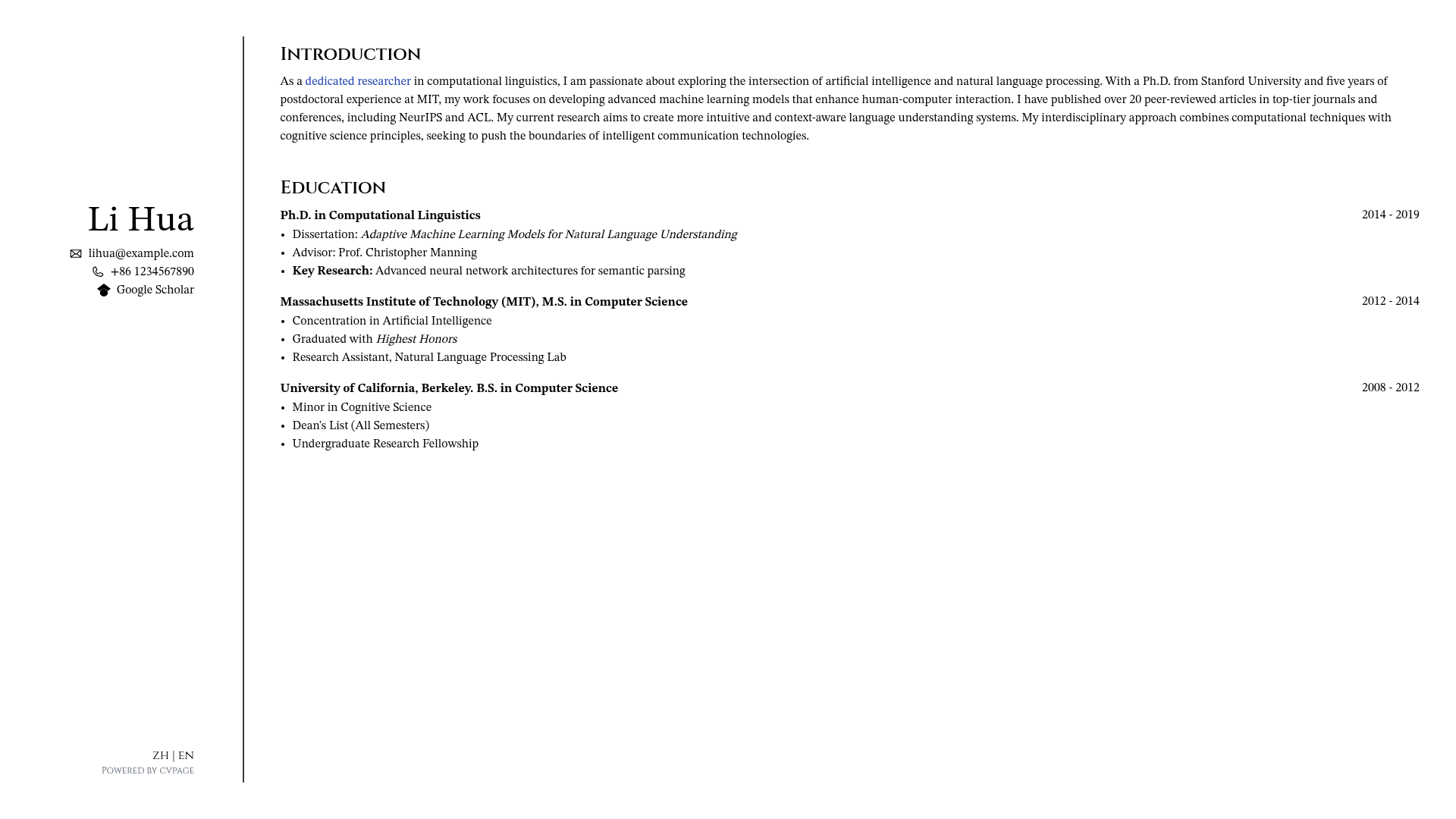
A minimalist CV/resume page built with Astro that supports dark mode and multi-language YAML content.
About this template
CVPage is a minimalist resume website template built with the Astro framework that renders a personal profile page from YAML files. It takes structured YAML files from a content/cv directory as input and generates a static, self-contained CV page as output. The project is open-source on GitHub under the account reonokiy, and its topics list it as an astrojs, cv, resume, and resume-template resource. The template focuses on text content, contact links, and list-based work experience sections.
What is CVPage?
CVPage is a minimalist resume website template built with the Astro framework. It takes structured YAML files from a content/cv directory as input and generates a static, self-contained CV page as output. The project is open-source on GitHub under the account reonokiy, and its topics list it as an astrojs, cv, resume, and resume-template resource. The template focuses on text content, contact links, and list-based work experience sections.
Key Features
- Dark Mode Support — The site includes a toggleable dark theme, letting viewers switch between light and dark appearances.
- Multiple Language Support — Content is organized by language: each YAML file must be named with a language code such as
en.yamlfor English orzh.yamlfor Chinese, so you can maintain localized versions of your CV. - YAML-driven configuration — All personal data is edited in YAML files under
content/cv; no coding is required to update your resume content. - Schema validation — A JSON schema is provided in the
schemadirectory; adding the comment# yaml-language-server: $schema=../../schema/cv.jsonat the top of your YAML file enables validation and auto-completion in editors that support the language server. - Structured components — The base info component accepts
v0.email,v0.phone,v0.github, andv0.google-scholarfields; the CV info component supportsv0.markdown,v0.unordered-list, andv0.unordered-list-with-itemto mix paragraphs and bullet lists. - Astro-based static output — The template runs on Astro, so the final build is a fast, static website that can be deployed to any static host.
- pnpm workflow — The project uses pnpm as its package manager; setup requires Node.js and pnpm, then
pnpm installandpnpm run devfor local development, orpnpm run buildfor production.
Who is it for?
- Developers and engineers who want a low-maintenance resume site that stores content in version-controlled YAML files rather than a database.
- Academics and researchers who need to highlight their Google Scholar profile and GitHub repositories directly in the contact header.
- Multilingual job seekers who maintain separate CVs for different countries and languages; the language-file convention makes it straightforward to add or update a translation.
- Design-minded minimalists who prefer an understated, text-first layout over heavily animated portfolio templates.
What can you do with CVPage?
- Job searching: publish a clean resume with your email, phone, GitHub, and a narrative summary plus work-history lists in markdown format.
- Academic networking: present a CV that links to Google Scholar and lists publications as markdown sections or unordered lists.
- Open-source visibility: connect your GitHub profile in the base info block and showcase projects using the list components.
- Localization practice: create a new YAML file for each language you speak (for example,
de.yamlorfr.yaml) to offer international visitors a version in their language.
How does CVPage work?
The workflow is file-based. Clone the repository, install dependencies with pnpm, and edit the YAML files in the content/cv directory. Each YAML file corresponds to one language version. The Astro components read the predefined fields and render them as a single-page website; run pnpm run dev to preview changes locally and pnpm run build to output a production-ready static site.
FAQ
How do I change my contact details?
Edit the base info section at the top of your language YAML file, where the fields v0.email, v0.phone, v0.github, and v0.google-scholar are defined. Save the file and the rendered page updates on your next dev build.
What do I need to run CVPage locally?
You need Node.js and pnpm installed. After cloning the repository, run pnpm install to fetch dependencies, pnpm run dev for a development server, and pnpm run build to generate a production build.
Can I create a CV in a new language?
Yes. Create a new YAML file in content/cv with the filename pattern [lang].yaml (for example, es.yaml for Spanish). Follow the same structure as the existing en.yaml and zh.yaml files.