Template details
DuckDuckGo Themes
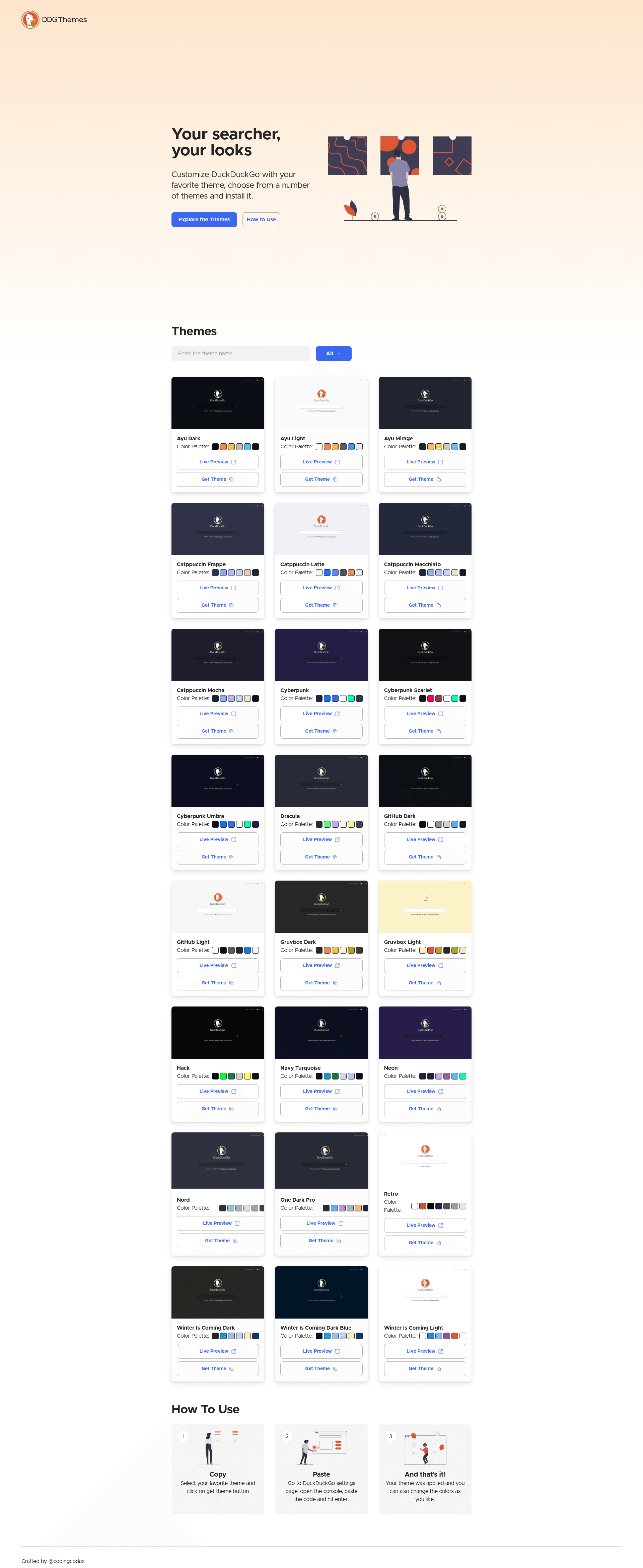
Customize DuckDuckGo with your favorite theme, choose from a number of themes and install it.
About this template
DuckDuckGo Themes (ddg-themes) is an open-source directory of custom themes that lets you personalize DuckDuckGo search and install your favorite look from a web gallery.
What is DuckDuckGo Themes?
DuckDuckGo Themes is a curated collection of themes designed to customize the DuckDuckGo search interface. The project is a web application built with the T3 stack, using Next.js, Tailwind CSS, and TypeScript, and is published on GitHub under the MIT license. A live demo is hosted at ddg.codingcodax.dev, where users can browse the available themes and apply them to DuckDuckGo.
Key Features
- Easy to use — The interface lets visitors pick a theme from a gallery and install it without writing CSS or JavaScript.
- Responsive design — The site adapts to desktop and mobile viewports, so you can browse themes on any device.
- Dark mode — The gallery itself supports a dark theme, making it comfortable to use in low light.
- Live demo — An online preview at ddg.codingcodax.dev lets you see all themes before installing.
- T3 Stack — Built with Next.js, Tailwind CSS, and TypeScript, providing modern React tooling and type safety.
- MIT licensed — The entire codebase is released under the MIT license, allowing free use, modification, and redistribution.
Who is it for?
- DuckDuckGo users who want to change the look of their search page but lack CSS skills — they can pick a theme from the gallery and install it directly.
- Front-end developers looking for a practical example of a theme gallery built with Next.js and Tailwind CSS, or wanting to contribute their own themes to the collection.
- Open-source enthusiasts who prefer privacy-respecting search tools and want to extend the ecosystem by adding new themes.
Use cases
- Personalizing your search experience: Browse the theme gallery, select a design that matches your aesthetic, and apply it to DuckDuckGo so every search reflects your style.
- Building a theme directory: Fork the repository and adapt it to host themes for other services or your own product.
- Contributing themes: Developers can add new themes to the collection and submit them via GitHub issues or pull requests, growing the gallery for everyone.
How does it work?
The project runs as a Next.js application that renders a gallery of themes, each with a preview. Visitors open the live site, browse the available themes, and choose one to install; the site then provides the necessary instructions or steps to apply the theme to DuckDuckGo. The specific installation steps are not documented in the README, but the core workflow is browse, choose, and install.
FAQ
Is DuckDuckGo Themes free?
Yes, the project is open source and released under the MIT license, so the code and themes are free to use and modify.
What tech stack does DuckDuckGo Themes use?
It is built with the T3 stack: Next.js for the framework, Tailwind CSS for styling, and TypeScript for static typing.
How do I install a theme?
The README does not include step-by-step installation instructions, but the live site at ddg.codingcodax.dev lets you browse and pick a theme to install.