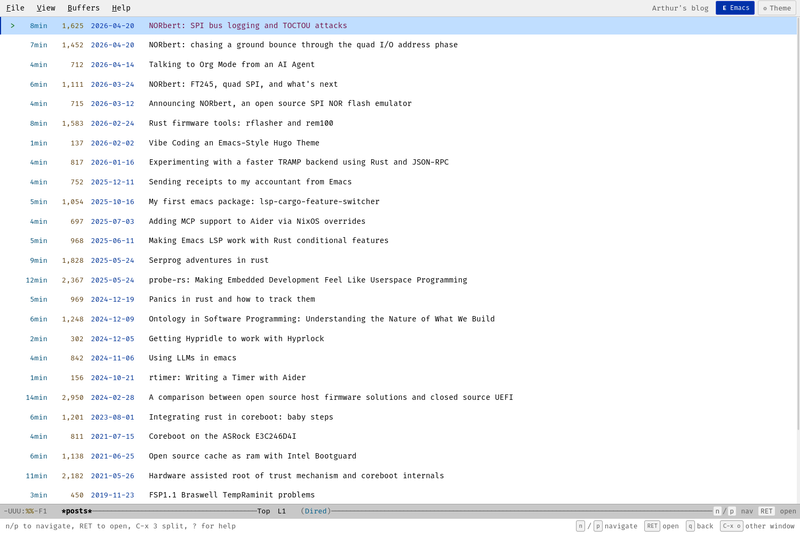
Emacs Hugo Theme is a Hugo blog theme that turns a static site into a browser-based imitation of the GNU Emacs editor, complete with buffer-style article lists, split windows, and Emacs keybindings. The theme takes standard Hugo content (Markdown files) and renders list, single, terms, and 404 pages with a full-screen buffer layout and a modeline that shows buffer name, scroll position, and major mode. It is open source, dual-licensed under MIT or Apache 2.0, and hosted on GitHub at ArthurHeymans/hugo-emacs-theme; the repository description says it was fully vibe coded with Claude.
What is the Emacs Hugo Theme?
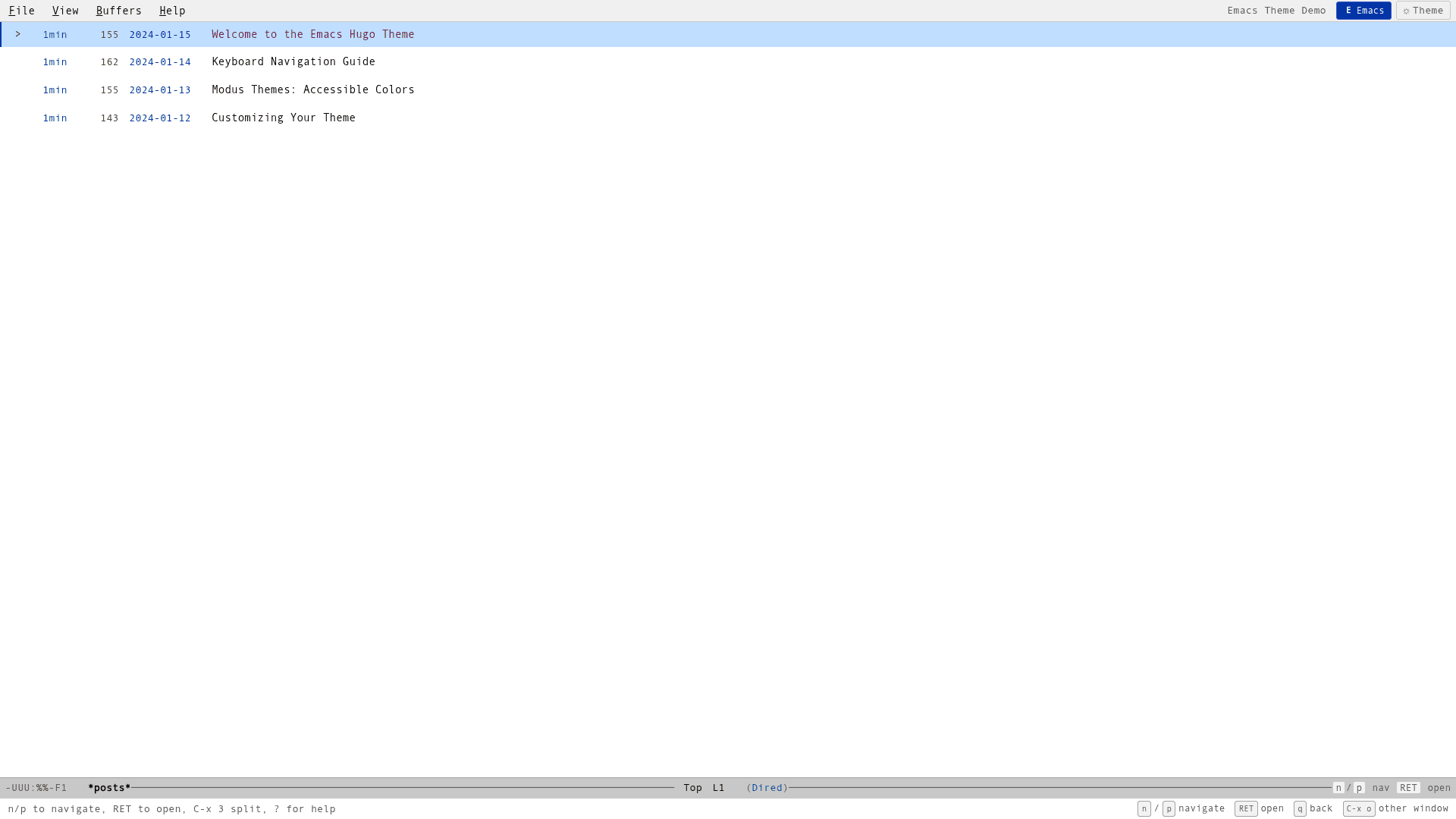
The Emacs Hugo Theme is a theme for the Hugo static site generator that reproduces the look and interaction model of GNU Emacs inside a web browser. Instead of a conventional blog layout, visitors see the article list as an Emacs-style buffer, navigated with n and p to move between posts, RET to open, q to go back, and t to toggle between the Modus Vivendi (dark) and Modus Operandi (light) color schemes. The theme consists of Hugo templates, HTML partials, CSS files for seven styling areas, and three JavaScript modules for keyboard input, menu interactions, and window management.
Key Features
- Emacs window splitting — In content view you can split the pane horizontally with C-x 3 or vertically with C-x 2, close windows with C-x 0, and switch between open buffers with C-x o or Tab.
- Authentic modeline and menu bar — A persistent modeline displays the current buffer name, scroll position, and a placeholder major mode; the menu bar offers File, View, Buffers, and Help dropdowns while an echo area prints keyboard hints.
- Dired-like article listing — The list buffer shows each post title with reading time, word count, and date, borrowing the metadata layout from Emacs Dired.
- Modus color schemes with toggle — Colors are defined as CSS custom properties in
assets/css/themes.css, and pressing t switches between the Modus Vivendi dark palette and the Modus Operandi light palette without reloading. - Full keyboard navigation — n/p or arrow keys scroll; Space and Shift-Space page up and down (also available as C-v and M-v), the angle bracket keys jump to the beginning or end, and ? opens an overlay that documents every shortcut.
- Mobile responsive — On narrow screens the theme renders a single buffer with no split windows, preserving usability for touch and small viewports.
- Bundled Fira Code font — The
static/fonts/directory ships the Fira Code typeface, which is loaded via@font-facerules inassets/css/main.cssand used across the interface.
Who is the Emacs Hugo Theme for?
The theme is aimed at developers, technical writers, and Emacs fans who want a keyboard-driven blog reading experience and an interface that looks like an editor. A Hugo user who writes technical posts can put the theme on their personal site and navigate their own content with n/p/RET. A reader unfamiliar with Emacs can still scroll and click, because JavaScript is only required for keyboard shortcuts, split windows, and other interactive parts; without JavaScript the pages degrade to ordinary scrollable HTML.
What can you do with the Emacs Hugo Theme?
- Personal and technical blogs — Publish Hugo content where visitors can open a post as a buffer, split the view to read two articles side by side, and use Emacs search-and-navigation habits.
- Portfolio and documentation sites — Since the theme provides list, single, terms, 404, and homepage layouts, it can present tutorials, project logs, or writing samples in the same buffer-and-window paradigm.
- Learning Emacs concepts — The help overlay and echo area teach buffer, window, and prefix-key ideas in the browser, making it a low-friction sandbox for people curious about Emacs interactions.
- Theme and font exploration — Because colors live in CSS custom properties and the font is declared in a single
@font-faceblock, anyone can fork the theme to test alternative palettes or typefaces.
How does the Emacs Hugo Theme work?
Installation follows the normal Hugo workflow: add the repository via git submodule add (or clone it) into your site's themes/ directory, set theme = "emacs" in config.toml, and add [markup.highlight] noClasses = false for syntax highlighting. When you run hugo server -D, the theme's layouts generate buffer-style list and single pages; at runtime the JavaScript modules intercept keys and manage the DOM to create split windows and toggle colors. The keyboard layer depends on JavaScript, while the base layout and typography still render statically.
FAQ
Is the Emacs Hugo Theme free?
Yes. The theme is open source and released under both the MIT License and the Apache License 2.0, so it can be used for personal or commercial blogs without cost, provided you keep the license text.
Can I use this theme if I have never used Emacs?
Yes. The default layout is readable with mouse and scroll, and all keyboard actions are optional. A help overlay accessible with the ? key lists every shortcut, and the echo area shows hints as you type.
What browsers are supported?
The README states support for modern browsers — Chrome, Firefox, Safari, and Edge — with the caveat that keyboard navigation requires JavaScript and older browsers will receive a static but still usable layout.
Does the theme include a dark and a light theme?
Yes. The theme includes Modus Vivendi for dark and Modus Operandi for light, and pressing t switches between them on the fly. If you prefer to hard-code one scheme, the color variables in assets/css/themes.css can be overridden.
Where can I download the theme?
The theme is available on GitHub at ArthurHeymans/hugo-emacs-theme. That repository contains the theme.toml, all layouts and partials, the CSS and JavaScript assets, and the bundled Fira Code font files.