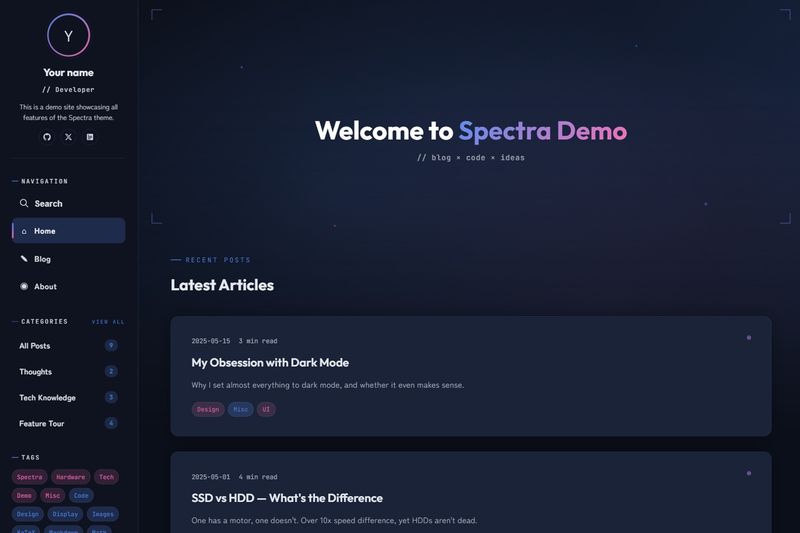
Spectra is a Hugo blog theme with a sci-fi visual identity for building static blog sites, made for Hugo Extended v0.157.0+ and distributed under the MIT license. It produces a blog with a parallax homepage banner, post covers, reader-friendly article pages, sidebar navigation, search, and full multilingual support, and it requires no npm build step.
What is Spectra?
Spectra is a Hugo theme that transforms Markdown posts into a static blog with sci-fi aesthetics and modern UI interactions. It accepts regular Hugo content files and hugo.toml configuration as input, and emits a static site via the standard hugo server or hugo build commands. The theme was authored by JoeYang1412, developed with Claude Code assistance, and relies on Hugo Extended v0.157.0 or newer for SCSS compilation and image processing through Hugo Pipes.
Key features
- Dark/light mode toggle — Built-in color scheme switching with configurable accent colors: tech blue, pink, and purple defaults that can be overridden under
[params.style]. - Parallax homepage banner — A full-width banner supports an optional background image, built-in gradient, floating particles, L-bracket decorations, and separate banner title and highlight text.
- Post covers and card thumbnails — Add a cover image in front matter to show a full-width cover and a list thumbnail; images in Page Bundles or the assets folder are compressed and converted to WebP automatically, with independent quality settings for cards (default 80) and covers (default 85).
- Conditional KaTeX math — Enable math per post by setting
math: true; inline formulas use single dollar signs and block formulas use double dollar signs. - Reading and navigation aids — Posts can show a fixed desktop table of contents, a top progress bar, scroll entrance animations, image lightbox, scroll-to-top button, and a code-block copy button; all are toggles in
hugo.toml. - Client-side search with Fuse.js — Search uses the site's JSON home output, configured as HTML plus RSS plus JSON, and runs entirely in the visitor's browser.
- Multilingual i18n — Language-specific post files use suffixes like
.zh-tw.mdand.en.md; each language can carry its own author, bio, description, menu entries, and social links. - Sidebar with tag cloud and social icons — The sidebar includes avatar, menu, recent posts, categories, and tags; social links recognize 12+ platforms from GitHub and X to HackMD, Mastodon, Email, and RSS, with generic fallback for unrecognized names.
Who is Spectra for?
- Developers running a personal tech blog — Publish Markdown posts with syntax highlighting, copy buttons, optional math, and linked series, and let the built-in related-posts logic suggest additional articles by tag and year.
- Bilingual content creators — Set up English and Traditional Chinese versions of the same post in one Page Bundle; the example site demonstrates a complete two-language configuration.
- Design-minded site owners — Reskin the blog by editing style values such as accent colors, font families, and banner gradient in
hugo.toml, plus custom CSS and JS arrays, without modifying theme files. - Technical writers documenting a series — Add
seriesfront matter to group several posts and get automatic previous/next navigation inside each article.
What can you do with Spectra?
- Set up a blog in minutes — Copy the exampleSite's hugo.toml and content folder, adjust baseURL and author info, and start
hugo serverto see the theme running immediately. - Publish cross-language stories — Maintain multiple language versions of each post using the language suffix convention and let Hugo generate localized menu labels and URLs.
- Optimize each image for the web — Store cover and inline images in Page Bundles or assets to get automatic compression and WebP conversion; images in static are served as-is.
- Make a personalized homepage banner — Choose a background image or use the built-in gradient, set your own title and highlight text, and enable floating particles and parallax for a sci-fi effect.
How does Spectra work?
You install the theme as a Git submodule or Hugo module, then merge the theme's default configuration with your own hugo.toml. Feature toggles control what loads; style overrides are read at build time by Hugo Pipes; and the search index is generated whenever Hugo builds the home page with the JSON output format. All scripts, including Anime.js and Fuse.js, are bundled by Hugo without npm.
FAQ
What does Spectra require?
Spectra requires Hugo Extended version 0.157.0 or newer. No Node.js or npm is needed, because the theme uses Hugo Pipes to compile SCSS, bundle JavaScript dependencies, and process images during site generation.
Is Spectra free to use?
The theme is open source under the MIT license. You can use it in commercial projects, modify it, and host the generated static site anywhere that can serve plain HTML files.
Does Spectra have dark mode?
Yes. The theme ships with dark/light mode enabled, using a configurable accent palette. The default tech blue, warm pink, and soft purple accents are overridable from your site configuration.
How do I add math formulas to a post?
Add math: true to the post front matter, then write LaTeX inside single dollar signs for inline math or double dollar signs for display math. Resources are loaded only for posts that request math, so other pages stay lean.
Can I turn off individual features?
Most features can be disabled by setting their flag to false in [params] — for example enableSearch, showBanner, enableCodeCopy, and showReadingProgress. All flags default to true; no theme source changes are needed.