Template details
FunWeather
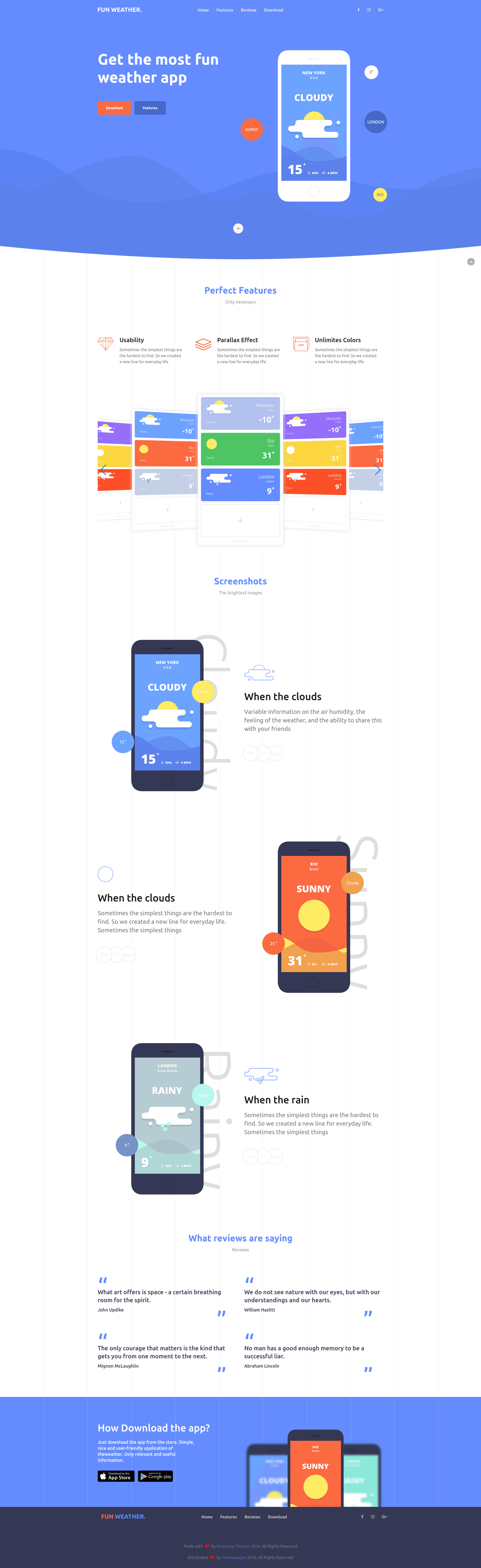
Free responsive Bootstrap 3 landing page template for weather forecast apps with on-scroll animations and mobile navigation.
About this template
FunWeather is a free, responsive Bootstrap 3 landing page template built for weather forecast apps, offering a one-page HTML site with on-scroll animations and a mobile-friendly navigation menu.
What is FunWeather?
FunWeather is a static landing page template developed by BootstrapThemes and distributed through ThemeWagon. It is built with HTML5, CSS3, and Twitter Bootstrap 3.5, and it is designed specifically for weather forecast mobile apps that run on Android, iOS, and Windows platforms. The template takes the developer's app information and outputs a complete one-page website with centered content, smooth scrolling, and a modern visual style. Its source code is openly available, and it can be used in commercial projects at no cost.
Key Features
- Fully Responsive Layout — The page adapts cleanly to mobile phones, tablets, and desktops using the Bootstrap 3 grid system, with content reflowing to fit any screen width.
- Based on Twitter Bootstrap 3.5 — This framework provides the grid, components, and JavaScript plugins, ensuring consistent behavior across Chrome, Edge, Firefox, Opera, Safari, and mobile browsers.
- HTML5/CSS3 W3C Valid — The markup passes W3C validation standards, making the code cleaner and easier for browsers to render consistently.
- Developer Friendly Commented Code — HTML and CSS files include explanatory comments throughout, which helps developers find and edit sections without guessing.
- Modern Responsive Mobile Navigation — The menu collapses into a hamburger-style toggle on small screens, keeping navigation accessible on handheld devices.
- On Scroll Animation — Elements animate into view as the user scrolls down the page, adding polish without requiring a separate animation library.
- Font Awesome Icons — A wide set of vector icons is included for feature bullets, social links, and app store badges, all styled with a consistent look.
- Easy To Understand Documentation — The download includes documentation that explains how to set up the template and customise its content.
Who is it for?
- Startup founders building a weather app can use FunWeather to publish a clean landing page that presents the app's value proposition and download options before launch.
- Mobile app developers who need a quick web presence for an Android, iOS, or Windows weather app can customise this static page without writing a full front-end stack.
- Small business owners in outdoor, travel, or agriculture sectors can adapt the page to promote their weather-related services or tools.
- Freelance web designers can start client projects with this free template, replacing the placeholder images and text to match each brand.
What can you do with FunWeather?
- Launch a weather app landing page: Showcase app screenshots, key features, and store download buttons for multiple mobile platforms in a single page.
- Build a product teaser site: Use the one-page layout to introduce an upcoming app and direct visitors to a signup form or app store.
- Learn Bootstrap 3 basics: The commented, clearly organised code makes it a practical reference for developers studying responsive grid layouts and navigation patterns.
Pros and cons
- Pros: free to download and use commercially; responsive layout; cross-browser compatible; includes Font Awesome and Google Fonts; documented and commented code.
- Cons: built with Bootstrap 3.5, an older framework version that lacks modern utilities found in Bootstrap 5; the design is styled for a 2016–2017 look, which may feel dated.
Pricing
FunWeather is free to download. It is open source, can be used in commercial projects, and comes with lifetime free updates.
FAQ
Is FunWeather free?
Yes, FunWeather is completely free to download from ThemeWagon. The license permits use in commercial projects, and there are no recurring fees.
What framework does FunWeather use?
FunWeather is based on Twitter Bootstrap 3.5, along with HTML5 and CSS3. It also integrates Font Awesome icons and Google Fonts.
Which browsers are supported?
The template is compatible with Chrome, Edge, Firefox, Opera, Safari, and mobile browsers, according to the ThemeWagon product page.
Can I use this template for a non-weather app?
The layout and design are geared toward weather forecast apps, but the structure is generic enough that you can replace the text and images to promote any mobile app.