Template details
Gatsby Starter Resume
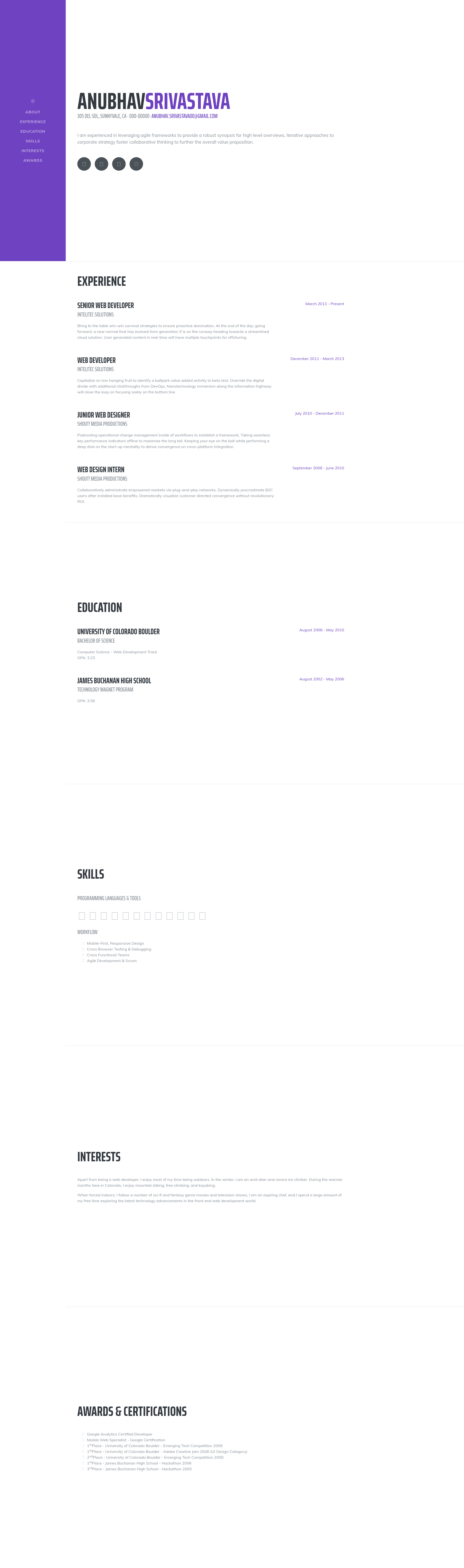
Gatsby.js V4 starter template for a resume website, based on the Start Bootstrap Resume design.
About this template
Gatsby Starter Resume is a Gatsby.js V4 starter template that creates a single-page resume website from a config file, based on the Start Bootstrap Resume design.
What is Gatsby Starter Resume?
Gatsby Starter Resume is a starter template for the Gatsby static site generator, authored by Anubhav Srivastava. It takes personal data — name, title, social links, and other resume details — from a JavaScript configuration file and produces a static HTML resume site. The template is built on Gatsby.js V4 and uses Sass for styling, with the colour scheme controlled by a primary colour variable. It is distributed under the MIT license and can be installed directly with the Gatsby command-line tool.
Key Features
- Config-based personalization — Edit
config.jsto set your site title, first and last name, and an array of social links, each with a Font Awesome icon name, label, and URL. - Start Bootstrap Resume design — The layout is a single-page resume template adapted from the Start Bootstrap theme of the same name.
- Sass theming — Change the entire site accent colour by updating the
$primaryvariable insrc/assets/sass/_variables.scss. - GitHub Pages deployment — Run
npm run deployto publish the site using thegh-pagesmodule, with a built-inpathPrefixsetting for hosting under a subpath such ashttps://example.com/somePath/. - Gatsby CLI integration — Scaffold a new site with one command:
gatsby new my-resume https://github.com/anubhavsrivastava/gatsby-starter-resume, then rungatsby developfor local development. - Part of a larger starter collection — The author maintains over a dozen related Gatsby starters (casual, grayscale, spectral, newage, stylish, and more) that share the same install and configuration workflow.
Who is it for?
- Job seekers who need a clean, single-page resume site that they can deploy to GitHub Pages for free.
- Developers who want a minimal Gatsby project scaffold to learn how Gatsby configurations, Sass, and static deployment work, since the template keeps customization to a small config file.
- Designers who want a Start Bootstrap-style resume page and need to change only a colour variable and content file to make it their own.
What can you do with Gatsby Starter Resume?
- Publish a resume quickly: Fill in your details in
config.js, run the Gatsby develop server, and you have a production-ready resume page. - Host on a subpath: Adjust the
pathPrefixvalue inconfig.jsto deploy the site under a subfolder of a domain, as the Gatsby documentation suggests. - Reuse the setup for other themes: Because the template follows the same configuration convention as the author's other starters, you can switch between the resume, creative, aerial, or prologue layouts with minimal rework.
How does Gatsby Starter Resume work?
Install the Gatsby CLI globally (npm install --global gatsby-cli), then run gatsby new my-resume https://github.com/anubhavsrivastava/gatsby-starter-resume. After entering the project directory, run npm install and gatsby develop to start the local server. Customization happens in config.js, and deployment to GitHub Pages is a single npm run deploy command.
Alternatives
The template's author maintains other Gatsby starters for different page styles, including Gatsby Starter Creative, Gatsby Starter Spectral, and Gatsby Starter New Age, each using the same configuration approach.
FAQ
How do I change the theme colour?
Edit the $primary variable in src/assets/sass/_variables.scss. This variable controls the accent colour used throughout the resume layout, and changing it updates the whole site.
Is this template free to use?
Yes, the template is released under the MIT license, so you can use, modify, and distribute it freely. The repository's README includes an open-source love badge that points to the license file.
How do I deploy to GitHub Pages?
Run npm run deploy from the project directory. The package.json includes a deploy script that uses the gh-pages module to publish the built site to GitHub Pages. If you host under a subpath, configure the pathPrefix in config.js first.
Can I add more social links?
Yes, the socialLinks array in config.js accepts any number of entries. Each entry requires an icon class (such as fa-github), a display name, and a profile URL.
What is the difference between this and the other starters by the same author?
Each starter uses a different Start Bootstrap theme — for example, Resume is a single-page CV layout, while Creative, Spectral, and Aerial have their own visual designs and section structures. They all share the same installation and configuration workflow.