Template details
gfolio
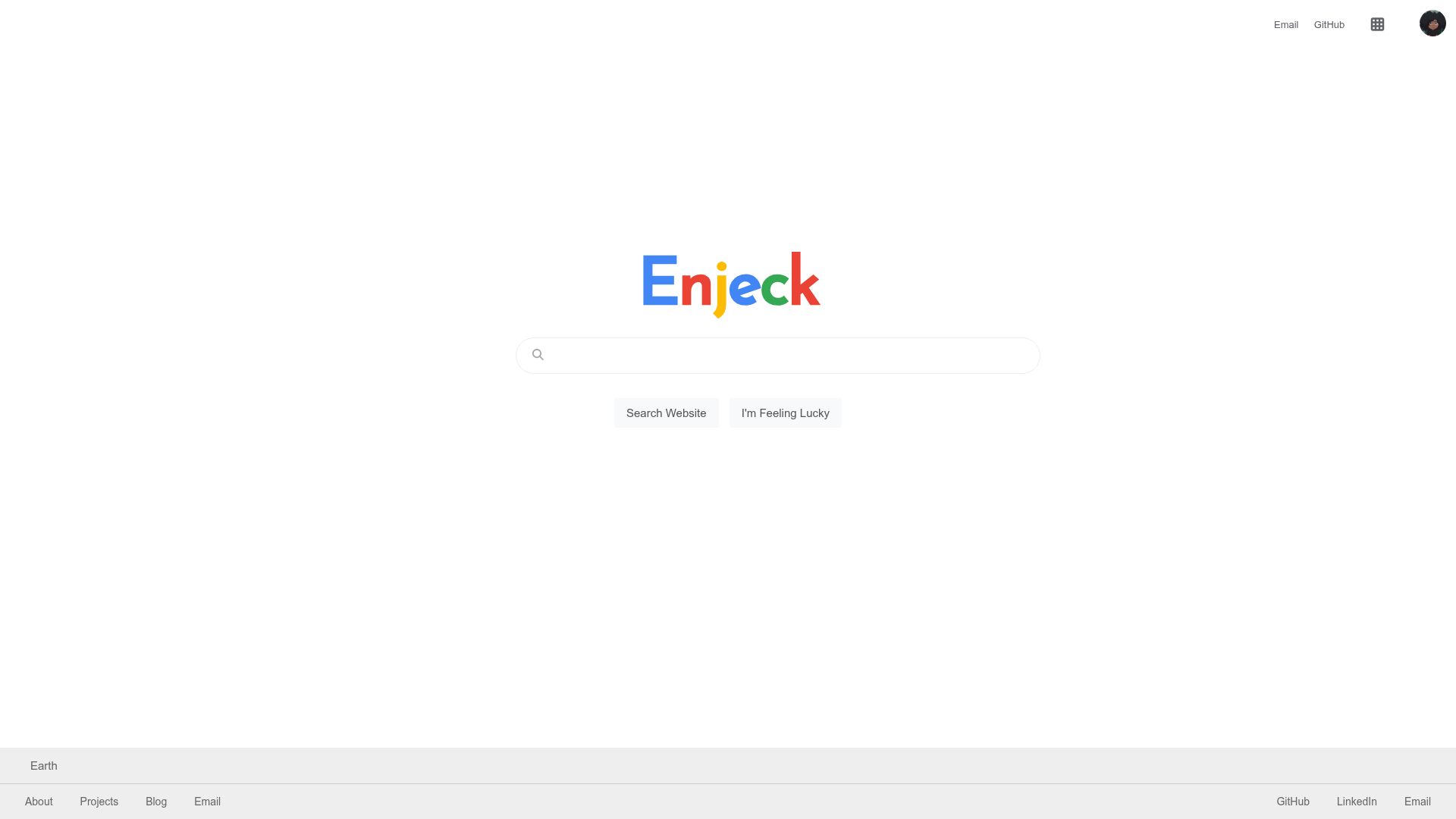
Google Search themed portfolio website built with Next.js and React.
About this template
gfolio is a portfolio website template patterned after the Google Search results page, built with Next.js and React, that presents a developer's projects and personal info inside a familiar search-engine interface.
What is gfolio?
gfolio is a personal website template that mimics the look and behavior of Google Search results. It is built on Next.js (with React) and takes your profile content — such as your name, bio, and project links — and renders it as if it were search results. The template is created by Enjeck and is available as an open-source GitHub repository under the GPL-3.0 license. A live demo is hosted at gfolio.enjeck.com.
Key Features
- Google Search UI simulation — The entire layout copies Google’s search results page, including the logo, search bar, and result list, giving your portfolio an instantly recognizable presentation.
- Built on Next.js and React — Uses the Next.js framework for server-side rendering and static generation, making the site fast and easy to deploy on modern hosting platforms.
- Quick start guide — The repository includes a QUICKSTART.md file that walks you through replacing the default content with your own details.
- Architecture documentation — ARCHITECTURE.md contains diagrams and explanations of how the code is structured, so you can understand and extend it.
- Easy local setup — Run it locally with three commands: git clone, npm install, and npm run dev; the app then runs at http://localhost:3000.
- Open source license — Released under GPL-3.0, so you can reuse and modify the code with appropriate attribution.
Who is it for?
- Developers who want a portfolio that stands out from standard resume-style sites by borrowing the universally familiar Google interface.
- Designers looking for a creative template they can remix, since the code is open source and documented.
- Job seekers who want to present projects and experience in a memorable way that shows technical flair.
What can you do with gfolio?
- Build a personal portfolio — Clone the repo, edit the content files as explained in QUICKSTART.md, and replace the placeholder info with your own bio, projects, and links.
- Run it locally for development — Use npm install and npm run dev to start a local server at http://localhost:3000, then preview changes before deploying.
- Study a simulated Google Search design — The repo’s ARCHITECTURE.md explains the component structure, useful for learning how to re-create familiar UI patterns in React/Next.js.
How does gfolio work?
To get a copy running, you clone the repository from GitHub, install dependencies with npm install, and start the dev server with npm run dev. The app becomes available at http://localhost:3000, and you follow the steps in QUICKSTART.md to plug in your own content. The architecture is described in ARCHITECTURE.md.
Pricing
gfolio is free and open source under the GPL-3.0 license. There are no paid tiers or subscription fees.
FAQ
Is gfolio free to use?
Yes. gfolio is released under the GPL-3.0 license, so you can freely view, copy, modify, and distribute the code as long as you keep the license terms.
What technologies does gfolio use?
The template is built with Next.js, which is a React framework. It uses JavaScript (npm) for dependency management and can be run on any Node.js environment.
How do I run gfolio locally?
Clone the repository, run npm install to install dependencies, then npm run dev to start the development server. Open http://localhost:3000 in your browser to see the site.
Can I customize it for my own portfolio?
Yes. The QUICKSTART.md file provides instructions for replacing the default content with your personal information, and ARCHITECTURE.md helps you understand the codebase so you can make deeper changes.
Where can I see a live demo?
The author hosts a live version at gfolio.enjeck.com, so you can see the template in action before deploying your own.