Template details
Hexo Theme Freemind
Bootstrap-powered Hexo blog theme with tag plugins, local search, color themes, and comment system.
About this template
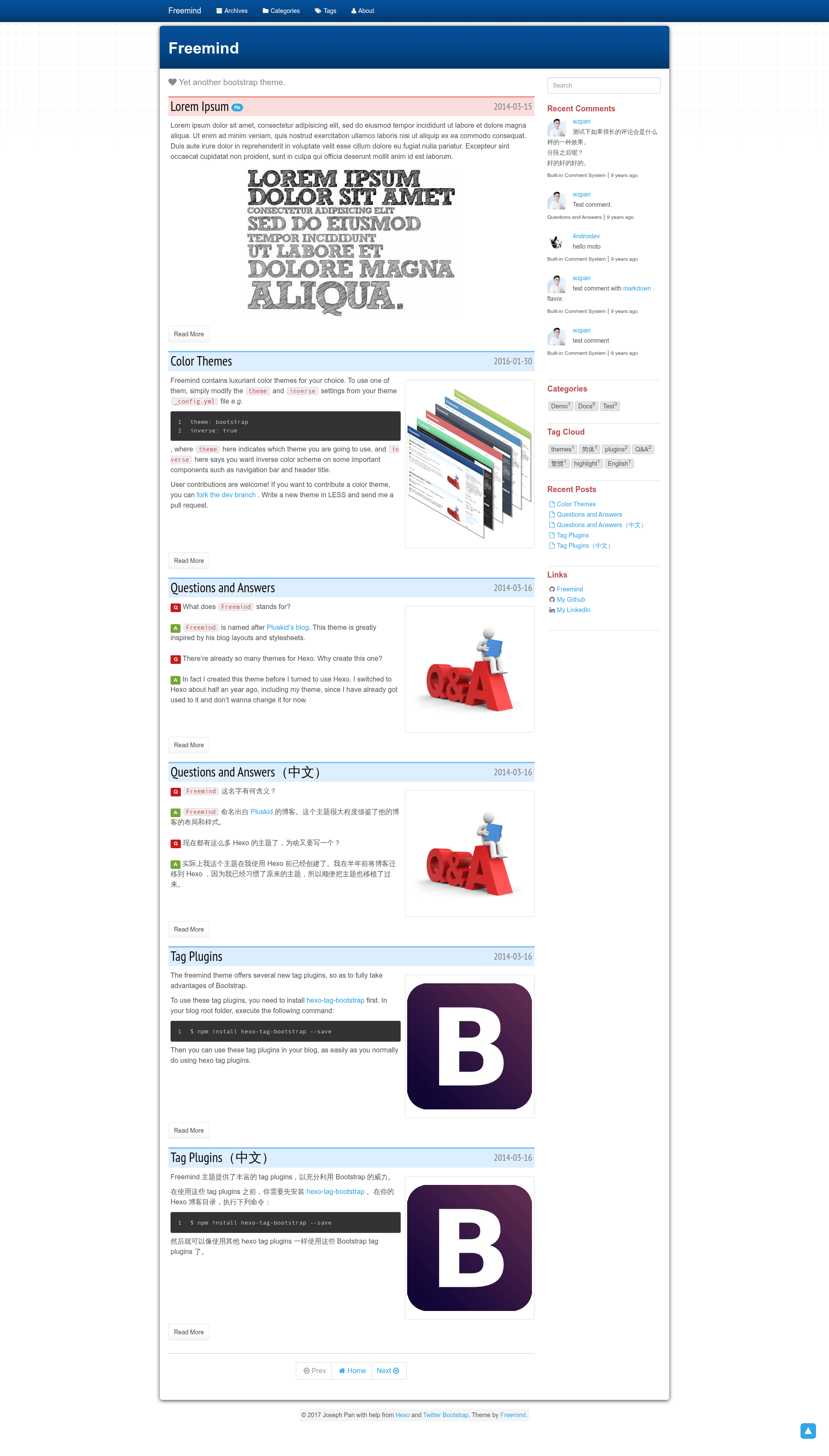
Hexo Theme Freemind is a Bootstrap-based theme for the Hexo static site generator that turns a blog into a two-column layout with built-in tag plugins, local search, color themes, and a GitHub-backed comment system.
What is Hexo Theme Freemind?
Freemind is a theme for Hexo (version 3.0 or higher) built on Twitter Bootstrap 3.1.1. It takes Hexo blog content and renders a two-column blog layout with a sidebar of widgets, color-theme support, and Bootstrap tag plugins. The theme is created by wzpan and distributed under the MIT License.
Key Features
- Bootstrap integration — Built on Twitter Bootstrap 3.1.1 and Font Awesome icons, with an inverse navbar color option.
- Tag plugins — Requires hexo-tag-bootstrap (version 0.0.8 or higher) to provide textcolor, button, label, badge, and alert plugins usable directly in Markdown posts.
- Local search — Ships with a built-in search widget powered by hexo-generator-search (optional install), and also supports Swiftype via a config key.
- Color themes — Selectable Bootswatch color themes and an inverse navbar toggle via the theme configuration file.
- Pin to top — Set
top: truein front-matter to pin an article to the top of the first index page. - Comment systems — Built-in comment.js (with GitHub or OSChina as backends), plus optional Gitalk, DuoShuo, and Disqus integrations.
- Custom front-matter — Supports per-post description, feature image, table of contents, and
issue_idfields. - Widgets and analytics — Configurable sidebar widgets (search, categories, tagcloud, recent posts, links) plus Google Analytics and Baidu Tongji support.
Who is it for?
- Hexo bloggers — Users of Hexo 3.0+ who want a Bootstrap-style blog theme with minimal configuration.
- Technical writers — Writers who need tag plugins to insert buttons, labels, alerts, and badges into their Markdown articles.
- Developers who self-host comments — Anyone who wants comments stored as GitHub issues via comment.js or Gitalk.
What can you do with Hexo Theme Freemind?
- Add Bootstrap components to posts: Use the textcolor, button, label, badge, and alert tags to enrich article content with styled UI elements.
- Switch color themes quickly: Change the
themesetting in_config.ymlto pick a Bootswatch theme and toggle the inverse navbar with theinverseflag. - Pin important articles: Set
top: truein front-matter to keep a post at the top of the first index page. - Search your blog locally: Enable the search widget with hexo-generator-search, or set a Swiftype key to use Swiftype instead.
FAQ
Is Hexo Theme Freemind free?
Yes, this theme is released under the MIT License, so it is free to use and modify. The repository is available on GitHub.
What Hexo version does Freemind require?
Freemind requires Hexo 3.0 or higher. Older versions of Hexo are not compatible with this theme.
Which comment systems does Freemind support?
Freemind includes support for comment.js (with GitHub or OSChina backends), Gitalk, DuoShuo, and Disqus. Comment.js and Gitalk are configured in the theme's _config.yml, while Disqus is configured in the root _config.yml.
Does Freemind include a search feature?
Yes, it has a built-in local search engine via hexo-generator-search. You can also set a Swiftype key to use Swiftype for search instead.
How do I create the Categories, Tags, and About pages?
Create an index.html file in each corresponding folder under your site's source folder with the appropriate layout (categories, tags, or page). The About page can also be created with the hexo new page about command.