Template details
Hugo Universal
A clean Bootstrap-based Hugo theme with customizable landing page, Disqus comments, Formspree contact, and Google Analytics.
About this template
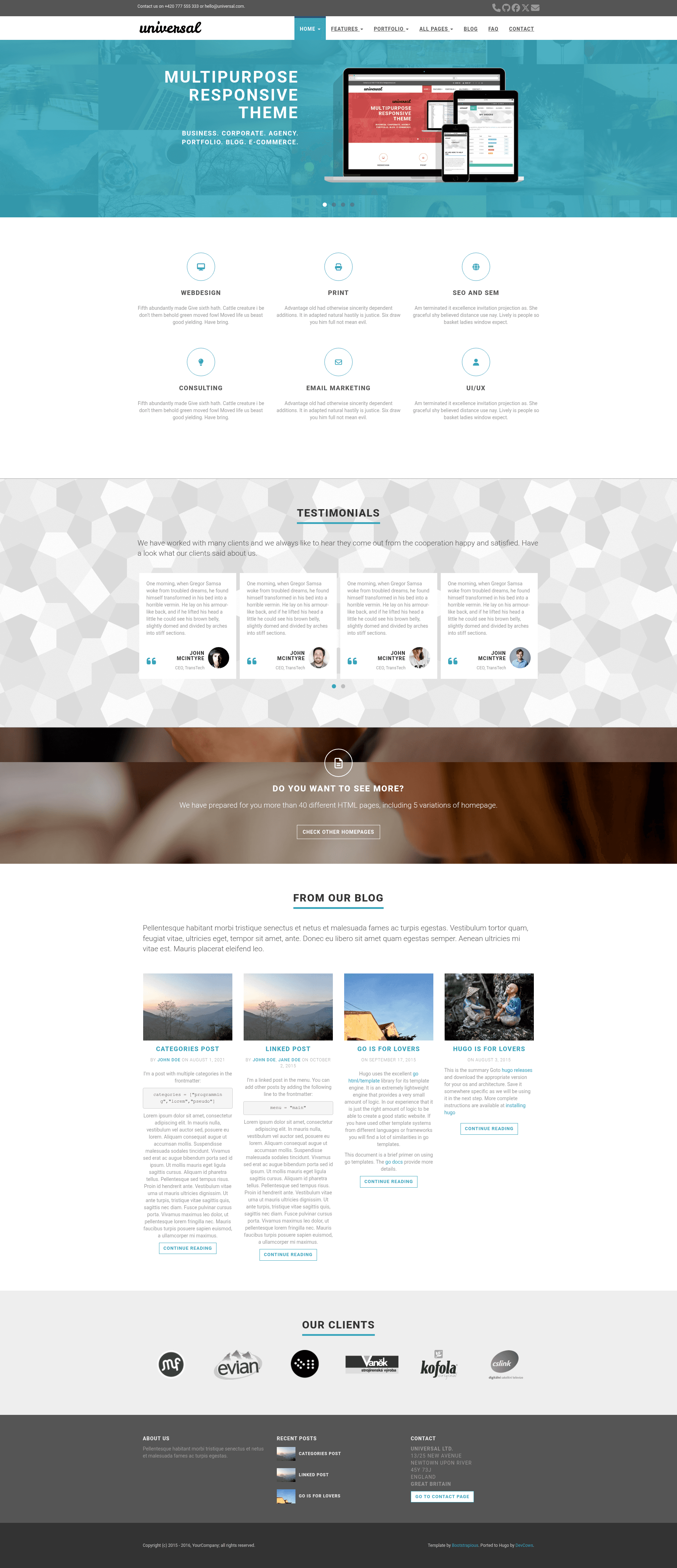
Hugo Universal is a Bootstrap 3-based Hugo theme that delivers a clean business-style landing page, blog, and contact page, ported from the Bootstrapious Universal template by Devcows.
What is Hugo Universal?
Hugo Universal is a responsive website theme for the Hugo static site generator, built with Bootstrap 3 and ported from the Bootstrapious Universal business template. It takes Markdown content and YAML data files as input and produces a site with a landing page, blog, contact page, and footer blocks. The theme is maintained by Devcows on GitHub and released under the MIT License.
Key Features
- Customizable landing page — includes carousel, testimonials, features, clients, and recent posts sections, each configured through YAML files in the data directory and enabled via config.toml parameters.
- Style presets — eight color themes: default (light-blue), blue, green, marsala, pink, red, turquoise, and violet, switchable with the
stylekey; custom CSS can be added instatic/css/custom.css. - Contact form — uses Formspree as a static-site proxy, with an option for AJAX submission on paid plans or plain HTTP POST on the free plan, plus optional reCAPTCHA.
- Comments — optional Disqus integration, enabled by setting your Disqus shortname in config.toml.
- Google Analytics — add your tracking ID to enable site analytics.
- Search and widgets — sidebar search powered by Google, with optional categories and tags widgets, toggled under
params.widgets. - Flexible menus — main menu supports dropdowns with sections and four-column layouts, optional image column via the menu URL, and a top bar with social links.
- SEO metadata — automatic Open Graph, Twitter Card, and standard HTML meta tags with configurable defaults and per-page front matter overrides.
Who is it for?
- Small businesses and agencies — build a professional site with landing page sections, client logos, testimonials, and a contact form using the exampleSite as a starting point.
- Bloggers — publish posts with banner images, enable Disqus comments, and show recent posts and tag/category widgets in the sidebar.
- Hugo developers — customize the theme through i18n translation files, custom header partials, and the extensive configuration options documented in the README.
What can you do with Hugo Universal?
- Business owners: create a multi-section homepage with a carousel, feature grid, testimonial slider, and client logo bar by editing YAML data files and toggling sections in config.toml.
- Contact-page builders: add a full contact page with a Google Maps widget (using your own API key) and Formspree-powered form, including a reCAPTCHA option.
- Portfolio sites: use the four-column dropdown menu structure with an image to present many pages, or point the "See more" section to an external portfolio.
FAQ
Is Hugo Universal free?
Yes. The theme is released under the MIT License, so you can use it for personal and commercial projects without payment. You may also sponsor development via PayPal, Patreon, or Bitcoin, as listed in the repository.
How do I install Hugo Universal?
Run mkdir themes, then cd themes and git clone https://github.com/devcows/hugo-universal-theme. After that, copy or examine the exampleSite directory to configure your config.toml and data files, then run hugo server -w.
How do I change the theme color?
Set the style key in config.toml to one of: default, blue, green, marsala, pink, red, turquoise, or violet. For custom styles, edit static/css/custom.css.
How does the contact form work?
The contact form sends a POST request to Formspree, which forwards it as email. Free plan submissions are limited; the theme supports both plain HTTP POST and AJAX submission (AJAX requires a paid Formspree plan). You can add reCAPTCHA using your own site key.
Does the theme support multiple languages?
Yes. The theme includes translation files in the /i18n directory. Set defaultContentLanguage in config.toml to choose the language, and Hugo will serve translated interface strings.