Template details
Hugo Agency Web
A clean and professional Hugo theme for digital agencies, startups, and modern product landing pages.
About this template
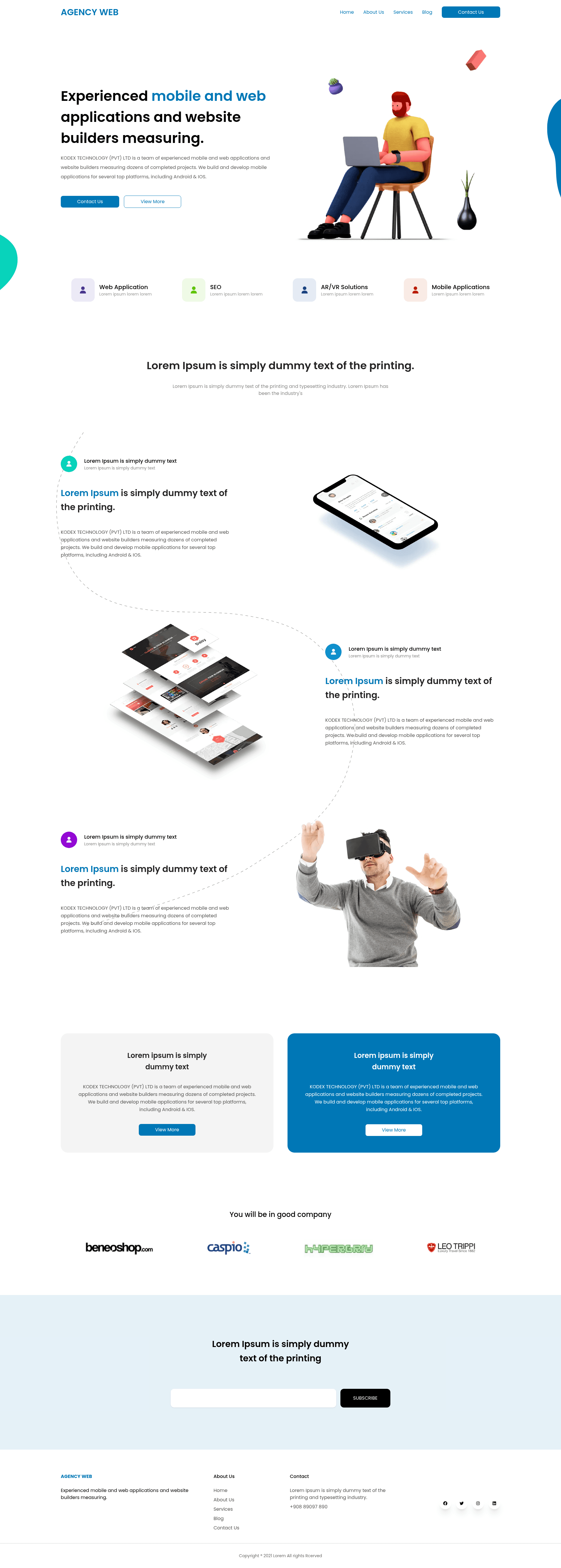
Hugo Agency Web is a Hugo static-site theme for digital agencies, startups, and product landing pages, built with Tailwind CSS and modeled after the "Agency Web" Figma community design by Sanoj Dilshan. It accepts Markdown content and YAML data files and outputs a fast, deployment-ready static HTML site.
What is Hugo Agency Web?
Hugo Agency Web is a theme for the Hugo static site generator, maintained in the writeonlycode GitHub repository. The theme produces a clean, professional single-page-style marketing website with sections such as hero, features, and pricing, all driven by YAML files in the data/ directory. It uses Hugo's configuration directory structure, so all site-wide settings live in the config/ folder. Because Hugo compiles content into static HTML, the output is a public/ directory that can be hosted anywhere, including Netlify and Vercel.
Key Features
- Hugo + Tailwind CSS stack — The theme is built on Hugo (a Go-based static site generator) and Tailwind CSS for utility-first styling, requiring Node.js and npm to compile the front-end tooling.
- Data-driven sections — Hero, features, and pricing sections are populated from YAML files in
data/, so non-technical edits do not require touching HTML templates. - Config directory structure — Global settings are managed through Hugo's configuration directory (
config/), making environment-specific or multi-file configuration straightforward. - Figma-inspired design — The visual design is derived from the free "Agency Web" Figma community file by Sanoj Dilshan, giving the theme a polished agency aesthetic out of the box.
- Live-reload development — Running
hugo serverstarts a local server athttp://localhost:1313with hot reloading for any content or template changes. - Simple deployment flow — The
hugocommand generates a completepublic/static directory that can be uploaded to any static host or connected to Netlify/Vercel for continuous deployment. - MIT licensed — The theme is free to use, modify, and distribute under the MIT License.
Who is it for?
Hugo Agency Web is for digital agencies that want a fast, lightweight marketing site without maintaining a server-side CMS. Startups building a product landing page can use the data-driven hero and pricing sections to iterate quickly. Freelance web designers who already know Hugo or static site workflows can use it as a starting point for client projects, customizing styles with Tailwind utilities.
What can you do with it?
- Digital agencies: Publish a portfolio-style landing page with a hero section, feature highlights, and pricing tiers, all managed through YAML data files.
- Startups: Spin up a product landing page in minutes by cloning the demo branch, editing
data/YAML, and deploying the static site to Netlify or Vercel. - Developers: Use the theme as a Hugo learning project or as a base for a larger Hugo site, modifying Tailwind classes and Hugo partials directly.
How does it work?
Start by installing the prerequisites: Hugo, Go, Node.js, and npm. Clone the repository's demo branch into a new site folder, then run npm install to install front-end dependencies and hugo server to launch a live-reloading development environment at http://localhost:1313. To publish, run hugo to build the public/ folder and upload its contents to a static host or connect it to a platform like Netlify or Vercel.
Pricing
Hugo Agency Web is free. The MIT License allows unrestricted use, modification, and redistribution, with no paid tiers or usage limits stated in the repository.
FAQ
How do I install Hugo Agency Web?
Clone the repository using the demo branch, with a command like git clone --depth 1 --branch demo https://github.com/writeonlycode/hugo-agency-web.git, then install dependencies with npm install. After that, run hugo server to see the site locally at http://localhost:1313.
What tools are required to run the theme?
You need Hugo, Go, Node.js, and npm installed on your machine. Go is required because Hugo is a Go-based executable, while Node.js and npm handle the Tailwind CSS build process through the npm install step.
What content sections come with the theme?
The README specifies that the theme includes structured sections such as a hero, features, and pricing, all populated from YAML files inside the data/ directory. The exact set of sections is defined by the demo content, and you can extend them by adding new YAML files and corresponding Hugo partials.
Is the theme free to use?
Yes, Hugo Agency Web is released under the MIT License, meaning you can use it for personal and commercial projects without paying a fee. You are also free to modify and redistribute the theme as long as the original license is included.
How do I deploy the site?
Run the hugo command in the project root to generate a public/ directory containing the entire static site. Upload the contents of that folder to any web host, or connect the repository to Netlify or Vercel for automated builds.