Template details
Jamstack Hackathon Starter
Make Authenticated, Serverless, Dynamic Clientside JAMstack apps with Gatsby + Netlify Dev (Functions + Identity)
About this template
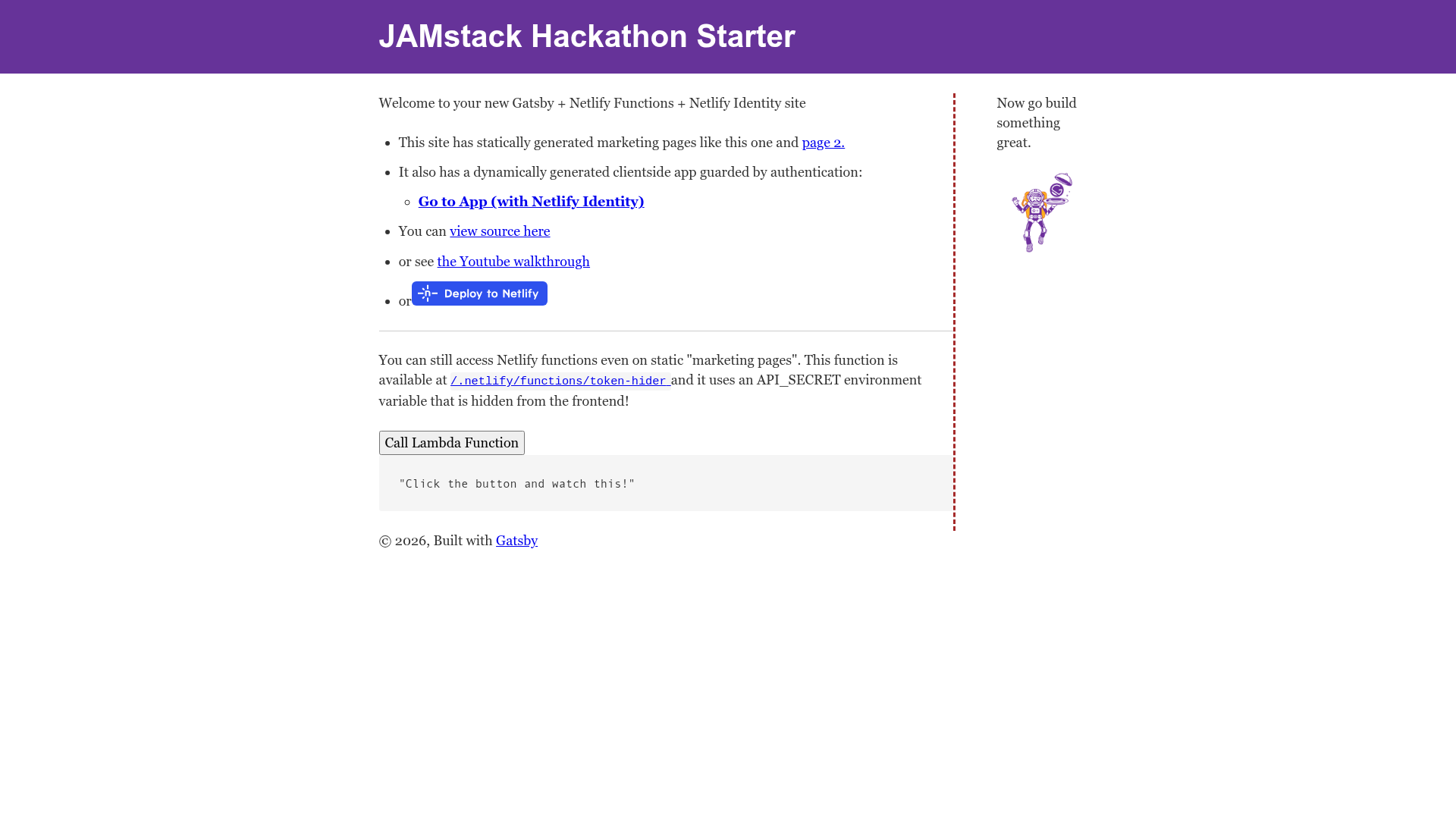
The Jamstack Hackathon Starter is a Gatsby.js boilerplate for building authenticated, serverless, dynamic clientside JAMstack apps with Netlify Identity and Netlify Functions via the Netlify Dev workflow.
What is the Jamstack Hackathon Starter?
It is a fork of the official gatsby-starter-default, created by swyx (Shawn Wang) and shared on GitHub. The starter takes a standard Gatsby site and layers on Netlify Identity for authentication and Netlify Functions for serverless APIs, all orchestrated locally through Netlify Dev. As input, you get a pre-configured React/Gatsby project; as output, it produces a deployable site where functions and identity are available on Netlify's platform, with one-click deployment.
What makes the Jamstack Hackathon Starter stand out?
- Serverless Functions — Netlify Functions run server-side code without managing a server; dependencies are installed via
netlify-lambda. - Authentication with Netlify Identity — The
react-netlify-identity-widgetpackage provides signup, login, and logout flows for React components. - Authenticated Serverless Functions — Functions can be protected so only logged-in users can invoke them, keeping API secrets out of the frontend bundle.
- External Provider Login — Netlify Identity supports login with GitHub, Bitbucket, Google, and other OAuth providers out of the box.
- Protected Routes — Gatsby pages can be gated behind authentication, redirecting unauthenticated visitors.
- Dynamic Clientside Pages — Enables pages that render client-side, which is required for authenticated content and serverless interactions.
- One-Click Deploy — The Deploy to Netlify button sets up the site and can auto-configure Identity when the
stack=cmsparameter is included. - Gitpod Integration — A pre-built Gitpod environment launches the project in the browser with no local setup.
Who should use the Jamstack Hackathon Starter?
- Hackathon teams — Get a running start with auth and serverless functions already integrated, so they can focus on their hackathon demo.
- Gatsby developers — Learn how to wire Netlify Identity and Functions into a Gatsby project by following the included examples and README docs.
- JAMstack enthusiasts — Study a real reference implementation of a dynamic, authenticated app that still deploys as static files.
- Netlify users — Explore the Netlify Dev local workflow for running functions and site builds together.
Use cases
- Members-only web apps: Build a site where users sign in via Netlify Identity and access protected pages or data.
- Third-party OAuth login: Configure GitHub, Bitbucket, or Google login for your users in minutes.
- Serverless APIs with secrets: Create endpoints that access external APIs without exposing API keys in the browser.
- Learning Netlify Dev: Run the entire stack locally with
netlify devand see how the CLI proxies the Gatsby server and functions.
How does the Jamstack Hackathon Starter work?
First, install the Netlify CLI globally with npm i -g netlify-cli and log in with netlify login. In the project root, run netlify dev (or ntl dev). The CLI starts a Gatsby dev server on port 8000 and a functions server on a randomly selected port, then proxies both to port 8888. You must access the site at http://localhost:8888 for functions to work. The README notes that enabling Netlify Identity manually is required unless you used the Deploy to Netlify button with stack=cms.
FAQ
How do I enable Netlify Identity?
Go to https://app.netlify.com/sites/YOUR_SITE_HERE/identity and enable it manually. Alternatively, use the Deploy to Netlify button with the stack=cms query parameter, which configures Identity automatically.
What extra dependencies does this starter add?
It adds netlify-lambda to manage Netlify Functions dependencies during deployment and react-netlify-identity-widget to provide the authentication UI and logic for React.
Can I add this to my existing Gatsby site?
Yes. The README links to a Gatsby blog post titled "Turning the Static Dynamic" and a FreeCodeCamp guide that explain how to add Netlify Identity and Functions to any Gatsby project without forking this starter.
Why do I need to visit port 8888 instead of 8000?
With Netlify Dev, the Gatsby server and the functions server run separately. The CLI proxies both to a new port (usually 8888) so requests to functions and pages are handled together. Visiting 8000 directly would bypass the proxy and break functions.
Is there a video walkthrough?
Yes. The README embeds a 3-minute video walkthrough on YouTube, accessible from the repository page, that demonstrates the starter in action.