Template details
Kider – Free Responsive HTML5 Bootstrap 5 Educational Website Template
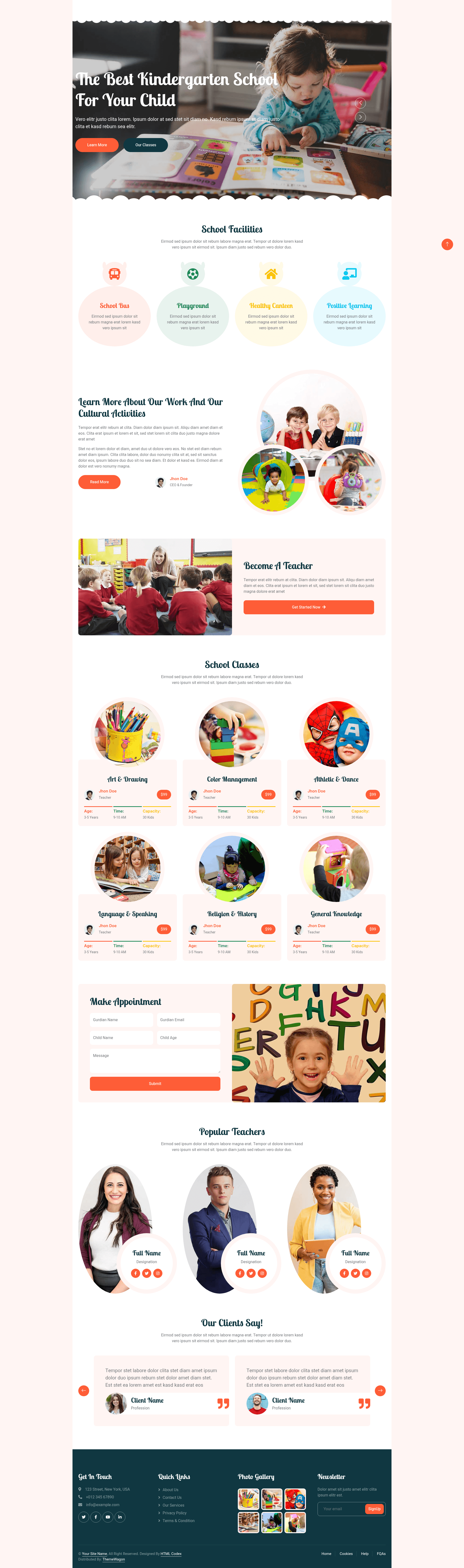
Free responsive Bootstrap 5 preschool website template with 10 HTML pages, hero header, photo gallery, and appointment form UI.
About this template
Kider is a free, responsive HTML5 and Bootstrap 5 multi-page website template built for preschools, kindergartens, and children's education centers, offering 10 ready-to-use HTML pages and a full set of UI components.
What is Kider?
Kider is a free multi-page website template distributed by ThemeWagon and created by HTML Codex. It is built with HTML5, CSS3, and Bootstrap 5, and includes SCSS-compatible source files for customization. The template produces a static website that runs in any modern browser without needing a backend or build process. Its 10 HTML demo pages cover typical sections for an education site, such as class descriptions, facilities, courses, and academic systems.
Key Features
- Bootstrap 5 + HTML5/CSS3 — Built on Bootstrap 5 with semantic HTML5 and CSS3, plus SCSS source files for styling customization.
- 10 HTML demo pages — A multipage template with pre-built pages for classes, facilities, courses, teachers, testimonials, and more.
- Responsive and mobile-friendly — 100% responsive layout that fits all screen sizes, featuring a burger menu for mobile navigation.
- Appointment form UI — A ready-to-use form interface for booking school visits or class tours.
- Photo gallery — A gallery layout to showcase school facilities and daily activities.
- Testimonial carousel — An Owl Carousel-powered slider for displaying reviews from parents or students.
- Geolocation UI — Google Maps integration so visitors can locate the school directly on the site.
- Additional UI components — Includes newsletter subscription form, contact form, call-to-action button, back-to-top button, social links, pricing table, and a dropdown menu bar.
Who is it for?
Kider is aimed at preschool and kindergarten administrators who need a professional web presence without a large development budget. It also works well for elementary education centers, childcare providers, and tutoring programs that want to present classes, facilities, and enrollment details online. Freelance web developers can adopt it as a starting point for client projects thanks to its SCSS files and clean, commented code.
What can you do with Kider?
- School administrators: Build a complete informational website with class listings, course descriptions, facility photo galleries, and an appointment booking section.
- Teachers and program coordinators: Publish staff profiles, testimonials, and a contact page that combines a form with a Google Map for parent inquiries.
- Freelance developers: Customize the SCSS variables and HTML structure to create a branded education website quickly, then deploy it to any static host.
FAQ
Is Kider free?
Yes, Kider is free to download and use. The ThemeWagon listing marks it as open source and allows commercial use, with lifetime free updates.
Can I use Kider in a commercial project?
The template license allows commercial use, so you can build websites for paying clients or for your own business without purchasing a separate license.
What is included in the download?
The download package contains 10 HTML pages, all demo images, JavaScript source files, SCSS and CSS files, and the required libraries and plugins such as Bootstrap 5 and Font Awesome.
Does Kider work on mobile devices?
Kider is fully responsive and mobile-friendly. It is compatible with Android, iPhone, and iPad, and includes a burger menu for smaller screens.
Which browsers are supported?
The template is cross-browser compatible and has been tested with Chrome, Edge, Firefox, Opera, and Safari.