Template details
Task Planner
A task planner app with Kanban Board and Calendar View built with Next.js and TypeScript.
About this template
Task Planner is an open-source task management web app that combines a Kanban board and a calendar view in a single Next.js project, built with TypeScript and styled with Tailwind CSS. Developed by iamrohanshrestha and published to GitHub under the repository name task-planner, the app is designed as a functional base for anyone who wants a self-hosted, customizable alternative to commercial task trackers.
What is Task Planner?
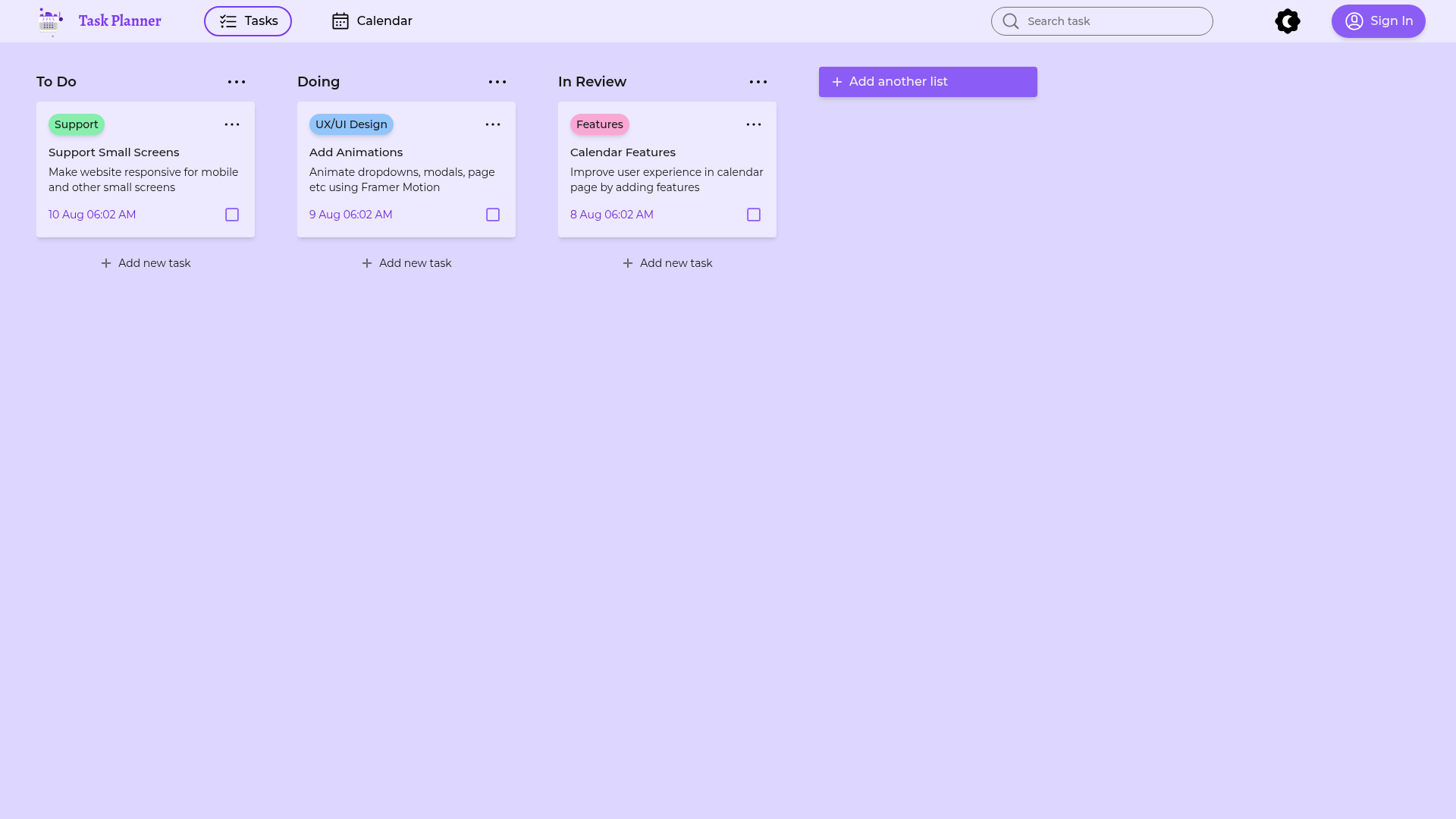
Task Planner is a full-stack productivity application that lets users add tasks and organize them across Kanban columns plus a calendar view. It takes as input user-created tasks and renders them as draggable cards on a board with To Do, Doing, and In Review columns, while a separate calendar page shows tasks by date. The app runs on Next.js with a Node.js backend, uses Prisma as the ORM, and TypeScript throughout the codebase.
Key Features
Task Planner's core differentiator is the combination of a drag-and-drop Kanban board and a calendar view in one Next.js app, backed by a modern TypeScript stack.
- Kanban board with drag-and-drop — Built with dnd-kit, the board supports pointer and keyboard dragging: press space to pick up a card, arrow keys to move it, space to drop, and escape to cancel. The same instructions are shown in the UI.
- Calendar view — A calendar page renders tasks by date, with more calendar features listed as planned work in the repository's roadmap.
- Authentication — NextAuth integration provides login support, so the app can keep tasks tied to user accounts.
- Data layer — Prisma models tasks and users, while TanStack React Query handles server-state fetching and caching; Zod schemas validate task input.
- UI foundation — Radix UI primitives provide accessible components, and Tailwind CSS handles styling; next-themes enables light/dark theme switching.
- Motion and animation — Lottie and lottie-react are included for animated illustrations, and Framer Motion is planned for animating dropdowns, modals, and page transitions (an open to-do item).
- Roadmap for responsiveness — Making the layout work on mobile and small screens is listed as a to-do task, so the current version is primarily desktop-oriented.
Who is Task Planner for?
Task Planner is aimed at developers and small teams who want a self-hosted, hackable task board rather than a paid SaaS tool.
- Next.js developers who want a real-world starter project that demonstrates a Kanban board, calendar, and full auth, rather than a minimal demo.
- Freelancers and small teams looking for a task board they can deploy and customize per their workflow without per-seat fees.
- Contributors and tinkerers who want an open codebase to extend — the repo's public board shows exactly which features are planned (responsive support, Framer Motion animations, enhanced calendar UX).
What can you do with Task Planner?
Users can manage tasks through two main workflows: adding cards to the board and moving them between columns.
- Create and organize tasks: Type a task title and click "Add new task" to place it in a column; every column (To Do, Doing, In Review) supports additions.
- Move cards with the keyboard: Use the documented space/arrow-key/escape controls to drag and drop without a mouse for accessibility.
- Review work at a glance: The three-column board reflects a simple workflow, making it easy to track what's outstanding, active, and in review.
How does Task Planner work?
The repository's open board functions as a literal roadmap: the To Do column lists "Support Small Screens", the Doing column lists "Add Animations" with Framer Motion, and the In Review column lists "Calendar Features". This transparency tells you which parts of the app are complete and which are still being built, so you know what to expect before diving into the code.
FAQ
Is Task Planner free?
Yes. The repository is public on GitHub, so you can clone it, run it locally with Node.js, and deploy it yourself. No paid tier or license key is mentioned on the repository page.
What tech stack does Task Planner use?
It uses Next.js and TypeScript, Tailwind CSS, Radix UI, dnd-kit, TanStack React Query, Prisma, NextAuth, Zod, Lottie, and next-themes. The primary language is TypeScript, and the repo lists topics for all of these libraries.
Does Task Planner support drag-and-drop?
Yes, it uses dnd-kit, and the board includes keyboard accessibility instructions for picking up, moving, and dropping cards. This is visible in the UI text on the board.
Does Task Planner have a calendar view?
Yes, the app has a calendar view, and the repository's roadmap lists a task to improve the calendar user experience, so basic calendar functionality exists now with more features planned.
Is Task Planner ready for production use?
The project is still in active development: the board shows that mobile responsiveness and Framer Motion animations are not yet implemented, and it has only 11 GitHub stars. It is a solid foundation, but expect to complete these gaps for a polished product.