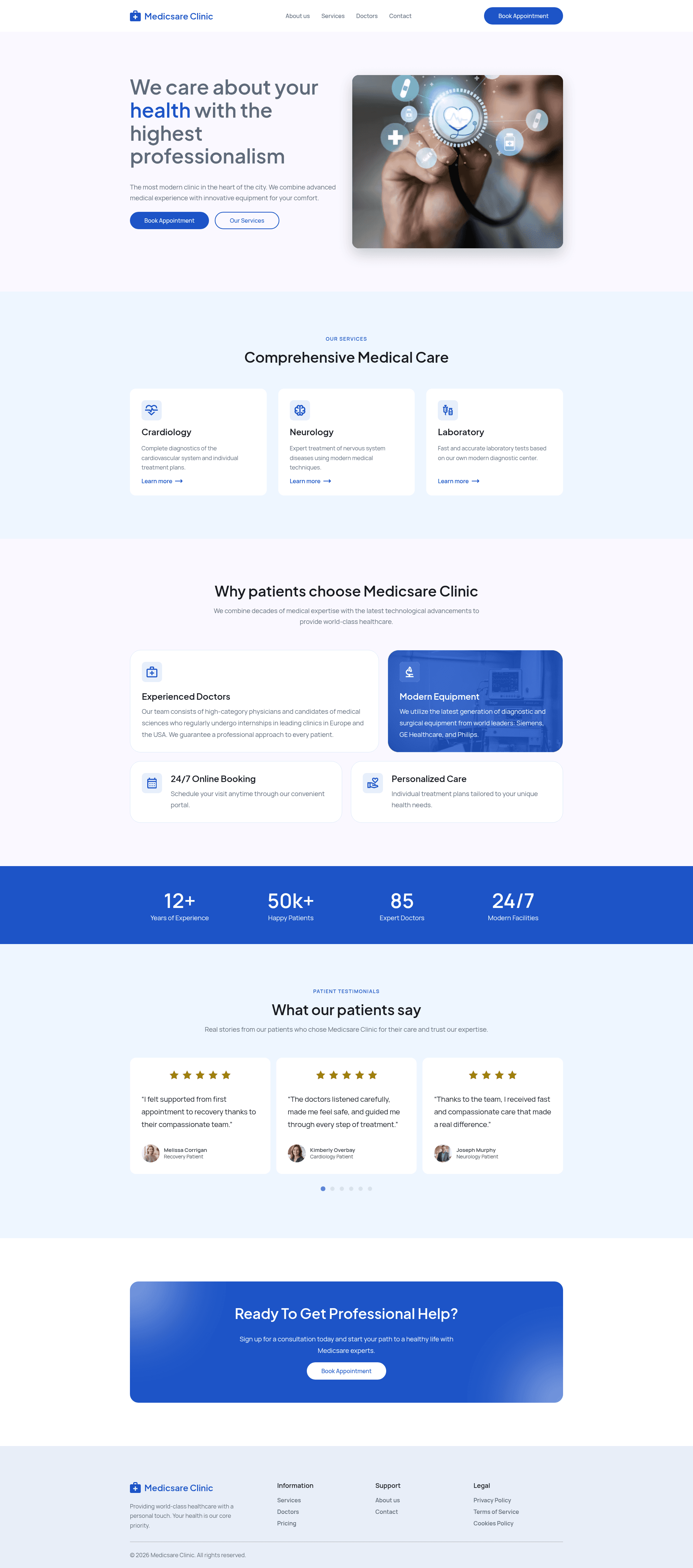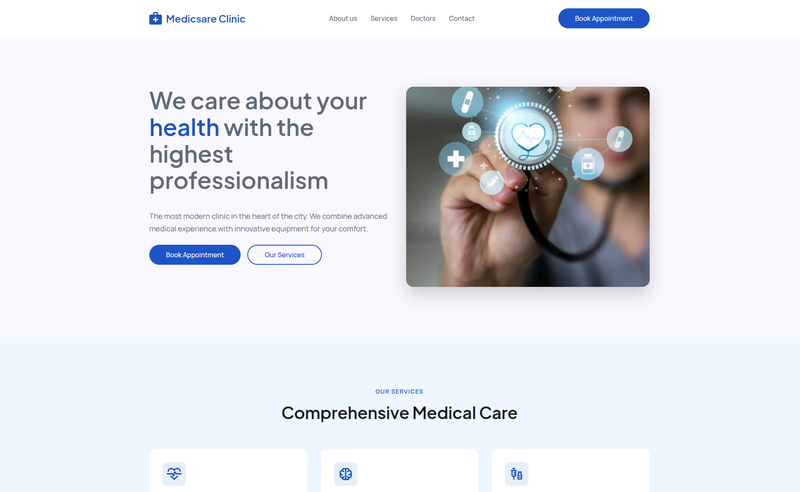
Medicsare is an Astro website template for healthcare businesses, private clinics, hospitals, medical centers, dentists, and healthcare professionals, designed to create a fast-loading, SEO-friendly static site.
What is Medicsare?
Medicsare is a modern, responsive website template built with Astro, a static site generator. It takes Markdown content and TypeScript components as input and outputs a static, SEO-friendly website that can be hosted on any static platform. The template includes pages for services, doctors, testimonials, FAQ, and a contact form, and a live demo is hosted at https://medicsare.netlify.app/. It is distributed as an open template on GitHub.
Key Features
- Fully responsive design — The layout adapts to mobile, tablet, and desktop screens, with a mobile-friendly navigation menu for smaller viewports.
- Built with Astro — The site is generated as static HTML, using Astro components and TypeScript for organization and interactivity.
- Fast page loading and performance — The README lists fast loading and excellent performance as features; the production build (
npm run build) outputs static files for quick deployment. - SEO-friendly structure — The template supports editing page metadata like titles and descriptions to improve search engine visibility.
- Reusable components — Sections such as services, doctors, testimonials, and FAQ are implemented as components that can be reused across pages.
- Services and doctors pages — The template ships with dedicated pages for listing healthcare services and medical staff, including specialist profiles.
- Testimonials and FAQ sections — Patient feedback and common questions are presented in pre-built sections that can be edited.
- Contact form — A contact form is included as a static front-end component; it does not include a backend integration by default.
Who is it for?
- Private clinics and medical centers — They can publish their services, doctor profiles, and contact information on a professional website without building a site from scratch.
- Dentists and specialist practices — The template's doctor and services pages suit solo practitioners and small offices that want an online presence.
- Hospital departments — Marketing teams can use the template to present staff bios, patient testimonials, and FAQ content in a structured layout.
- Freelance developers — Developers can use the template as a starting point for healthcare client projects, customizing colors, typography, content, images, sections, and SEO metadata via the Astro project structure.
What can you do with Medicsare?
- Launch a clinic website quickly — Clone or download the repo, run
npm install, then usenpm run devto preview the site locally athttp://localhost:4321; edit services, doctors, and content to go live. - Build a production-ready medical site — Use
npm run buildto generate a static production build in thedistfolder, then deploy it to any static host such as Netlify (the demo uses Netlify). - Customize the design and content — Modify CSS or SCSS files for colors and typography, replace Markdown content for sections, and adjust layout components; SEO metadata can also be updated per page.
- Preview changes without a server — The
npm run previewcommand serves the built output locally so you can check the production version before deploying.
How does Medicsare work?
The template is a standard Astro project. After installing dependencies with npm install, you run npm run dev to start a development server on port 4321. When the site is finished, npm run build compiles the project into static HTML, CSS, and assets, and npm run preview lets you test that build locally. The source relies on Astro components, TypeScript for scripting, CSS/SCSS for styling, and Markdown for content.
License and Pricing
The template's license states that it is free to use for personal and commercial projects. No tiered pricing or paid plans are mentioned in the repository; it is distributed as an open template.
FAQ
Is Medicsare free to use?
The repository's license states that the template is free for personal and commercial projects. No payment or purchase details are mentioned, so you can use it without a fee under that license.
How do I get Medicsare running locally?
After downloading the project, run npm install to install dependencies. Then run npm run dev to start the development server, which serves the site at http://localhost:4321. For a production build, use npm run build and then npm run preview to test the output.
What technologies are used in Medicsare?
The template is built with Astro as the site generator, TypeScript for scripts, CSS/SCSS for styling, and Markdown for content. Vite handles the bundling and development server during builds.
Can I customize the template's design?
Yes, you can customize colors, typography, content, images, sections, layouts, and SEO metadata. The project uses SCSS variables and components that can be edited to change the look and feel.