Template details
Nike Landing Page
A modern, responsive Nike shoe-brand landing page built with the Next.js App Router and Tailwind CSS v4.
About this template
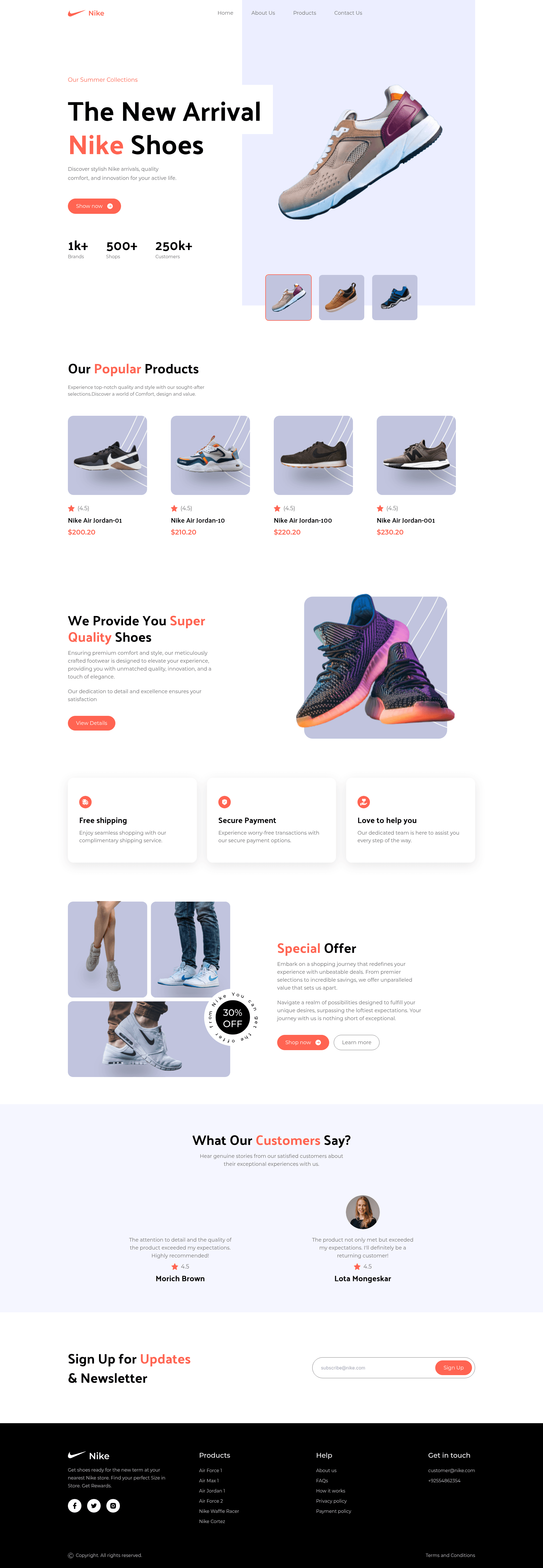
Nike Landing Page is a free, open-source single-page marketing template for a sneaker brand, built with the Next.js App Router, TypeScript, and Tailwind CSS v4, and maintained by Om Patel. The template renders a responsive, componentized landing page with sections for a hero collection, popular products, quality highlights, services, special offers, customer reviews, and a newsletter sign-up.
What is the Nike Landing Page template?
The Nike Landing Page template is a single-page marketing site that takes centralized, type-safe content from a constants/ folder and renders it through reusable React components to form a complete sneaker-brand landing page. It runs on Next.js with the App Router, uses Tailwind CSS v4 for styling, and is built with Bun 1.3+ as the package manager and runtime. The source code is published under the MIT License with a live demo at nikebyom.netlify.app.
Key Features
- Responsive layout — The page adapts across mobile, tablet, and desktop breakpoints without a separate mobile site.
- Interactive hero — Clicking a thumbnail swaps the featured shoe image in the hero section.
- Reusable typed components — Buttons and cards are implemented as fully typed presentational components that accept props from shared TypeScript models.
- Centralized content — All page copy and product data live in
constants/and are validated against models intypes/. - Tailwind CSS v4 styling — The design uses the CSS-first
@themedirective with a custom set of design tokens. - Single composed route — The App Router project contains one main home route that composes all sections.
- Bun tooling — Scripts cover
bun dev,bun run build,bun start, andbun run lintwith oxlint.
Who is the Nike Landing Page template for?
Frontend developers who want to study a production-structured Next.js application can read through a small, well-organized codebase with typed components and centralized data. Shoe and sneaker brands can use the template as a starting point for a marketing site that showcases products, offers, and reviews. Anyone learning Tailwind CSS v4 can see a practical example of the new @theme configuration in a real project.
What can you do with the Nike Landing Page template?
- Frontend learners: Clone the repo and trace how
constants/data flows into typed components and renders a full landing page. - Sneaker brands: Replace the shoe content in
constants/with your own product data to launch a hero-plus-products landing page. - Developers building with Bun: Use the provided scripts to develop, build, serve, and lint the project with a single package manager.
How do you set up the Nike Landing Page template?
The README lists a straightforward setup: clone the repository, navigate into the project directory, run bun install to install dependencies, and start the development server with bun dev. A production build is generated with bun run build and served with bun start. The only prerequisite is Bun 1.3 or newer, which can be checked with bun --version.
FAQ
Is the Nike Landing Page template free?
Yes. The template is distributed under the MIT License, so you can use, modify, and redistribute it freely, provided you include the original license notice.
What tech stack does the Nike Landing Page template use?
It uses Next.js with the App Router, React, TypeScript, and Tailwind CSS v4. Bun 1.3+ is the required package manager and runtime for running the project scripts.
Where can I see a live demo?
The README links to a live demo hosted at nikebyom.netlify.app, and the project repository is available at github.com/omunite215/Project_NikeLandingPage.
Does the template include a backend or CMS?
No. It is a front-end-only single-page marketing site that reads content from local TypeScript constants files; there is no backend, database, or CMS integration.
Who created the Nike Landing Page template?
Om Patel is the author, and the project is available on GitHub with contact links for contributions, issues, and feature requests.