Template details
Office
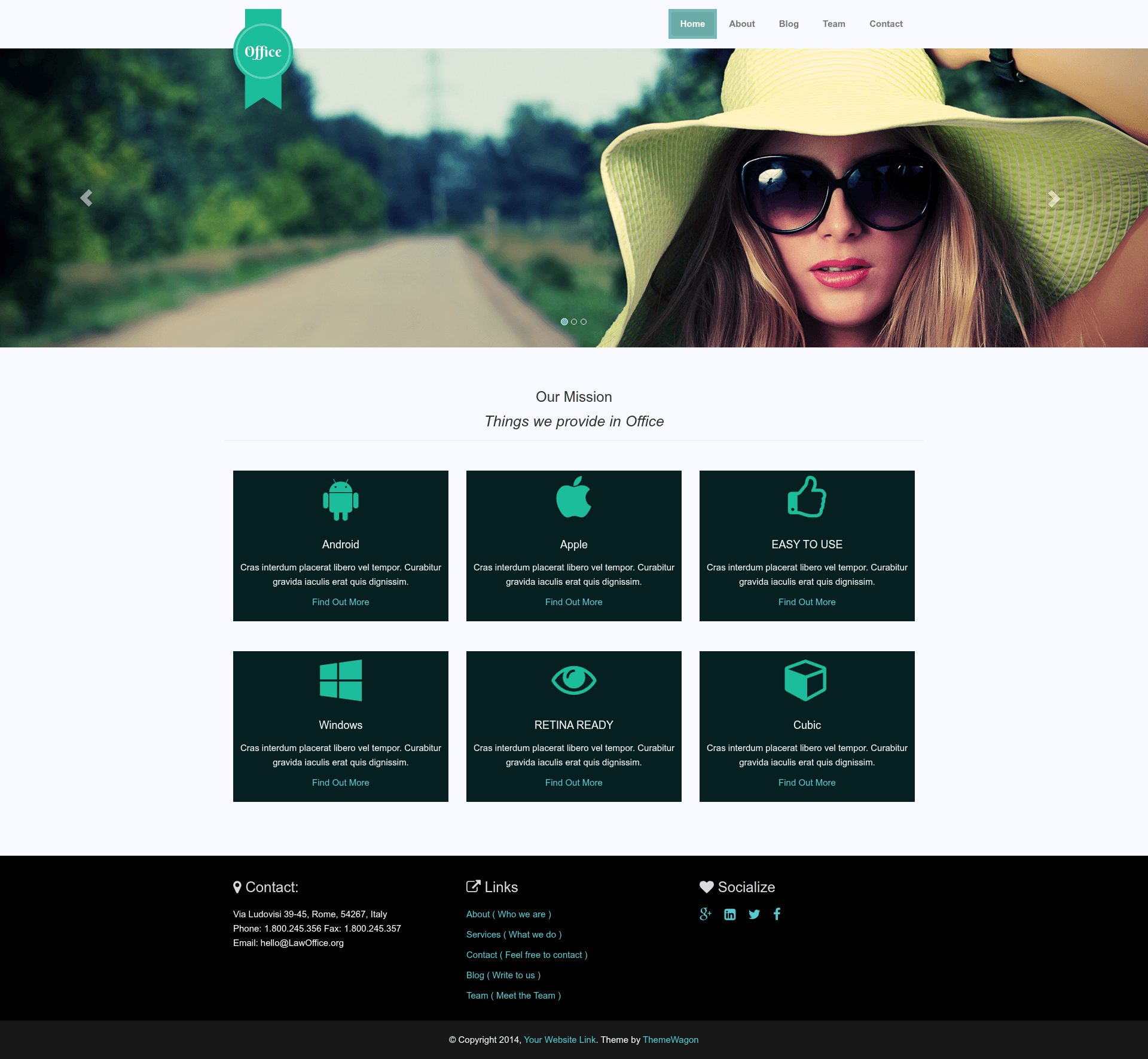
Free responsive multipage Bootstrap 3 template for small and medium business websites, featuring a slider, portfolio, services, and SEO-friendly code.
About this template
Office is a free, responsive multipage Bootstrap 3 website template from ThemeWagon for small and medium businesses that need a professional online presence without paying thousands for a custom design. The template was released by ThemeWagon and is credited to Technext Limited as its creator. It is built with HTML5 and CSS3, uses the Bootstrap 3 CSS framework, and integrates FontAwesome icons and Google Fonts. It includes a full-screen header background with a centered headline, a slim sticky header with a left-side logo, a slider, featured images for all pages, and portfolio and service sections on the home page, and it is optimized for search engines with page titles and meta descriptions. The template is free for both personal and commercial use, though the ThemeWagon credit link in the footer should stay intact unless you donate to remove it. It is compatible with Chrome, Edge, Firefox, Opera, Safari, and mobile browsers, and it is fully customizable thanks to well-commented code.
What is Office?
Office is a free multipage HTML5 template distributed by ThemeWagon that lets small and medium businesses build a complete business website by replacing the default text and images with their own content. It runs as a static HTML/CSS site that uses Bootstrap 3 for responsive layout and includes a live preview hosted on ThemeWagon's GitHub Pages. The template's creator is Technext Limited, and the current version on the page is 1.0, with an original release over a decade ago and an update listed as four years ago. It is intentionally simple so that non-developers can customize it by swapping out the placeholder copy and photos.
Key Features
- Colorful and modern design — The template ships with a clean, colorful look that targets business and corporate branding rather than a barebones layout.
- Slim sticky header with left-side logo — Navigation stays visible as visitors scroll, and the logo sits on the left of the header.
- Full-screen header background with centered headline — The home page opens with a large background image and a headline placed in the center of the screen.
- Slider component — A slider is included for showing rotating images or promotional content without additional plugins.
- Featured images for all pages — Every inner page has a featured image slot, not just the homepage.
- Portfolio and services sections on the home page — The homepage includes dedicated areas to showcase your services and display a portfolio of past work.
- Built with Bootstrap 3, HTML5, and CSS3 — The layout system is Bootstrap 3, and the page markup uses HTML5 semantics with CSS3 styling.
- FontAwesome icons and Google Fonts integrated — Icons come from FontAwesome and typography is loaded from Google Fonts.
- SEO optimized with well-commented code — The source includes page titles, meta descriptions, and commented sections that make content replacement straightforward.
- Cross-browser compatible — It is listed as compatible with Chrome, Edge, Firefox, Opera, Safari, and mobile devices.
- Free for personal and commercial use — The download is open source and includes lifetime free updates, though the credit link should remain unless you donate.
Who is it for?
- Small business owners opening a new office — They can publish a professional multipage site by editing text and images instead of hiring a developer.
- Startups and medium businesses on a tight budget — They get a responsive, cross-browser site for free, whereas a custom Bootstrap design might cost around 2,000 USD.
- Freelancers and web developers — They can use Office as a starting point for client projects, thanks to its clean, commented code and easily replaceable content.
- Personal business owners — The page explicitly targets people who need a website for a personal business and don't know how to build one.
What can you do with Office?
- Launch a business website quickly — Replace the provided text and images with your own company details, services, and portfolio, then host the static HTML files anywhere.
- Showcase your portfolio — Use the built-in portfolio section on the home page to display projects or work samples in a grid or list.
- Highlight your services — Fill the services area of the homepage to describe what your office, consultancy, or agency offers.
- Create an SEO-friendly presence — Edit the page titles and meta descriptions provided in the code so search engines can index the site quickly.
FAQ
Is Office free to use?
Yes, the template is free for both personal and commercial projects. It is an open-source download from ThemeWagon, and the license allows use in commercial projects with lifetime free updates.
Do I need design or coding skills to use Office?
No. The page is designed so you can change the text and images yourself. The code is well commented, and ThemeWagon says they planned to publish a blog article explaining how to replace text and images.
What browsers does Office support?
The template is compatible with Chrome, Edge, Firefox, Opera, Safari, and mobile browsers, so it works as a responsive site across desktop and mobile devices.
Can I remove the ThemeWagon credit link?
The page asks you not to remove the ThemeWagon credit link from this free HTML5 template until you donate. Technically, you can edit the footer, but the request is to keep it for free use.
What technologies does Office use?
Office is built with HTML5 and CSS3, uses the Bootstrap 3 CSS framework, and integrates FontAwesome icons and Google Fonts. It is a static template with no backend requirement.