Template details
Portfolios Dev
A collection of modern, customizable portfolio templates for developers, built with Astro and TypeScript.
About this template
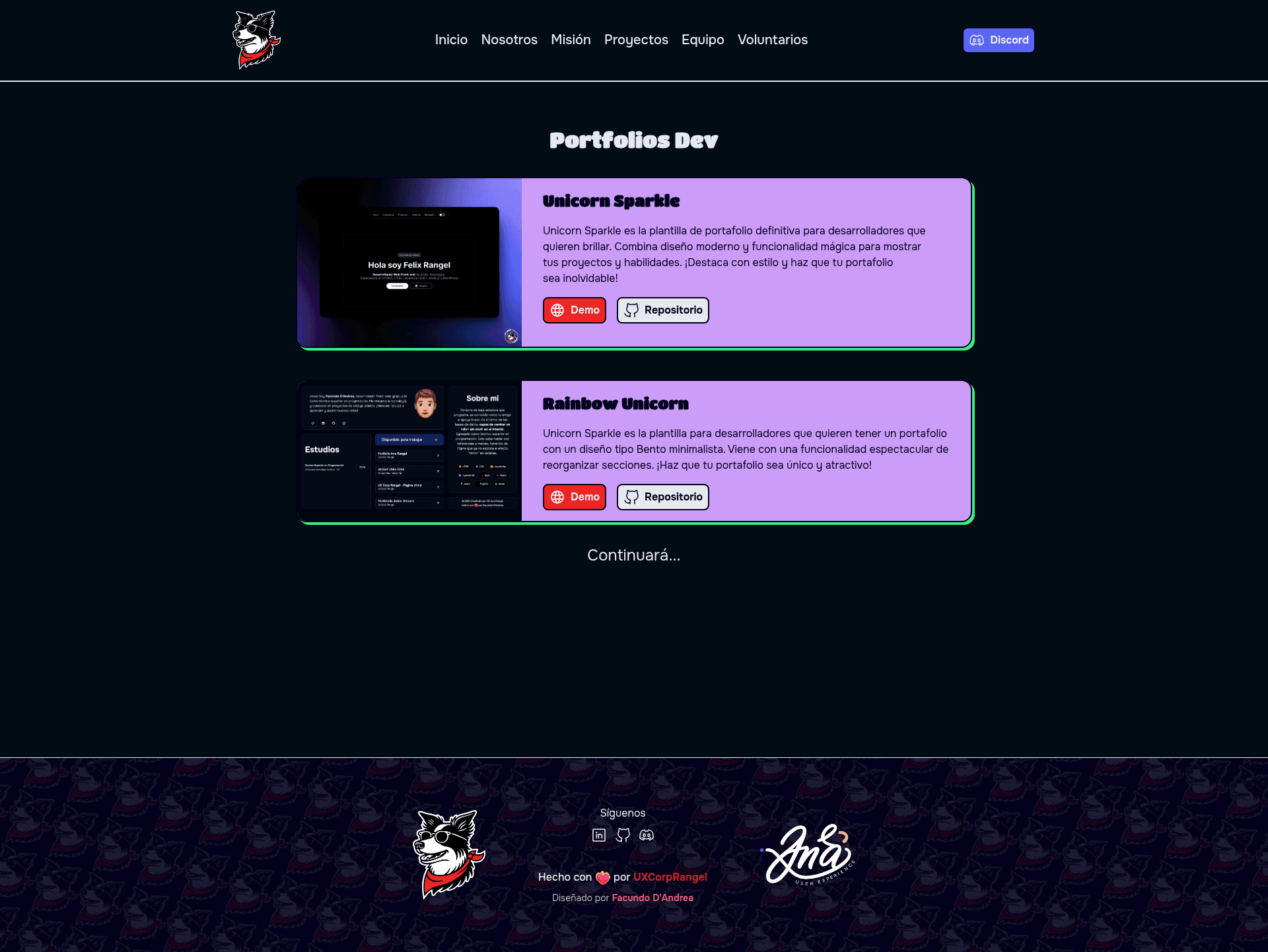
Portfolios Dev is an open-source collection of portfolio website templates for developers, maintained by UXCorpRangel, that scaffolds a new portfolio site from a ready-made Astro project with a single terminal command. The repository currently ships two first-party templates — Unicorn Sparkle and Mistical Unicorn (still in construction) — plus a community-contributed Rainbow Unicorn template, all designed to help developers showcase their projects and experience with modern, responsive layouts.
What is Portfolios Dev?
Portfolios Dev is a GitHub repository that bundles multiple developer portfolio templates under one project. The primary templates are built on the Astro framework with TypeScript and Sanitize.css for base styles, and the collection is curated by Ana Rangel (UXCorpRangel) with development by Felix Icaza. As input, the templates take your personal content — projects, experience, bio — and produce a deployable static portfolio website; the Unicorn Sparkle template also has a live demo at unicorn-sparkle.web.app and a matching Figma design file for visual customization. The repository is licensed under the MIT License and is free to use and modify.
Key features
- Modern and customizable design — every template provides a clean, contemporary layout that you can restyle to match your own branding.
- Responsive layout — layouts adapt to different screen sizes, so the portfolio looks consistent on mobile, tablet, and desktop.
- Multi-language support — the templates are available in multiple languages, making them usable for non-English-speaking developers.
- Performance-focused — the Unicorn Sparkle template ships Lighthouse performance, accessibility, best-practices, and SEO badges measured against its live demo.
- Light and dark theme — each template includes support for light and dark color schemes.
- CLI scaffolding — you can create a new project with
npm create astro@latest -- --template UXCorpRangel/portfolios-dev/unicorn-sparkle(or the pnpm equivalent) and then install dependencies to start. - Figma design file — Unicorn Sparkle includes a linked Figma design so you can edit the visual concept before writing code.
- Community contributions — the repository accepts pull requests that add third-party portfolio templates, as shown by Rainbow Unicorn, a Vite + React Bento-style template for reorganizing sections.
Who should use Portfolios Dev?
- Developers seeking a portfolio site — if you need a professional portfolio quickly, you can scaffold an Astro project from the Unicorn Sparkle template and fill in your own projects and experience.
- Designers who want a coded result — use the provided Figma file to prototype the Unicorn Sparkle design, then hand it off or build it yourself with Astro.
- Open-source contributors — you can add your own portfolio template to the collection by opening a pull request, which makes the library grow for everyone.
What can you do with Portfolios Dev?
- Job-seeking developers: generate a portfolio that highlights your projects and tech skills, with a live demo at unicorn-sparkle.web.app to reference the result.
- Community template authors: submit a new template to the repository; Rainbow Unicorn, contributed by Facundo Dandrea, is an example of a Bento-minimalist portfolio built with Vite, React, and TypeScript.
- Non-Spanish-speaking developers: use the multi-language support to adapt the templates to your preferred language before deploying.
How does Portfolios Dev work?
The repository gives you copy-paste commands for each template. For Unicorn Sparkle, run npm create astro@latest -- --template UXCorpRangel/portfolios-dev/unicorn-sparkle or the pnpm version, then enter the generated folder, install dependencies, and start developing. Rainbow Unicorn uses npx giget@latest gh:UXCorpRangel/portfolios-dev/rainbow-unicorn myPortfolio instead because it is a Vite project.
Pros and cons
- Pro: Open-source and MIT licensed, so you can use it for any project without cost.
- Pro: Performance-focused, with Lighthouse badges for the Unicorn Sparkle template demonstrating accessibility, SEO, and best practices.
- Pro: Includes a Figma design file for Unicorn Sparkle, letting you prototype before coding.
- Con: Mistical Unicorn is still under construction, so only two of the three listed templates are ready to use.
Pricing
Portfolios Dev is free and open source under the MIT License. All templates in the repository can be used, copied, and modified without payment.
FAQ
Is Portfolios Dev free?
Yes. The repository is released under the MIT License, so you can freely use, modify, and redistribute the templates, including for personal or commercial portfolios.
What templates are included?
The collection includes Unicorn Sparkle (an Astro template with a live demo), Mistical Unicorn (currently labeled as under construction), and Rainbow Unicorn, a community-contributed Vite and React template with a Bento layout.
How do I create a portfolio using Portfolios Dev?
Copy the npm command from the template's README section — for Unicorn Sparkle it is npm create astro@latest -- --template UXCorpRangel/portfolios-dev/unicorn-sparkle — run it in your terminal, install dependencies, and then edit the source files to add your own projects and information.
Is the Mistical Unicorn template ready to use?
No. The Mistical Unicorn folder is marked as under construction in the repository, so you should use Unicorn Sparkle or Rainbow Unicorn if you want a working template today.