Template details
Pricing Page Shadcn
Pricing Page template made with Shadcn UI & Next.js 14. Completely customizable.
About this template
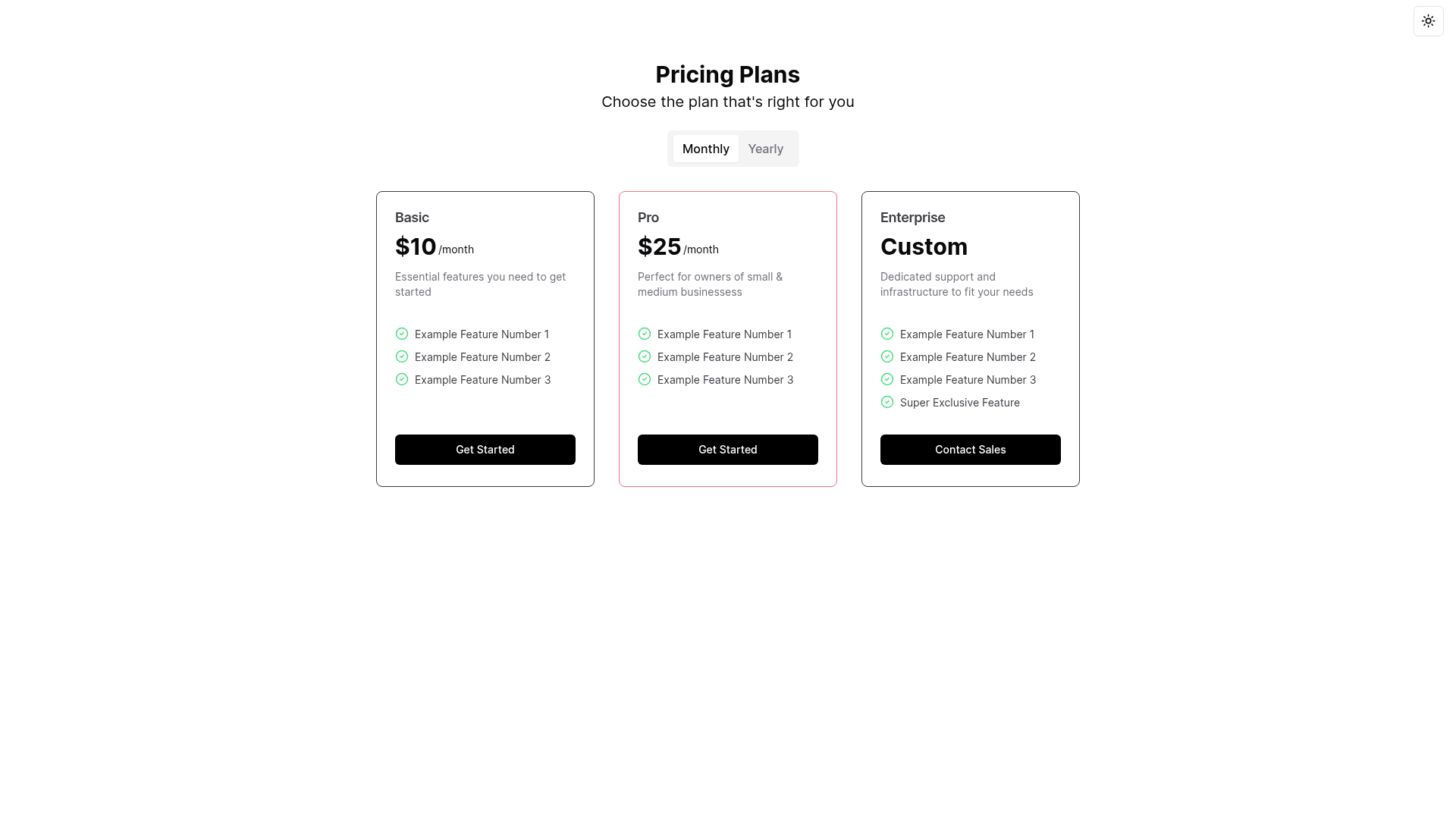
Pricing Page Shadcn is a Next.js 14 pricing page template built on Shadcn UI and Tailwind CSS that produces a responsive plan-comparison section with a monthly/yearly billing toggle and automatic savings calculation.
What is Pricing Page Shadcn?
Pricing Page Shadcn is a ready-made pricing page template that runs on Next.js 14 and uses Shadcn UI components styled with Tailwind CSS. It takes plan names, prices, and feature lists as editable props and renders them as interactive pricing cards with a billing-period switcher. The author offers consultations and development services via email, and the source repository has 240 stars.
Key Features
- Dark & Light Mode — the page adapts to the selected theme using next-themes and follows the official Shadcn UI dark theme guide for Next.js.
- Monthly / Yearly Plan Toggle — a tabs-based control lets visitors switch billing cycles without a page reload.
- Automatic Savings Calculation — the yearly price savings are computed and displayed as a highlighted amount on the cards.
- Popular Tag — a badge that marks the PRO plan in the live preview, easily reassigned to any tier.
- Exclusive Tag — a badge that marks the EXCLUSIVE plan in the dark theme preview.
- Shadcn UI Components — uses the dropdown-menu, tabs, card, and button components, which are added via the Shadcn CLI.
- Tailwind CSS Styling — utility classes handle spacing, colors, and responsive layout, and the design adjusts automatically to the configured theme.
Who is it for?
- SaaS founders — need a polished pricing section to communicate their plans and drive conversions without building UI from scratch.
- Developers — want a clean, component-based starting point in Next.js that they can extend with their own plan data, tags, and payment integrations.
- Design-conscious teams — need a pricing layout that matches the Shadcn UI aesthetic and supports light and dark modes out of the box.
What can you do with it?
- SaaS founders: launch a pricing page immediately by replacing sample plan data, then deploy the Next.js app.
- Product marketers: showcase yearly savings with the toggle and highlight popular plans using the "Popular" and "Exclusive" tags.
- Front-end developers: customize the plan cards, tags, and theme integration in a component-based Next.js setup.
- Open-source contributors: extend the template with new features or fork it for a different pricing layout.
How does it work?
Install the template by running three commands: bunx shadcn-ui@latest init, bunx shadcn-ui add dropdown-menu tabs card button, and bun i next-themes. Then configure dark mode according to the Shadcn UI official guide, and the pricing page will automatically use the active theme. Customization is done by editing the component files that hold the plan data and tag logic.
FAQ
Is Pricing Page Shadcn free?
The source is publicly available on GitHub with 240 stars, and the repository description does not mention any paid license or pricing. The template can be cloned and used without stated restrictions.
What stack does Pricing Page Shadcn use?
It uses Next.js 14 as the React framework, Shadcn UI for accessible components, Tailwind CSS for styling, and next-themes for theme management. The required Shadcn components are dropdown-menu, tabs, card, and button.
Can I customize the plan names and prices?
Yes, the plans are defined as plain data inside the component, so you can edit the plan names, prices, feature lists, and the "Popular" or "Exclusive" tags without touching the layout logic.
Does it support dark mode automatically?
If you set up next-themes and follow the official Shadcn UI dark theme guide, the pricing page switches to light or dark based on the user's preference. The template itself is theme-aware and includes the necessary next-themes dependency.